Native Pathfinding
intermediate featureVoxel Play 4 includes a native pathfinding system that works directly on voxel data: no NavMesh baking, no graph duplication. Searches run on background worker threads, so crowds of agents can request routes without impacting the frame rate, and paths react instantly to terrain edits: when a player builds a wall or digs a tunnel, any path crossing the modified chunks is invalidated and agents recompute their route automatically.
How it works
The pathfinder runs A* over the voxel grid itself. A cell is walkable when it has solid ground below and enough vertical clearance for the agent (2 voxels by default, configurable per agent). Agents can step up one voxel (stairs work naturally), drop down a configurable height, move diagonally without cutting corners, and wade through shallow fluids. Because walkability is read straight from voxel data at search time, there is nothing to rebuild after editing the world.
Setup
There is nothing to activate: worker threads start with the first path request and stop when the world unloads. The Native Pathfinding section in the Voxel Play Environment inspector exposes the tuning options:
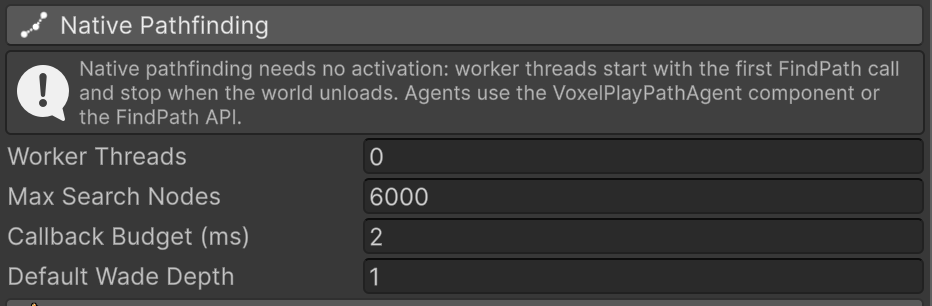
- Worker Threads: number of background threads solving paths. 0 = pick automatically based on the processor.
- Max Search Nodes: how many cells a search may explore before giving up and returning the best partial path.
- Callback Budget (ms): milliseconds per frame spent delivering finished paths to their callbacks.
- Default Wade Depth: how many fluid cells deep agents can walk through by default (see fluids below).
Per-voxel path costs
Each voxel definition has a Pathfind Cost property, shown for terrain voxels, fluids and custom voxels:
- Ground: 1 is a normal surface, higher values make agents prefer other routes (mud, hazards), values below 1 mark preferred terrain (roads, trails) and 0 makes the surface impassable.
- Fluids (water, lava): the cost of wading through. 0 means agents never enter it; the bundled lava definitions ship with cost 0 and the bundled waters with cost 2.
- Custom voxels: the cost of crossing the cell. 0 turns the voxel into an obstacle, which is the right choice for prefabs with tall colliders (the inspector warns about it).
Costs take effect immediately, even when changed at runtime.
Water, lava and other fluids
Agents wade through shallow fluids and refuse deep ones: a fluid cell at feet level is passable (paying the fluid cost), but the head always stays out, so with the default wade depth of 1 a two-cell-deep pond blocks the way and agents walk around it. Each agent can override the world default with its Fluid Traversal mode: use the environment default, never enter fluids at all, wade down to a custom Max Wade Depth (always capped so the head stays dry), or Swim. Fluids with cost 0, like the bundled lava, are never entered no matter the mode, not even when shoved.
Swim lifts the head-out rule: the agent sinks Swim Depth cells into the fluid (default 1, from 0 to its full height), stands on the bed when it is that close and floats at the surface otherwise, so deep water becomes a route instead of a wall. A one voxel tall swimmer with swim depth 1 wades one-cell water and floats over anything deeper, and still fits under one voxel gaps. Swim depth 0 keeps the whole body above the water; the full agent height keeps the head at the surface. Floating agents ride the surface up and down when the water level changes. Two limits to keep in mind: the surface sits at the voxel boundary, so partially filled cells are treated as full, and getting out of the water is a normal one voxel step up, so a swim depth above 1 needs a ramp or shallows to reach a shore.
Every agent reports its water situation through fluidState (dry, wading or floating), nextWaypointInFluid (true when the next waypoint is in water, useful to trigger a jump or a splash before the plunge) and the OnFluidStateChanged event, which fires on each transition with the previous and new states so animation controllers can switch between walk, wade and swim cycles.
Path agents
Add the VoxelPlayPathAgent component to any GameObject to make it chase a target or move to a destination following computed paths. Agents are designed for crowds: they stagger their path requests over time, reuse pooled request objects and revalidate their route when the terrain changes or the target moves. Movement is kinematic and lightweight; crowd separation is built in, so agents softly push each other apart through a shared spatial grid without involving physics.
Perception is optional and off by default (agents always know where their target is): give them a Detection Range to only react to nearby targets, require Line Of Sight so walls hide the target, make them give up beyond a Lose Target Distance, and send them back to their spawn point with Return Home.
Scene colliders (props, debris, the player) block movement too, but anything lower than the Collider Step Height (carpets, pressure plates, thin slabs) is simply walked over, and only colliders on the Blocking Layers count. Colliders attached to other path agents never block, whatever their layer: agents can carry their own colliders for hit detection or gameplay without getting in each other's way, since crowd separation already keeps them apart. Agents can also be shoved with AddKnockback: they slide with the usual movement rules, transfer part of the momentum to agents they ram, and never end up inside walls or forbidden fluids.
Events keep animation and gameplay in sync with the locomotion: OnStepUp and OnDrop report every vertical step with the number of cells, OnFluidStateChanged covers water, and OnTargetAcquired, OnTargetLost and OnDestinationReached follow the chase. The component is also built to be extended: every step of its update (grounding, perception, path following, movement, collider checks, repath) is a protected virtual method and its state is protected, so a derived class can replace one piece, such as the speed per state or the vertical motion when climbing a step, and keep the rest without editing the asset.
You can also ignore the component entirely and drive your own characters with the scripting API.
Demo scene
The Demo9_NativePathFinding scene shows a crowd of agents chasing the player across raised floors connected by stairs, a painted high-cost zone, a wadeable pond, a deep water pit they route around, a lava strip they never enter and a carpet they walk straight over. One in seven agents refuses to enter any fluid. Build or dig while agents chase you to see instant path invalidation, and left click to shove an agent. Floating labels name each zone.
Obstacles and blocked areas
Path searches read voxels only, never colliders. Scene colliders still block movement, so an agent whose route crosses debris or a prop would walk into it and stay there. Agents solve this on their own: the first time one is stopped by a collider, it reports the positions that collider covers to a shared obstacle table, replans at once and routes around it; other agents whose path crosses those positions replan on their next check without bumping into it themselves. Entries expire after Obstacle Memory seconds (Voxel Play Environment inspector, 5 by default) and every new bump renews them, so a permanent pile of rubble stays known as long as agents keep meeting it and a piece that sinks or is carried away is forgotten shortly after. Colliders lower than the agent's Collider Step Height and the collider of its own target are never reported.
Scripts can feed the same table: PathfindingBlockArea blocks every position inside a world space volume and PathfindingBlockPositions blocks a list of positions (world coordinates or voxel indices), permanently until PathfindingUnblockArea is called or for a given number of seconds. Blocked positions are impassable for the planner only: an agent already walking through keeps going, new paths go around, and blocking or unblocking recomputes the paths that crossed the area. To also stop the movement itself, use a collider or a voxel with path cost 0.
An agent left short by a partial path (its goal fenced off by obstacles or blocked areas) tries again every couple of seconds, so it moves on as soon as the way opens.
NavMesh coexistence
Native pathfinding does not use NavMeshes at all. Keep NavMesh generation enabled only if you also use Unity NavMesh agents; both systems can run side by side, but most projects need just one.
For the full list of methods and properties see the Pathfinding scripting reference.
Suggest an improvement
Help us improve this documentation page.