Texture Anti-Tiling
intermediate featureAnti Tiling breaks up the visible repetition of voxel albedo textures across large opaque surfaces. It combines a stochastic per-cell sampling pass with an optional low-frequency far-detail crossfade, so wide expanses of the same voxel (sand, grass, rock) no longer show an obvious grid pattern - especially in the distance where mip levels flatten the surface into a single tone.
Anti Tiling only affects opaque voxels (render types Opaque, Opaque 6-tex, Opaque Animated and Opaque No-AO). Transparent, cutout and fluid voxels are never anti-tiled. Smooth terrain voxels are anti-tiled too, on each of their triplanar projections.
Enabling Anti Tiling
Select the Voxel Play Environment component and enable Anti Tiling in the rendering quality settings (near Physically Based Rendering and Texture Size).
env.enableAntiTiling = true;It is driven by a single shader keyword, so enabling it does not multiply the number of material variants.
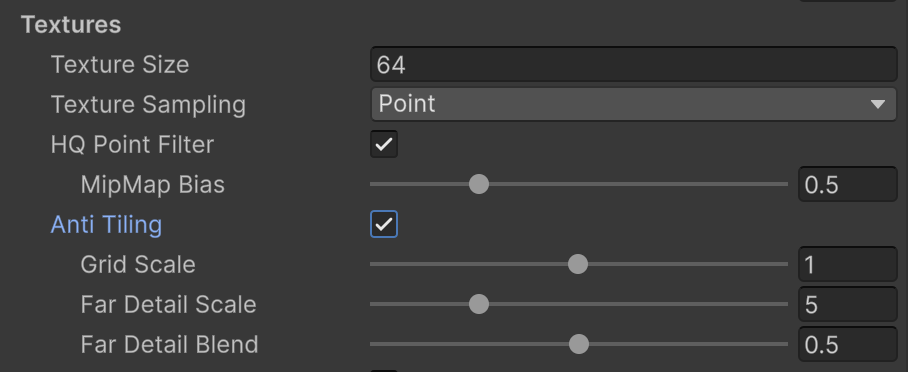
Settings
When Anti Tiling is enabled, three parameters control the result:
| Setting | Range (default) | What it does |
|---|---|---|
Grid ScaleantiTilingGridScale | 0.01 - 2 (1) | Stochastic cell size. Higher values vary the texture more frequently across the surface. |
Far Detail ScaleantiTilingMacroScale | 0.005 - 20 (5) | How quickly the footprint-based far-detail scale engages with distance. |
Far Detail BlendantiTilingMacroBlend | 0 - 1 (0.5) | How strongly the distance-scaled detail blends into the base anti-tiled albedo. Set to 0 to disable the far-detail crossfade. |
The far-detail crossfade restores low-frequency variation when mip levels flatten distant surfaces, so terrain keeps its character far from the camera instead of collapsing to a flat color.
Per-Voxel Opt-Out
Some textures carry baked gradients that should not be scrambled - for example a grass-to-dirt fade painted onto the side of a top-soil voxel. Each VoxelDefinition exposes a Disable Anti Tiling toggle (shown only for opaque render types) that skips anti-tiling and far detail for that voxel even when the global option is on.
voxelDefinition.disableAntiTiling = true;Biome top voxels automatically skip anti-tiling on their side texture slices, so baked grass-to-dirt gradients on biome surfaces stay intact without any manual setup.
Suggest an improvement
Help us improve this documentation page.