Biomes
intermediate conceptsVoxel Play 4 · World Architecture
A biome defines which voxels are used for terrain painting as well as vegetation, trees and ores.
Voxel Play 4 upgrades the biome system with 3-axis selection (altitude + moisture + temperature), per-biome shore voxels, and tighter integration with the 3D Terrain Graph via the Climate Map node.
Each biome can be applied to a range of "zones". A zone is a range in climate space defined by altitude, moisture and (in Voxel Play 4) temperature. For example, you can specify that the "forest" biome is applied to any altitude between 0 and 65 meters and a moisture from 0.35 and 0.65 (moisture and temperature are defined in the 0-1 range while the altitude is defined in world units). A zone that has altitude min and max set to 0 will be applied to any altitude (only the moisture and temperature ranges are considered in this case). See BiomeZone and 3-Axis Selection below for details.
A biome definition can be created pretty much like a World Definition. Right click in the Project window and select Create -> Voxel Play -> Biome Definition.
This is the contents of the Grassland biome provided in the Earth demo world:
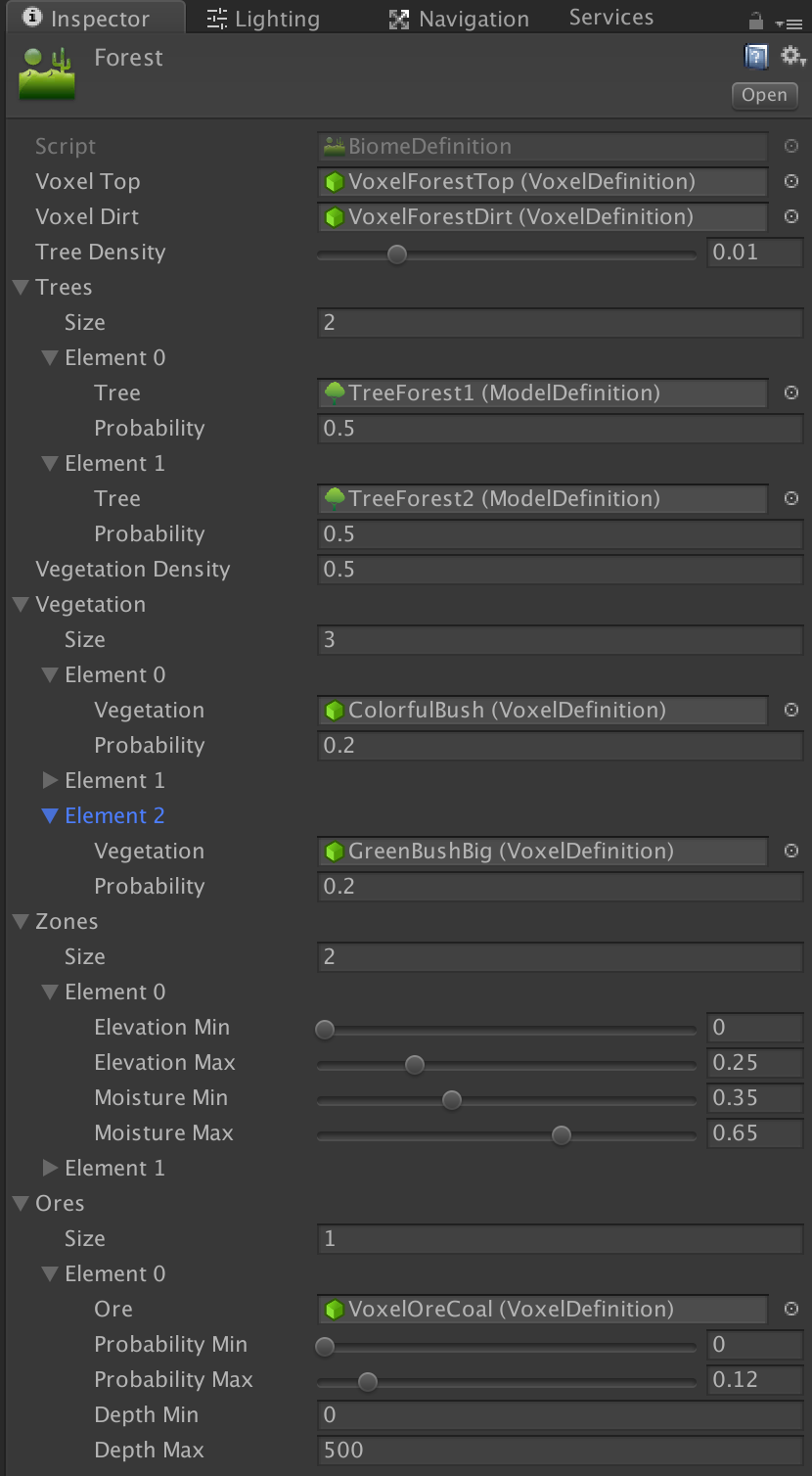
- The Voxel Top specifies the voxel that should be used for voxels at the surface level of the biome while the Voxel Dirt specifies the underground voxel for that biome.
- Biome Smart Surface: when enabled, the voxel dirt will be rendered as voxel top automatically when it becomes the surface (for example when digging). The voxel type doesn't change, only is appearance.
- Tree Density defines the chance of tree growing on random positions inside the biome. The greater the value the more trees your biome will have. This value only governs the amount of trees. See tree probability below.
- Trees: the list of Model Definitions that contains a tree (you can create new trees or models using the Constructor). You can define any number of trees. The sum of Tree Probability for all tree types for a biome must be 1. For example, if Tree 1 has a probability of 0.25 and Tree 2 has a probability of 0.75, that means that Tree 1 will be chosen 25% of times.
- Vegetation Density and Vegetation List: similar to trees but related to bushes. A bush is defined by a single voxel and not a model. Probabilities work the same as with trees.
- Underwater Vegetation Density and Underwater Vegetation List: similar to vegatation but related to underwater plants. A bush is defined by a single voxel and not a model. Probabilities work the same as with trees.
- Zones: here you define where this biome can occur. A biome is placed according to altitude, moisture and temperature. You can create any number of zones, each combining ranges for these axes (see BiomeZone and 3-Axis Selection below).
Ores
Ore can be defined per biome. Any number of ore types can be added per biome. Expand the Ores section and enter the number of ore types in Size field, then populate the properties for each ore type.
You can limit each ore type to a depth range. The probability range determines the chance that a specific ore is placed in each chunk. In the example above, the ore type VoxelOreCoal has a chance of 12% of appearing in any chunk of this biome. Probabilities should stack If you add a second ore type for this biome. For example, if you add a Gold ore type you could choose Probability Min = 0.12 and Probability Max = 0.15. That will give a 3% chance of Gold appearing in a voxel under the surface.
Once an ore has been selected for placement in a chunk, the VeinsCountMin and VeinsCountMax fields are used to determine the amount of veins in that chunk. The length/size of each vein is randomly determined by the VeinSizeMin and VeinSizeMax fields.
Note that the terrain is generated randomly by Voxel Play 4 using the Terrain Generation properties of the World Definition. You can also override the generated voxels using the OnChunkBeforeCreate and OnChunkAfterCreate events or even code your own terrain generator (see appropriate sections).
Biome Map Color
Each biome has a biomeMapColor property. This color is used exclusively by the Biome Map Explorer editor tool to visually distinguish biomes in the chart. It has no effect on in-game rendering.
BiomeZone and 3-Axis Selection
Each BiomeDefinition contains an array of BiomeZone entries. A BiomeZone defines a region in climate space where the biome applies:
| Axis | Fields | Range |
|---|---|---|
| Altitude | altitudeMin, altitudeMax | World units (e.g. -500 to 500) |
| Moisture | moistureMin, moistureMax | 0 to 1 (normalized) |
| Temperature | temperatureMin, temperatureMax | 0 to 1 (normalized, VP4 only) |
A position matches a biome when all three axes fall within the zone's ranges. Temperature is backward-compatible: zones where both temperature values are 0 ignore the temperature axis entirely, so existing biomes work without changes.
How Temperature Works
Temperature is not a built-in world property. It comes from the terrain graph: connect a noise node to the Climate Map's third input (Temperature). This could represent anything - actual temperature, distance from equator, elevation-based climate, or any other value you design.
Without a temperature input connected, biome selection works with altitude + moisture only.
Underground Zones (Depth-Based Cave Biomes)
Enable the Underground checkbox on a zone to turn it into a cave biome band. Underground zones are excluded from surface selection: instead of classifying columns by their surface altitude, they claim underground voxels whose Y position falls inside the zone altitude range. The moisture range still applies and can add horizontal variation to caves.
Where an underground zone matches, the cave biome provides the underground voxels, ores and the cave floor and ceiling vegetation. Its underground layers follow the usual precedence: the biome's own underground voxels first, then the world's geological strata, then voxelDirt - so a cave biome that only defines vegetation and ores keeps the surrounding rock intact.
- Heightmap generators apply underground zones below the surface column.
- 3D graph worlds apply the band at any position within the altitude range, including inside floating masses. In these worlds moisture matching uses 0, so keep the default 0-1 moisture range unless the zone targets heightmap worlds.
VoxelPlayEnvironment.GetBiome(position)reports the effective cave biome for underground positions.- Worlds without underground zones pay no extra generation cost.
Per-Biome Voxel Fields
Voxel Play 4 adds new per-biome voxel customization fields on BiomeDefinition:
| Field | VP3 | VP4 | Description |
|---|---|---|---|
voxelTop | Yes | Yes | Surface voxel (e.g. grass, sand) |
voxelDirt | Yes | Yes | Underground voxel (e.g. dirt, stone) |
voxelShore | - | New | Shore voxel for surfaces adjacent to water. Allows per-biome beach materials (sand for deserts, gravel for mountains). |
voxelLakeBed | - | New | Underwater floor voxel, distinct from underground dirt |
voxelWater | - | New | Water voxel override per biome (e.g. murky water in swamps) |
Climate Map Node
The Climate Map node in the 3D Terrain Graph performs biome lookup at generation time. It takes three inputs:
- Altitude (0-1): typically from a height calculation or World Y node
- Moisture (0-1): from a 2D noise node representing humidity
- Temperature (0-1, optional): from any noise or calculation node
The node provides dedicated Voxel, Vegetation, Tree and Water output ports, each returning a biome index (0..N) into the World Definition's biome array. Connect each to the matching terminal (Voxel ID, Vegetation ID, Tree ID, Water ID) to drive per-biome block selection, plant placement, tree generation and water placement.
Biome Transitions (Biome Blend)
By default, biome borders in the 3D Terrain Graph are a hard cut: each column belongs to a single biome. The Climate Map node's Biome Blend parameter softens these borders. When greater than 0, the climate inputs (altitude, moisture, temperature) are jittered by a small per-position random amount scaled by this value, so neighboring biomes interleave in a dithered band at their edges. 0 = off (hard borders); typical values are 0.02 - 0.08.
Biome Mixing (Classic Generator)
Worlds built with the classic generator (2D heightmap, not the 3D Terrain Graph) have a separate Biome Mixing option in the Voxel Play Environment inspector. When enabled, voxel types from neighboring biomes are randomly interleaved at biome borders, producing a natural speckled transition. The Mixing Spread slider (0.001 - 0.05) controls the width of the transition zone; higher values produce wider mixing bands.
This is independent from the Climate Map's Biome Blend described above. Biome Mixing applies to the classic generator only and is hidden in the inspector for 3D Terrain Graph worlds, which use the Climate Map node's Biome Blend parameter instead.
Biome mixing affects both near chunks (full voxel terrain) and far chunks (low-detail rendering). For per-voxel color variation beyond biome mixing, use the tint color system via the VoxelPlace() or VoxelSetColor() API methods, or use the Tint Gradient feature in Voxel Definitions.
Geological Layers (Global Underground Strata)
By default, each biome controls all underground voxels within its range via voxelDirt and voxelDirtAdditional. This works well for surface-level variation (soil, sand, clay) but makes it difficult to create shared geological layers like rock types that should be consistent across biomes.
The Geological Layers array in the World Definition solves this by defining global underground layers based on absolute altitude (Y). Each layer specifies:
| Field | Description |
|---|---|
| Voxel Definition | The voxel type for this layer (e.g. Granite, Limestone) |
| Probability | Weight (0-1) relative to other layers at the same altitude |
| Altitude Min / Max | Y range where this layer applies (default -500 to 500) |
How It Works
During terrain generation, for each underground voxel position:
- Biome-specific underground voxels (
voxelDirtAdditional) are applied first, consuming their configured probability. - Any remaining probability is filled from the global geological layers, proportionally rescaled to the remaining space.
- If no global layer covers that altitude, the biome's
voxelDirtis used as final fallback.
This means biomes only need to define their surface-level materials. Deep layers like granite, slate, or limestone are configured once at the world level and shared automatically.
If a biome needs to fully override the underground (e.g. a volcanic biome with 100% basalt), set its voxelDirtAdditional probability to 1.0 for the full altitude range - the global layers will never apply.
See Also
- Terrain Graph Overview - How to build terrain graphs
- Node Reference - Complete Climate Map node parameters
Suggest an improvement
Help us improve this documentation page.