Connected Textures
advanced featureIn Voxel Play 4, textures can be provided by custom modules during the mesh generation phase without affecting the original voxel definitions. This capability is specially useful for connecting textures in which textures change to match neighbors forming a more complex pattern. All of this occurs without changing or creating new voxel definitions.

Demo scene 1 contains a demo voxel which has a Connected Texture configuration. This voxel definition can be found inside the folder Voxel Play/Resources/Worlds/Earth/Voxels/Other/ConnectedTextureExample.
To create a Connected Texture configuration for any voxel definition, select the top menu Assets / Create / Voxel Play / Connected Texture. A new "Connected Texture" configuration asset will be created. For example, this is the configuration for the sample voxel included in the demo scene:
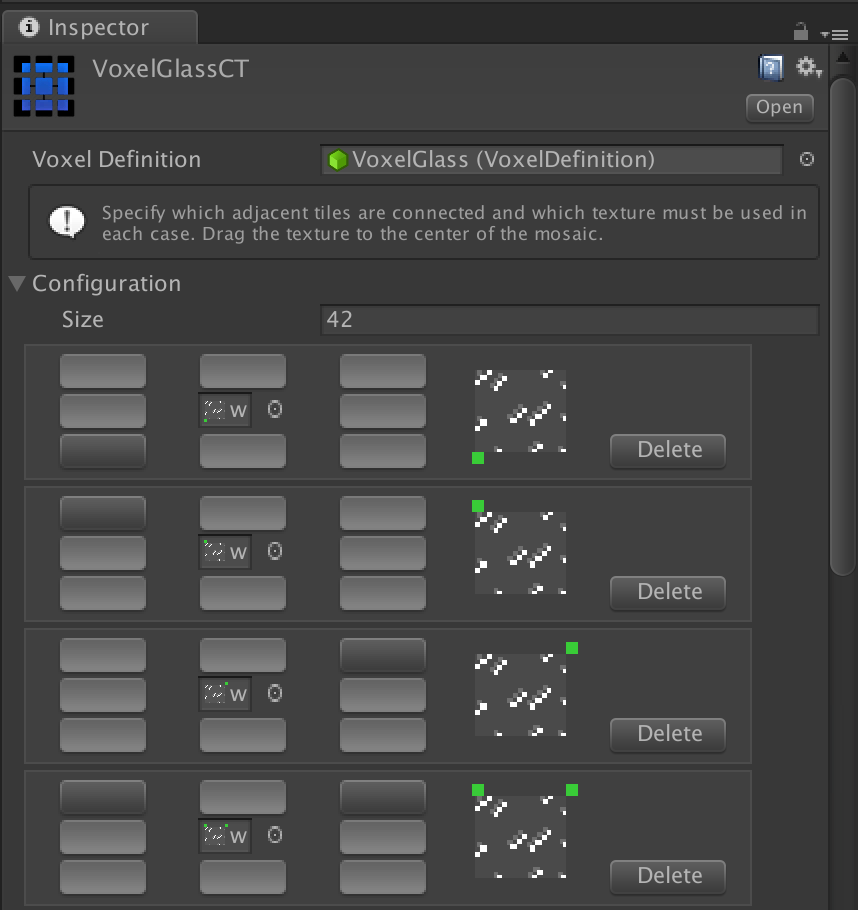
A Connected Texture asset specifies one or more different configurations for a specific voxel definition.
The Side selector accepts a single face (Top, Bottom, Forward, Back, Left or Right), or one of the grouped values: Lateral Sides applies the rules to the four vertical faces at once, Top And Bottom applies them to the two horizontal faces, and Any Side applies them to all six. The grouped values let one asset cover a whole set of faces instead of duplicating the same rules once per side.
Each configuration entry has an array of 8 toggle buttons representing the central voxel and its 8 neighbors. A pressed button means that the voxel definition is expected in that position.
When all voxel definitions surrounding a voxel match a given configuration, the texture assigned to the slot in the center of the array will be used instead of the regular texture of the voxel definition.
Suggest an improvement
Help us improve this documentation page.