Terrain Graph Node Reference
intermediate conceptsVoxel Play 4 · World Architecture
Complete reference for all nodes available in the Terrain Graph editors of Voxel Play 4. Voxel Play 4 has two independent terrain graph editors, each with its own node set: the 2D Terrain Graph (edited from a Multi-Step Terrain Generator) and the 3D Terrain Graph (edited from a 3D Terrain Generator). The nodes below are grouped by graph: first the nodes shared by both, then the nodes exclusive to each editor.
Matching node names across graphs: a few nodes do the same job but are named differently in each editor. If you are following a 2D workflow and cannot find a node, check its 3D name here:
- 2D Sample Height Map Texture = 3D Noise 2D Texture
- 2D Sample Height Map Fractal = 3D Noise 2D
Coordinate convention: a terrain graph is a function of position. It is evaluated in world space as the terrain is generated, at the coordinates of the point being sampled for each chunk. Every X, Y and Z referenced below (the coordinates fed to the noise samplers, and the World X / World Y / World Z nodes) is that absolute world position, not a chunk-local or pre-scaled one. Note that World X/Y/Z divide the coordinate by Max Height, so their output is normalized (1.0 = Max Height), while the noise samplers consume the raw world coordinate.
Nodes Common to Both Graphs
These nodes are available in both the 2D and the 3D Terrain Graph, with the same name and behaviour in each editor, except Invert, whose formula differs as noted below.
Constant
Outputs a fixed value. Supports Normalized (0-1), Percentage (0-100) and Meters unit modes.
Random
Deterministic pseudo-random value based on world X/Z position. Always outputs 0-1.
Copy
References the output of another node. Useful for reusing a result in multiple branches without recalculating.
Math Nodes
Transform a single input value.
| Node | Formula | Use case |
|---|---|---|
| Shift | input + value | Raise or lower terrain |
| Invert | 2D: 1 - input3D: -input | 2D: swap valleys and peaks. 3D: swap solid and air in a density value |
| Add And Multiply | (input + a) * m | Offset then scale |
| Multiply And Add | (input * m) + a | Scale then offset |
| Exponential | input ^ exp | Sharpen peaks (exp > 1) or flatten (exp < 1) |
| Abs | |input| | Create ridges from signed noise |
| Remap | Linear map from [a,b] to [c,d] | Rescale any range |
| Clamp | clamp(input, min, max) | Limit output range |
Blend Nodes
Combine two inputs (A and B).
| Node | Formula |
|---|---|
| Blend Additive | A * weightA + B * weightB |
| Blend Multiply | A * B |
| Min | min(A, B) |
| Max | max(A, B) |
| Subtract | A - B |
Threshold
Compares input against a threshold. If greater or equal: adds a value. If less: outputs a fixed value.
Select
Pass-through filter: if input is within [Min, Max], output it unchanged. Otherwise output a fixed value.
2D Terrain Graph Only (Multi-Step)
Nodes that only exist in the 2D Terrain Graph, edited from a Multi-Step Terrain Generator.
Sample Height Map Texture
Samples a repeating 2D texture as a heightmap. Remaps grayscale value to Min/Max range. The equivalent node in the 3D graph is Noise 2D Texture.
| Parameter | Description |
|---|---|
| Noise Texture | Texture2D asset to sample (tiled) |
| Frequency | Tiling frequency |
| Offset | X/Z offset for the sample position |
Sample Height Map Fractal
Procedural fractal noise evaluated at (X, Z) world coordinates. Y-independent, benefits from column caching. The equivalent node in the 3D graph is Noise 2D.
| Parameter | Description |
|---|---|
| Frequency | Scale of the noise pattern. Lower values = larger features. |
| Octaves | Number of noise layers (1-8). More octaves = more detail, higher cost. |
| Persistence | Amplitude decay per octave. Lower = smoother terrain. |
| Lacunarity | Frequency multiplier per octave. Default 2.0. |
| Offset | X/Z shift applied to the sampling coordinates. Give each noise node a different offset so several of them do not repeat the same pattern. |
| Min / Max | Output range remapping. |
Sample Ridge Noise From Texture
Samples a repeating 2D texture as a heightmap, like Sample Height Map Texture, but folds the value with 2 * (0.5 - abs(0.5 - value)) to create sharp ridges. Produces more acute reliefs, typically used for pointy mountains or, when inverted, river valleys.
| Parameter | Description |
|---|---|
| Noise Texture | Texture2D asset to sample (tiled). The package ships three noise textures under Resources/Worlds/Earth/Noise. |
| Frequency | Tiling frequency (scale applied to the texture) |
| Offset | X/Z offset for the sample position |
| Min / Max | Output range the sampled value is remapped to |
Ridge Noise Fractal
Procedural ridge noise, no texture required. It builds the same fractal as Sample Height Map Fractal and then inverts it around its midpoint, so the result is a field of sharp ridgelines: mountain chains, eroded crests and, when inverted again, river valleys. Unlike Sample Ridge Noise From Texture it needs no noise texture asset and does not tile.
| Parameter | Description |
|---|---|
| Frequency | Base frequency of the ridge noise. Lower values = larger features. |
| Octaves | Number of fractal layers combined (1-8). |
| Persistence | Amplitude multiplier from one octave to the next. |
| Lacunarity | Frequency multiplier from one octave to the next. |
| Offset | X/Z shift applied to the sampling coordinates, so two ridge nodes produce different ranges. |
| Min / Max | Output range remapping. |
Cellular Noise
Procedural cellular (Worley) noise, no texture required. The plane is divided into cells around scattered feature points and the node outputs either the distance to the nearest cell centre or the border between cells. Useful for anything that should read as a patchwork rather than as rolling noise.
| Parameter | Description |
|---|---|
| Frequency | Base frequency of the cellular pattern. Higher values pack more cells into the same area. |
| Mode | Cells outputs the distance to the nearest cell centre: regions, plateaus, patches of biome. Edges outputs the borders between cells: cracks, canyons, river networks and biome frontiers. |
| Jitter | How far cell centres wander from the regular grid (0-1). 0 is a perfect grid, 1 is fully scattered. |
| Offset | X/Z shift applied to the sampling coordinates. |
| Min / Max | Output range remapping. |
Sample Height Map Unity Terrain
Reads height values from a Unity TerrainData asset. Useful for importing existing terrain designs into Voxel Play.
Island (2D)
Distance-based falloff from world origin. Reduces height values outside a radius, creating finite island worlds.
Terraces
Quantizes values into stepped bands, creating terrace formations. The equivalent node in the 3D graph is Terraces 3D.
| Parameter | Description |
|---|---|
| Steps | Number of terrace levels (2-64) |
| Smoothness | Blend between sharp and smooth terrace edges (0-1) |
| Strength | Blend between original input and terrace effect (0-1) |
Flatten Or Raise
Modifies slope above a threshold. Use case: create plateaus and mesas.
Fill
If a reference input is within a range, output a fill value. Otherwise pass through the main input.
Test
Boolean test: outputs 1 if input is within [Min, Max], otherwise 0. Useful for masking.
Beach Mask
Special filter that suppresses beach generation where a mask value exceeds a threshold.
Divide
Combines two inputs: A / B (safe, returns 0 if B near zero).
3D Terrain Graph Only (Density)
Nodes that only exist in the 3D Terrain Graph, edited from a 3D Terrain Generator. These operate on a volumetric density field, enabling caves, overhangs and floating islands.
Noise 3D
3D fractal Perlin noise evaluated at (X, Y, Z). Produces values that vary with altitude, essential for caves and volumetric features.
Same parameters as Sample Height Map Fractal / Noise 2D. Higher computational cost since it cannot use column caching.
Noise 2D
Procedural fractal noise evaluated at (X, Z) world coordinates. Y-independent, benefits from column caching. This is the 3D-graph name for the same node the 2D graph calls Sample Height Map Fractal.
| Parameter | Description |
|---|---|
| Frequency | Scale of the noise pattern. Lower values = larger features. |
| Octaves | Number of noise layers (1-8). More octaves = more detail, higher cost. |
| Persistence | Amplitude decay per octave. Lower = smoother terrain. |
| Lacunarity | Frequency multiplier per octave. Default 2.0. |
| Offset | X/Z shift applied to the sampling coordinates. Give each noise node a different offset so several of them do not repeat the same pattern. |
| Min / Max | Output range remapping. |
Noise 2D Texture
Samples a Texture2D at (X, Z) world coordinates; the red channel is used as the value. This is the 3D-graph name for the same node the 2D graph calls Sample Height Map Texture.
| Parameter | Description |
|---|---|
| Noise Texture | Texture2D asset to sample (tiled) |
| Frequency | Tiling frequency |
| Offset | X/Z offset for the sample position |
Noise 2D Ridge / Noise 3D Ridge
Ridge noise variant: applies 1 - 2 * |noise - 0.5| to create sharp ridgeline patterns. Good for mountain ranges and jagged terrain.
Cellular 2D / Cellular 3D
Procedural cellular (Worley) noise in the density graph, with no texture required. Cellular 2D evaluates at (X, Z) and benefits from column caching; Cellular 3D evaluates at (X, Y, Z) and varies with altitude.
| Parameter | Description |
|---|---|
| Frequency | Base frequency of the cellular pattern. Higher values pack more cells into the same area. |
| Mode | Cells outputs the distance to the nearest cell centre: in 2D that gives regions and plateaus, in 3D blobs and pockets. Edges outputs the borders between cells: in 2D cracks, rivers and biome frontiers, in 3D cave-like walls between cells. |
| Jitter | How far cell centres wander from the regular grid (0-1). 0 is a perfect grid, 1 is fully scattered. |
| Offset | X/Z shift applied to the sampling coordinates. |
| Min / Max | Output range remapping. |
World X / World Y / World Z
Output the normalized world coordinate (position / maxHeight). World Y is critical for 3D terrain - it provides the vertical position for height-based density.
Height Gradient
The fundamental 3D terrain node. Adds a vertical gradient that makes terrain solid below a base height and air above it.
| Parameter | Description |
|---|---|
| Base Height | Normalized height (0-1) where surface forms. 0.3 = surface at 30% of max height. |
| Gradient | How sharply density changes with altitude. Negative values = solid below, air above (standard terrain). |
Formula: output = input + (y - baseHeight * maxHeight) * gradient / maxHeight
Island 3D
Radial falloff from world origin. Subtracts density beyond the specified radius, creating island boundaries.
| Parameter | Description |
|---|---|
| Radius | Island radius in world units |
| Slope Multiplier | Falloff steepness beyond the radius |
Terraces 3D
Quantizes values into stepped bands, creating terrace formations. The equivalent node in the 2D graph is Terraces.
| Parameter | Description |
|---|---|
| Steps | Number of terrace levels (2-64) |
| Smoothness | Blend between sharp and smooth terrace edges (0-1) |
| Strength | Blend between original input and terrace effect (0-1) |
Canyon 2D
Carves a channel along the X or Z axis: river beds, canyons, trenches. The centerline meanders with fractal noise and the depth fades smoothly toward the banks. Pair with a water level to make a river.
Cave Carver
Generates swiss-cheese cave networks. It has a single In port: connect the terrain density to it and use its output as the carved density. The node evaluates its own 3D fractal noise and, wherever that noise exceeds Threshold, subtracts Strength from the incoming density; elsewhere the input passes through unchanged. No Subtract node is needed.
| Parameter | Description |
|---|---|
| Frequency | Cave network scale |
| Octaves | Detail layers for cave shape |
| Persistence | Amplitude decay per octave |
| Lacunarity | Frequency multiplier per octave |
| Threshold | Minimum noise value to carve (higher = fewer caves) |
| Strength | Amount subtracted from the density when carving |
Formula: output = noise3D > Threshold ? input - Strength : input
Mask By Y
Restricts a value to a vertical band. Outside the band, outputs a fixed value.
| Parameter | Description |
|---|---|
| Y Min / Y Max | Vertical range where the input passes through |
| Outside Value | Value used outside the range |
| Fade | Distance inside the band, in world units, over which Edge Bias fades out from Y Min and Y Max (0 = hard cut) |
| Edge Bias | When Fade is above 0, amount subtracted from the input at the band edges, fading to 0 at the Fade distance. Only density above this value stays solid at the edges, so tops and bottoms taper instead of ending in flat cuts. 0 uses the default of 1 |
Formula: outside the band output = Outside Value; inside, with d = distance to the nearest band edge, output = d < Fade ? input - (1 - smoothstep(d / Fade)) * Edge Bias : input
Smooth Min
Smooth organic blend of two inputs controlled by a K factor. A softer alternative to the Min node for seamless density transitions.
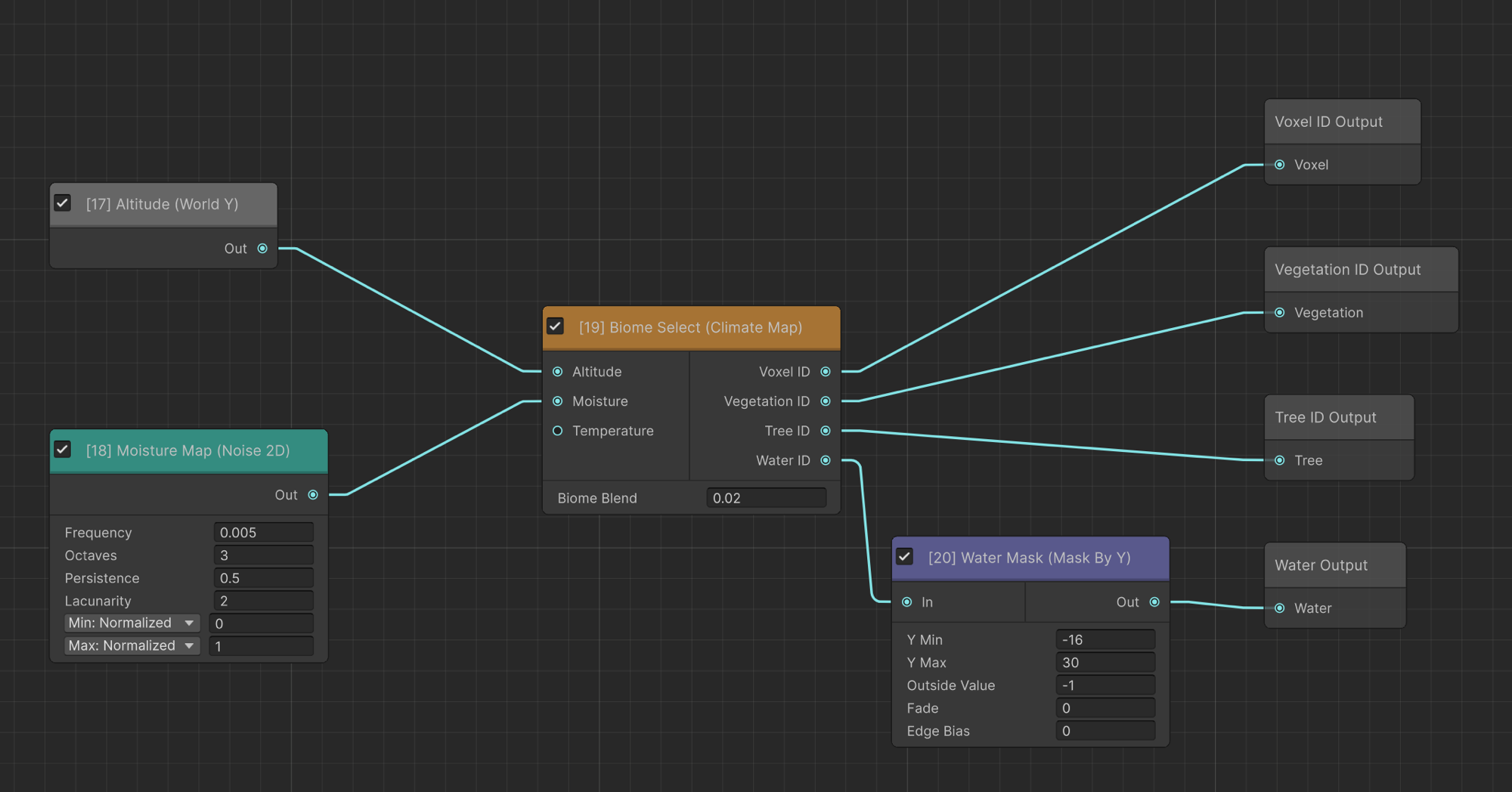
Climate Map
Looks up the biome index from the World Definition's biome array based on altitude, moisture and temperature inputs.
| Input | Description |
|---|---|
| Altitude | Normalized height (0-1) |
| Moisture | Humidity value (0-1) |
| Temperature | Optional third axis (0-1) for VP4's 3-axis biome selection |
The node provides dedicated Voxel, Vegetation, Tree and Water output ports, each carrying the biome index (0..N) of the first biome whose altitude/moisture/temperature ranges contain the input values. Connect each port to the matching terminal (Voxel ID, Vegetation ID, Tree ID, Water ID).
Biome Blend: softens biome borders instead of a hard cut. When greater than 0, the climate inputs are jittered by a small per-position random amount (scaled by this value) so neighboring biomes interleave at their edges. 0 = off (hard borders). Typical values: 0.02 - 0.08.
Discard
Always outputs zero (air). Use with conditional nodes to create empty regions.
Suggest an improvement
Help us improve this documentation page.