Structural Collapse & Debris
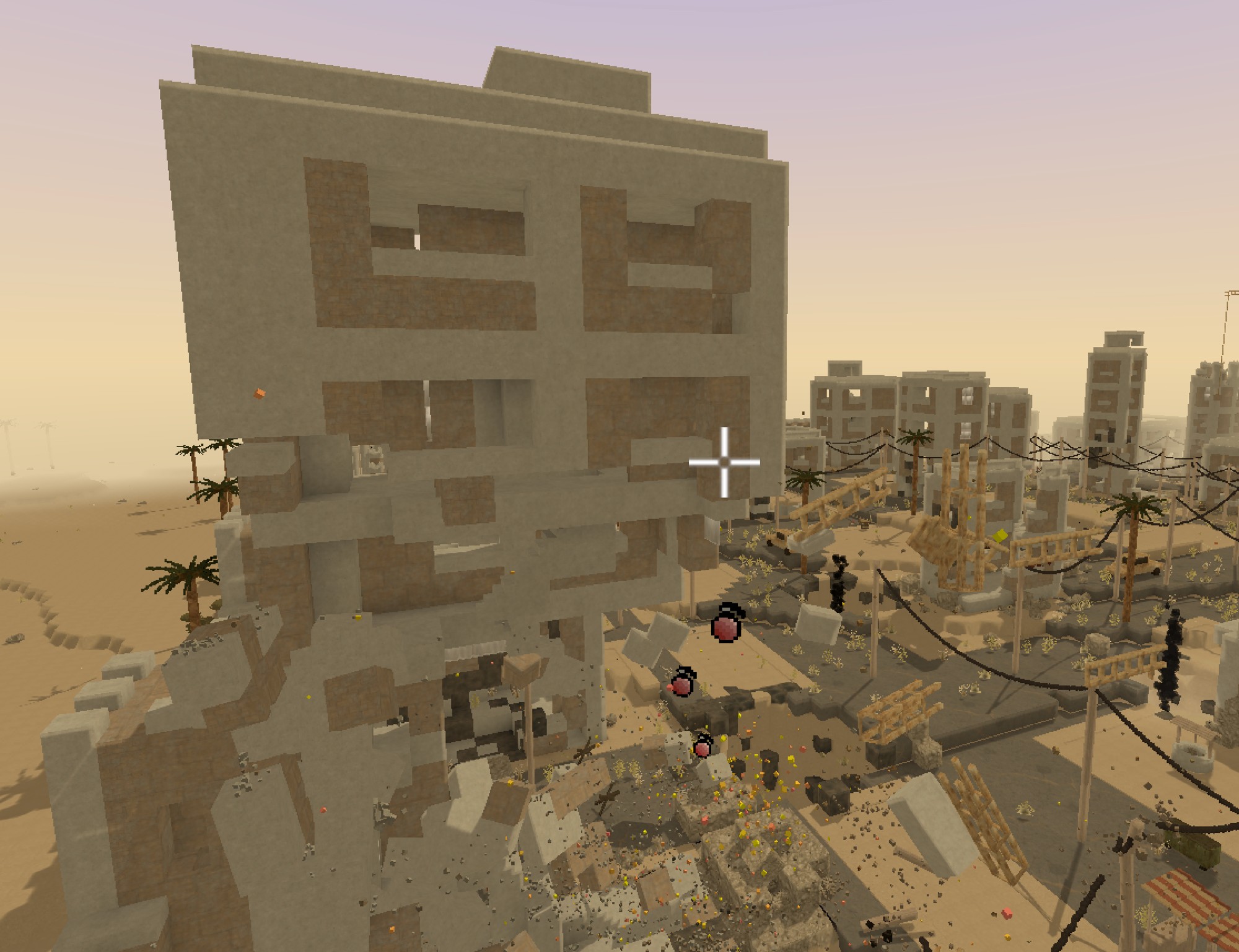
intermediate featureStructural Collapse makes destroyed voxels bring down whatever they were holding up. When a solid voxel is removed, Voxel Play looks at the structure connected to it: any group of solid voxels that no longer reaches a support - the ground, or a block flagged as anchored - breaks free and falls into the scene as a single debris body. Undermine the base of a tower and the top drops; sever a cable and the whole span comes down.
Enabling it
Structural collapse lives on the World Definition and is enabled by default, including for worlds loaded from older assets. When a solid voxel is destroyed by a call that asks for it, the engine runs a connectivity check around the impact and drops whatever is left unsupported. To go back to the classic behavior (voxels simply disappear when destroyed), turn Collapse On Destroy off.
Collapse is opt-in per call and only runs in play mode. VoxelDestroy, VoxelDamage, RayHit, VoxelExplode and MicroVoxelDestroy take a triggerCollapse parameter that defaults to false, so world generation, editor tools and scripted edits never spawn debris by accident. The bundled first and third person controllers, grenades, fire and debris impacts pass triggerCollapse: true; do the same in your own weapons and tools. VoxelCollapse runs the check explicitly at any time.
| World Definition setting | Purpose |
|---|---|
Collapse On Destroy (collapseOnDestroy) | Master switch for structural collapse. Default true. When off, destroyed voxels never trigger a collapse, whatever the calling code asks for. |
Collapse Amount (collapseAmount) | Connectivity search budget. A disconnected group larger than this is assumed to be supported and stays in place, so the worst-case cost per hit stays bounded. Default 1000. |
Debris Removal (debrisRemoval) | What happens to a debris body once its lifetime expires: StayForever, Sink (drops into the ground) or SmartRemoval (deleted the moment it leaves the camera view). Default StayForever. |
Debris Lifetime (debrisLifetime) | Seconds a debris body rests before its removal begins. Default 5. |
Debris Sink Duration (debrisSinkDuration) | Seconds a body takes to sink out of sight when the removal mode is Sink. Default 2. |
Debris Max Bodies (debrisMaxBodies) | Maximum number of debris bodies alive at the same time. Beyond this the oldest bodies retire early (they leave the physics simulation and sink away), which keeps physics cost bounded during heavy destruction. Default 64; 0 means unlimited. |
Debris Impact Particles (debrisImpactParticles) | Multiplier for the dust and chips debris raise on impacts and while tumbling, and for the burst a fragile voxel (Max Debris Size 0) throws when it shatters. 0 disables them. Default 1. |
Debris Impact Damage (debrisImpactDamage) | Multiplier for the damage falling debris deals to the voxels it lands on, scaled by the impact impulse (mass x speed) and resisted by each type's Resistance Points. Anchored types never chip. Range 0-3; 0 means impacts don't damage the world. Default 0. |
Debris Edge Chipping (debrisEdgeChipping) | Chance that debris pieces lose half-voxel chips along their exposed edges and corners, giving fracture borders an irregular, broken look instead of voxel-perfect faces. Chipping is deterministic per body and leaves colliders untouched. Range 0-1; 0 keeps exact voxel shapes. Default 1. |
Per-Voxel Behavior
Every solid voxel type carries a Collapse Behavior (VoxelDefinition.collapseBehavior) that decides how it takes part in the solve. Most block types need no setup - the default Auto already does the right thing - so you only touch this for terrain-like materials and for hanging elements.
| Collapse Behavior | Meaning |
|---|---|
| Auto (default) | Standard solid block. It joins the structure, passes support to its neighbours and falls when the group it belongs to loses contact with an anchor. |
| Anchored | Never falls and acts as a permanent support for everything resting on it. Use it for terrain, bedrock, roads and floors. Anchored materials also stop a collapse flood from spreading into the ground, which keeps the search budget from being spent on large slabs. |
| Tension | Hanging element such as a cable or rope. It does not pass support along and connects diagonally (catenary runs). The whole run falls as soon as it keeps fewer than two separate supports, so cutting a cable or dropping one of its poles brings down the entire span instead of leaving it floating. |
Participation is automatic: opaque and cutout block types join the structure without any per-voxel flag, while water, fluids, clouds, cross vegetation and custom/invisible types are transparent to the solve (they neither fall nor support). The Collapse Behavior field is hidden for those types.
Max Debris Size
Every solid type also carries a Max Debris Size (VoxelDefinition.maxDebrisSize, default 3): the maximum length in voxels of a falling piece along any axis. A disconnected group larger than this is cut into grid-aligned pieces of at most that size as it falls, so breaking the base of a five-voxel stone column drops two pieces instead of one rigid slab. 0 makes the type fragile: the cell shatters into a burst of particles tinted with its own colors instead of joining a debris body - use it for glass, ice, foliage or crumbly rock (the Debris Impact Particles setting scales the burst). The maximum value (64) means unlimited: the piece always falls whole, which suits cables so a fallen span stays a single chain.
What counts as a support
A group of voxels stays in place while it still reaches at least one of these:
- Deep generated terrain - terrain the world generator produced at least four cells below the top of its column. Shallow lips, thin ledges and cave ceilings are not anchors on their own, so undercutting them makes them fall; a mass four or more voxels thick anchors itself.
- Anchored voxels - any block whose Collapse Behavior is set to
Anchored. - The search budget - a group bigger than Collapse Amount is assumed supported and never falls.
In worlds built with the 3D Terrain Graph the generated-terrain anchor does not apply, so mark your base terrain materials as Anchored to give structures something solid to hang from.
Debris Bodies
Each disconnected group falls as one debris body: a single mesh (cube faces with inner faces culled, plus any microvoxel cells with their palette colors), a compound of merged box colliders and one rigidbody whose mass scales with the number of cells. Islands drop as a whole rather than bursting into a cloud of individual voxels, so a large chunk of a building or an entire tree trunk falls convincingly. Bodies raise dust when they hit the ground and keep puffing while they tumble.
Destructible debris
Fallen debris stays interactive. You can keep shooting or hitting a body after it lands: cells take damage individually, and when a body is broken apart the pieces split into smaller independent bodies that inherit its motion, all the way down to single cells. This is handled by the standard hit path, and the targeting highlight follows debris cells just like regular voxels.
Microvoxel structures
Collapse resolves connectivity down to the microvoxel level, so chipping away part of a detailed model can bring down the rest even without fully emptying a voxel cell. Partial cells are tracked as connected components and only the pieces that lose support fall; the rest stay put.
Notes & Behavior Changes
- Because collapse is on by default, existing VP4 worlds behave differently than before: cutting a tree trunk drops the trunk (and the canopy if it is connected), while a dug sand overhang no longer crumbles grain by grain because it is still anchored to the terrain mass. Turn Collapse On Destroy off to restore the old behavior.
- A huge unanchored slab spreads the flood across its whole area and can burn the entire budget in a single hit. Flag such materials as Anchored to cut the flood cheaply.
- Cross vegetation sitting on top of a fallen voxel is removed with it only when its Destroy With Voxel Below option is on (see Voxel Behavior & Gameplay).
See Also
Suggest an improvement
Help us improve this documentation page.