Getting Started
beginner quick startBuild and run the demo
The Pyramid demo ships fully assembled (terrain, biome, generators and materials):
- Open
Assets/VoxelPyramid/Demos/DemoPyramid.unity. - Press Play. The monument and its buried interior stream in around the spawn point.
Where the settings live
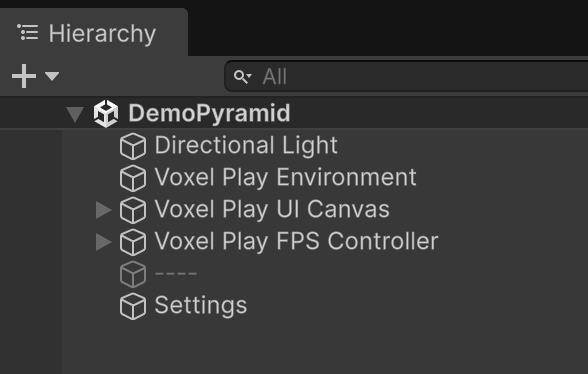
In the demo scene, select the Settings GameObject in the Hierarchy to reach the Pyramid Maze Generator configuration asset: the complete generator inspector, with its per-floor preview, is embedded right there, together with the demo component that rebinds the R regenerate and N chip-mode keys.
Play-mode controls
- 1-0 - select a hotbar slot; TAB opens the paged inventory (left/right arrows change page).
- LMB breaks, RMB places the selected item.
- N - toggle whole-voxel breaking vs microvoxel chipping.
- R - rebuild with a fresh random seed.
- F1 - open the Voxel Play console.
- Standard Voxel Play first-person controls for movement, look and jump.
The explorer kit
The demo ships a light, optional gameplay layer. The loadout starts with a pickaxe (digs much faster than bare hands), torches to light and mark your path, and placeable blocks for gaps and climbs. The HUD shows your depth below the desert line and the gold you have mined.
The tomb is built to resist you. Structural stone takes several swings of the pickaxe: roughly seven for the deep granite and basalt, five for the outer casing, sandstone and rock, four for masonry and limestone, three for a gold seam. Rubble, dirt and cobwebs come away at once. Cracked stone is the exception: two swings, which is what makes it read as the way through.
Underground, watch for cracked stone: cracked slabs over corridor pits crumble underfoot, and thin cracked walls hide secret shortcuts you can pick through. Mine the gold trim in treasure rooms: the river vault seals behind a golden offering door that only opens when you strike it carrying enough gold. Every piece sits behind a generator toggle (see Generator Settings).
The demo also ships a creature spawner and a small melee framework, so a placeholder creature roams the corridors and can be struck with the pickaxe. Both are templates meant to be replaced by your own creatures and combat: see Underground Features.
What the demo assembles
- DesertDressingGenerator scatters weeds, scrub, date palms and rock outcrops, with optional oases kept clear of the pyramid footprint.
- PyramidMazeGenerator plans a partially-buried stepped pyramid with a south entrance and columned portico, then carves the interior: switchback descent, tier galleries, a braided maze with hypostyle halls, painted chambers, double-height halls, pit rooms and treasure vaults, an apex light shaft, an underground lake, a lava pool and cascade, hanging vines, a plank bridge, torches and braziers.
- A subterranean river grotto crosses below, with a stone bridge, a portal from the burial chamber and a riverside vault.
- Tomb decor (sarcophagus, canopic jars, altars, statues, vases, cobwebs, wall reliefs) dresses the burial spaces.
Suggest an improvement
Help us improve this documentation page.