Generator Settings
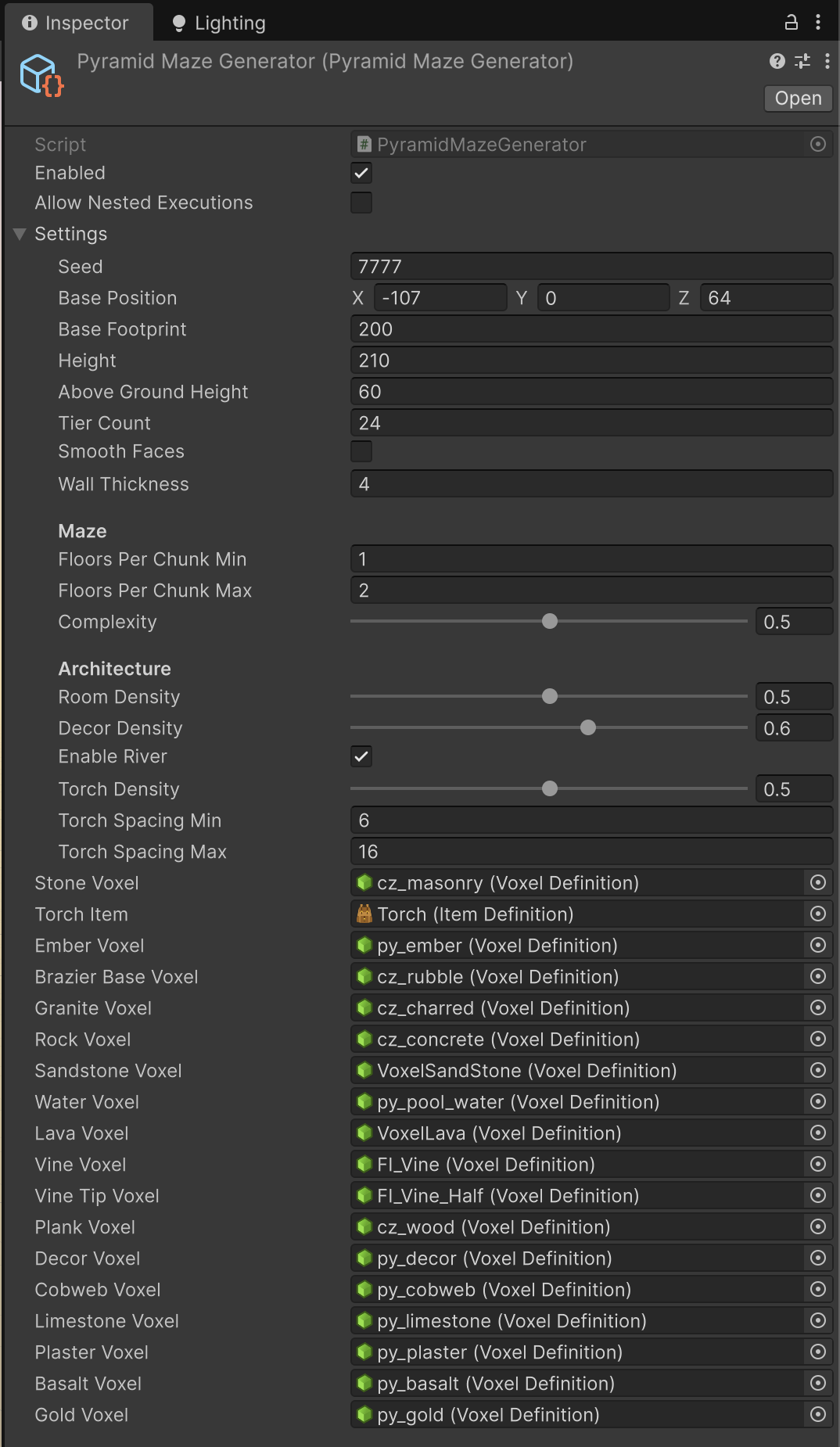
intermediate featureVoxel Pyramid is driven from the Pyramid Maze Generator asset. Its settings control the pyramid form, the maze density, the room and decor mix, the feature set and the torches. Regenerate in Play mode to iterate. The inspector is organised into General, Maze, Features and Advanced sections, with a seed Randomize button, per-feature teleport buttons, validation warnings and a per-floor minimap preview; the demo scene embeds this same inspector in its Settings object.
This page is the complete option reference. For how the generator is built and which script consumes what, see How Generation Works.
Inspector tools
| Tool | What it does |
|---|---|
| Randomize | Next to the seed field: writes a fresh random seed. Everything else is left untouched. |
| Teleport button | The small camera button on each feature row. In Play mode it jumps the player in front of that feature and clicking again visits the next instance. Targets are derived from the plan, not probed from voxels, so they work even for parts of the tomb that have not streamed in yet. Disabled when the feature is off or the plan is not ready. |
| Floor Preview | Renders the real deterministic layout of any floor without entering Play mode. See below. |
| Regenerate World | Play mode only: calls Regenerate(seed), which clears the plan and reloads the world with the current settings. |
General
| Setting | Range / default | Effect |
|---|---|---|
| Seed | integer (demo: 7777) | Master seed. Every random decision in the add-on is drawn from DeterministicRng(seed, salt), so the same seed reproduces the same monument and maze exactly. |
| Base Position | world voxel position | Where the base centre sits. Only X and Z are used to place the frustum: the vertical position comes from the terrain datum sampled at plan time. The desert dressing generator also reads this value to keep its oases off the monument. |
| Base Footprint | voxels (200) | Side length of the square base. Clamped to a minimum half-width of 2. It also sets the radius the desert dressing keeps clear. |
| Height | voxels (210) | Apex height above the base plane, so the base plane sits at apex - height. Raising it buries the monument deeper and adds maze floors; lowering it removes them from the bottom up. |
| Above-Ground Height | voxels (60) | Voxels of the tip above the terrain line, and also the tip half-width, since the visible profile is 45 degrees with one-voxel climbable steps. |
Maze
| Setting | Range / default | Effect |
|---|---|---|
| Floors/Chunk Min | 1–8 (1) | How many maze floors pack into each 16-voxel chunk slice. The generator uses the largest count in the range that divides 16 evenly (1, 2, 4 or 8) and still leaves at least 4 voxels of pitch: floor slab, two voxels of headroom, ceiling slab. Corridor height is the pitch minus two, so 1 gives generous 14-voxel galleries, 2 gives 6-voxel corridors and 4 gives a crawl. |
| Floors/Chunk Max | 1–8 (2) | |
| Complexity | 0–1 (0.5) | 3D labyrinth density. It drives four things at once: the cell pitch (11 voxels at 0, 8 at 1, so smaller cells and more of them), the braid factor that reopens walls into loops, the chance a corridor cell hides a drop-pit, and how many stairwells connect each pair of floors. 0 = sparse and open, 1 = dense. |
| Room Density | 0–1 (0.5) | How much of each floor is claimed by rooms. It scales the number of placement attempts per floor; each successful attempt claims a 2×2 or 3×3 block of cells with a free margin, up to 24 rooms per floor. Which kind lands where depends on the floor's depth, not on this value. |
Feature toggles
Each feature can be switched off independently; the maze and its guaranteed connectivity never depend on them. Because every feature draws from its own salted random stream, turning one off leaves the rest of the tomb identical. Some toggles are nested under the feature they belong to and are hidden when the parent is off.
| Toggle | Default | Effect and requirements |
|---|---|---|
| Decor Density | 0.6 | Interior dressing: wall reliefs, statues, vases, debris and cobwebs. At 0 the tomb generates bare, and cobwebs stop appearing regardless of their own toggle. |
| Underground River | on | Subterranean river grotto below the maze: basalt bed and banks, a stone bridge on the axis, a portal from the burial chamber and a riverside vault. Needs the water voxel to run wet. |
| Sealed Vault | on | Nested under the river. The vault closes behind a golden offering door built from the Sealed Door Voxel. The door cannot be mined. |
| Gold Cost | 10 | Gold units the door demands. Read by PyramidVaultDoor at the moment of the strike, so changing it in Play mode takes effect immediately, without regenerating. |
| Entrance Portico | on | Columned portico with engraved glyph bands and cornice on the south face. Also widens the chunk acceptance test around the entrance band, since it projects beyond the face. |
| Guardian Statue | on | Nested under the portico: a monumental seated pharaoh on the portico roof. |
| Caverns | on | Natural cavern bulges opened along the switchback descent, every other leg. They are what hosts the lake, the lava pool, the vines and the plank bridge, so turning them off takes those with them. |
| Plank Bridge | on | Nested under caverns: a wooden bridge with a parkour gap across the lake cavern. Needs at least three caverns and the plank voxel. |
| Lava | on | Self-lit lava in the deepest cavern and in the deep pit rooms (the lower 40% of the floor stack). Off, those basins stay dry or use water. Lava is placed one cell at a time so each voxel registers as a light source. |
| Hanging Vines | on | Vines on cavern ceilings and in the burial shaft: one in five ceiling cells, two to five voxels long, with a tapered tip voxel when one is assigned. |
| Cobwebs | on | Corner cobwebs and loose strands in corridors, rooms and caverns. Requires Decor Density above zero. The cobweb host voxel has no collider and does not occlude light, so webs never block or darken a passage. |
| Apex Light Shaft | on | Vertical shaft with an oculus rising from the central plaza to the apex, so daylight falls deep into the monument. |
| Crumbling Floors | on | Corridor drop-pits are covered with cracked slabs instead of being left as open holes. The cover is a quarter-voxel microvoxel skin flush with the floor. It only decays underfoot if the PyramidCrumblingFloors component is in the scene; without it the slabs are just breakable floor. |
| Arrow Traps | on | Wall slits that shoot bolts across a corridor on a fixed beat. They take over a share of the wall-light spots, so they always sit flat on a gallery wall facing the corridor, and each fires out of phase with its neighbours: a run of them has to be timed rather than outrun. Three sub-settings appear under Torch Density when it is on. Arrow Trap Share (0.2) is the fraction of wall-light spots that become slits instead of torches; Bolt Damage (18) is the life one bolt takes; Bolt Interval (2.2 s) is the time between shots once the player is close enough to wake the slit. They are applied to every slit the generator raises, so the whole tomb is tuned here rather than from the prefab. |
| Secret Passages | on | A few extra maze connections carved and then walled up behind thin cracked panels the player can pick through. Rooms, pits, rubble cells and cells crossed by a stair are excluded, because a stair would open a way around the partition. |
| Torch Density | 0–1 (0.5) | Wall-torch frequency along carved galleries. It tightens the stride toward the minimum rather than adding torches at random. At 0, or with no Torch Item assigned, the galleries stay unlit. |
| Spacing Min | voxels (6) | Lower bound of the jittered stride between torches along a run. Clamped to a minimum of 3. |
| Spacing Max | voxels (16) | Upper bound of the stride, before density tightens it. |

Advanced
The Advanced foldout holds the wall thickness and the voxel palette: which VoxelDefinition plays each role. Every slot is registered with Voxel Play during Init(), and an empty slot means its feature is skipped rather than an error, except where a fallback is listed. Swap a slot to reskin the whole monument without touching a line of code.
| Setting | Default | Effect |
|---|---|---|
| Wall Thickness | voxels (4) | Shell wall thickness for the hollow interior. Clamped to a minimum of 1. The spawner also subtracts it when deciding what counts as "inside the structure". |
Strata & Casing
| Slot | Role |
|---|---|
| Stone Voxel | Universal fallback for every unassigned slot below. Leaving it empty stops the generator entirely, and the inspector warns about it. |
| Granite Voxel | Deep strata band, the bottom third of the buried mass. |
| Rock Voxel | Mid strata band. |
| Sandstone Voxel | Upper strata band, matching the surrounding desert. |
| Casing Voxel | Clean dressed limestone on the visible exterior shell. |
| Casing Band Voxel | Restrained horizontal accent bands near the base. |
| Casing Cracked Voxel | Cracked masonry around losses in the outer casing. |
| Cracked Slab Voxel | The crumbling cover over corridor drop-pits. Falls back to Casing Cracked Voxel. This is the definition PyramidCrumblingFloors looks for, so it is only ever written at floor level. |
| Secret Passage Voxel | The breakable vertical panel over a sealed shortcut. Kept as a separate slot on purpose: it must never be the crumbling-floor definition, or a wall would be treated as a floor. Falls back to the casing voxel, then to stone. |
| Sealed Door Voxel | The golden offering door on the river vault. Falls back to the gold voxel. |
Interior
| Slot | Role |
|---|---|
| Limestone Voxel | Pale dressed stone: hall liners, room floors, bridges and platforms. |
| Plaster Voxel | Painted plaster: chamber walls, the ground for the murals. |
| Basalt Voxel | Dark stone: pit rooms, river bed and banks. |
| Gold Voxel | Gold trim bands in treasure rooms and the vault. Registered as both a voxel and an item, which is what makes mined gold a real inventory entry and therefore the currency the offering door accepts. |
| Decor Voxel | Neutral opaque host for the coloured-microvoxel tomb props. Falls back to stone. |
| Cobweb Voxel | Host for cobwebs, with zero opacity: it renders microvoxels but contributes no collider and no light occlusion. Falls back to the decor voxel. |
Fluids & Flora
| Slot | Role |
|---|---|
| Water Voxel | Cavern lake, pit-room basins and the river, all written as still water through the deferred queue: it never floods and never spreads. |
| Lava Voxel | Self-lit lava pool in the deepest cavern and in deep pit rooms. |
| Vine Voxel | Hanging vines (cutout cross geometry). |
| Vine Tip Voxel | Tapered last voxel of a vine run. Optional: without it the run ends flat. |
| Plank Voxel | Bridge planks over the lake cavern. |
Lighting
| Slot | Role |
|---|---|
| Torch Item | The wall torch. This one is an ItemDefinition, not a voxel: prefab, flame and light in a single definition. Without it, torch density has no effect. |
| Ember Voxel | Glowing coals of the floor braziers. These are the actual light source. |
| Brazier Base Voxel | Dark cup of the floor braziers. |
Validation warnings
The inspector checks three things and tells you before you press Play:
- Stone Voxel is unassigned. It is the fallback for every other slot; without it unassigned features are skipped.
- Torch Density is set but no Torch Item is assigned, so the galleries stay unlit.
- Underground River is enabled but Water Voxel is unassigned, so the grotto bed generates dry.
Tuning how hard the stone is
Digging speed is not a generator setting: it comes from the Resistance Points on each voxel definition, weighed against the hitDamage of whatever the player swings (9 for the demo pickaxe). Swings needed is resistance divided by damage, rounded up.
| Voxel | Resistance | Pickaxe swings |
|---|---|---|
| Granite, basalt (deep mass) | 60, 55 | 7 |
| Casing, rock, sandstone | 45, 45, 40 | 5 |
| Masonry, limestone, weathered casing | 35, 30, 30 | 4 |
| Gold seam, decor | 20 | 3 |
| Plaster, planks, embers | 18, 12, 10 | 2 |
| Cracked slab (secret walls, crumbling floors) | 15 | 2 |
| Rubble, dirt, cobweb | 8, 8, 2 | 1 |
Keep the cracked slab soft: it is both the wall over a secret passage and the floor that gives way underfoot, so raising it makes shortcuts tedious and slows the drop-pits at the same time. The offering door sits at 250 and does not yield to mining at all.
Floor preview
The Floor Preview foldout renders the real deterministic layout of any floor without entering Play mode: corridors, rooms by kind, pits, collapsed cells, sealed shortcuts and the stairwells climbing to the floor above. The caption under the map reports the floor's world Y, the grid size, the room count broken down by kind, the number of floor pits and the number of sealed shortcuts, so you can judge a settings change by reading numbers instead of walking the tomb.
Outside Play mode the preview plans against a flat-terrain stub, so floor Y alignment shifts slightly from what you will see in game; the layout itself is the real one. In Play mode it reads the live plan.

Dungeon Spawner Generator
Creatures come from a second detail generator listed in the same World Definition, so it can be tuned, reused elsewhere or removed on its own. How it decides where to place things is described in How Generation Works; what it spawns and how it behaves is in Underground Features.
| Setting | Default | Effect |
|---|---|---|
| Seed | 9001 | Master seed. Placement is deterministic per chunk and band, so the same seed repopulates the same rooms. |
| Pyramid | the demo generator | The generator whose floors the bands refer to. Leave it empty to band by absolute world height instead, for a cave system or a dungeon of your own. |
| Top World Y | 64 | Used only when no pyramid is assigned: the world Y where the first band starts, descending. |
| Band World Height | 16 | Used only when no pyramid is assigned: the Y span each band covers. |
| Min Player Distance | 12 | Nothing spawns within this many voxels of the player. The spot is not discarded, it is held and used once the player has moved on, which is what keeps the corridors you actually walk populated. |
| Inside Structure Only | on | With a pyramid assigned, only populate its carved interior. Off, the open desert around it is populated too. |
| Ground Offset | 0.25 | Raises each spawn so the body rests on the floor instead of sinking into it. Roughly half the prefab's height. |
| Bands | 3 in the demo | The depth bands themselves, described below. |
Depth bands
Each band owns a range of maze floors counted from the top (0 is the topmost) and its own population rules, so a world can get harder the deeper you go. The demo ships three: empty upper galleries, a mid maze at low density, and a deeper band with a higher density and a larger per-chunk ceiling.
| Field | Effect |
|---|---|
| Name | For your own reference only; it does not affect generation. |
| From Floor / To Floor | Floor range the band covers, counted from the top maze floor. Bands are matched in order, first match wins. |
| Prefabs | What the band places, picked at random per spot. Anything works: a spawn nest, a creature with your own AI, a trap, a chest. An empty list disables the band. |
| Density | 0–1, the chance per candidate spot. 0 empties the band, 1 fills every valid spot. |
| Max Per Chunk | Ceiling on spawns queued per chunk, as a safety valve while you tune density. |
Spawn nest component
What the demo bands place is a DungeonSpawnNest prefab. Its own settings live on the prefab, not on the generator:
| Setting | Default | Effect |
|---|---|---|
| Creatures | - | What the nest lets out, one picked at random per release. |
| Release Interval | 6 s | Seconds between releases while the player is near. |
| Max Alive | 3 | How many of its own brood may be out at once. The nest waits while the cap is met. |
| Lifetime Releases | 0 | Total releases over the nest's life. Zero means it never runs out. |
| Activation Range | 26 | Dormant until the player comes this close, so distant rooms cost nothing. |
| Min Player Distance | 3 | A doorstep this close to the player is skipped, so nothing is released on top of them. |
| Tell Duration / Tell Scale | 0.8 s / 1.18 | The wind-up: the nest swells for a moment before each release so the player can read what is coming. |
The Gameplay object
The demo scene carries the exploration and combat kit on a Gameplay GameObject. Each component is independent and optional: remove one and only its own behaviour goes with it. The architecture of each is described in How Generation Works.
Pyramid Vitals
| Setting | Default | Effect |
|---|---|---|
| Max Life | 100 | The explorer's life pool. Refilled on respawn. |
| Safe Fall Height | 5 | Voxels of free fall survived unharmed. |
| Damage Per Fall Voxel | 6 | Life lost per voxel beyond the safe height. Only the free-fall part of a drop is charged. |
At zero life the explorer is returned to the entrance with a full pool. Removing the component removes the life row from the HUD and every effect that depends on it, including the creature's blast damage.
Pyramid Crumbling Floors
| Setting | Default | Effect |
|---|---|---|
| Generator | the demo asset | The generator that owns the cracked-slab definition. Auto-located in the world when left empty. |
| Tick Interval | 0.175 s | Seconds between decay ticks while standing on a cracked slab. |
| Damage Per Tick | 5 | Damage applied to the slab per tick. Against the default slab resistance of 15 that is three ticks, roughly half a second of standing still. |
| Crumble Sound | - | Optional dedicated clip. Left empty, the slab's own impact sound is used. |
| Crumble Volume / Pitch | 0.28 / 0.74 | Level and pitch of the crumble cue, with a small random pitch jitter per play. |
| Sound Interval | 0.5 s | Minimum seconds between crumble sounds, kept independent from the faster damage ticks so the cue does not turn into noise. |
| Low Pass Cutoff | 2600 Hz | Cutoff of the low-pass filter on the crumble source, which is what makes it read as muffled stone underfoot. |
Pyramid Vault Door
| Setting | Default | Effect |
|---|---|---|
| Generator | the demo asset | The generator that owns the vault. Auto-located when empty. The gold cost itself lives on the generator settings, not here. |
Dungeon Melee Attack
| Setting | Default | Effect |
|---|---|---|
| Bare Hands Range | 3 | Reach in voxels with nothing equipped. An equipped item uses its own hitRange property. |
| Bare Hands Damage | 3 | Damage with nothing equipped. An equipped item uses its own hitDamage. |
| Swing Interval | 0.25 s | Minimum seconds between swings. |
Dungeon Damage Taker
This one goes on the targets, not on the Gameplay object: any creature, prop or fixture that should answer to the melee framework.
| Setting | Default | Effect |
|---|---|---|
| Health | 20 | Hit points. |
| Hit Cooldown | 0.25 s | Immunity window after a hit, so one swing cannot register several times. |
| Log To Console | on | Writes each hit to the Voxel Play console (F1). Turn it off once you have your own feedback. |
| Hit Effect / Defeat Effect | - | Prefabs spawned at the impact point and where the target goes down. Left empty, a built-in particle burst is used instead. |
| Hit Sound / Defeat Sound | - | Left empty, Voxel Play's default impact and destruction sounds are used. |
| Burst Color | dark red | Tint of the built-in burst, used only when no effect prefab is assigned. |
| Hit Particles / Defeat Particles | 14 / 60 | Specks thrown by the built-in burst. Zero turns it off. |
onDamaged / onDefeated | - | Unity events raised on every hit that lands and once when health reaches zero, just before the object is removed. This is the hook for loot, animation or score. |
Dungeon Aim Highlight
| Setting | Default | Effect |
|---|---|---|
| Range | 7 | How far the crosshair reaches, in voxels. Matches the melee range by default. |
| Intensity | 2.6 | Brightness multiplier at the pulse peak. The highlight changes brightness only, never hue, so it reads for every player. |
| Pulse Speed | 5 | Speed of the pulse. |
Dungeon Blob Creature
The demo creature, meant to be replaced by your own. It is included as a worked example of a creature that navigates a streamed voxel world without a NavMesh.
| Setting | Default | Effect |
|---|---|---|
| Activation Range | 18 | Starts hunting the player within this distance. |
| Hop Length / Height / Cooldown | 1.7 / 1.15 / 0.35 | The hop itself: distance, arc height and the pause between hops. |
| Attack Range / Attack Boost | 3.6 / 1.6 | Inside the attack range the hop length is multiplied by the boost, so the last leap is a lunge. |
| Gravity | 22 | Used to compute the hop arc; it does not use a Rigidbody. |
| Body Half Height / Body Radius | 0.7 / 0.35 | The volume checked against voxels when validating a landing, and when nudging clear of walls. |
| Frustration Time | 3 s | Seconds without getting closer to the player before it gives up and roams. |
| Roam Time | 4 s | How long a roam lasts before it resumes hunting. |
| Idle Frames / Jump Frames | mesh arrays | Mesh keyframes played at ten frames per second: idle loops, jump plays once from crouch to landing. |
| Audio feedback | - | Jump, landing and player-impact clips, each with its own volume and pitch, played from a spatialised source with a small pitch jitter. |
| Contact Radius / Blast Radius | 1.2 / 2 | How close it must get to detonate, and how far the detonation reaches the player. |
| Player Damage | 25 | Life taken from PyramidVitals when the player is inside the blast. |
| Crater Damage / Radius | 255 / 1 | Passed to VoxelExplode: the tomb takes real damage where it goes off. |
| Debris Amount / Force | 0.15 / 6 | How much rubble the explosion throws, and how hard. |
onExploded | - | Unity event raised with the number of voxels damaged, for your own reactions. |
Demo hotkeys
The PyramidDemo component on the Settings object is demo convenience, not part of the generator:
| Setting | Default | Effect |
|---|---|---|
| Generator | the demo asset | The generator to regenerate. Auto-located when empty. |
| Regenerate Key | r | Rebuilds the world with a fresh random seed. Key names are the ones the Voxel Play input controller understands. |
| Break Mode Key | n | Toggles between whole-voxel breaking and microvoxel chipping. Avoid keys Voxel Play already binds. |
| Micro Block Size | 2 | Microvoxel block removed per hit when chipping, so 2 means a 2×2×2 bite. |
| Micro Hit Delay | 0.05 s | Hit delay while chipping. The whole-voxel delay is remembered and restored when you toggle back. |
| Ambient Dust / Dust Rate | on / 7 | Low-cost camera-local dust motes. Purely visual and safe to disable. |
Suggest an improvement
Help us improve this documentation page.