Getting Started
beginner quick startVoxel Combat Zone · Quick Start
Run the demo
The fastest way to see what Voxel Combat Zone does is the included demo scene:
- Open
Assets/VoxelCombatZone/Demos/DemoCombatZone.unity. - Press Play. The city streams in around the spawn point as chunks are generated.
A second scene, Assets/VoxelCombatZone/Demos/DemoCombatZoneDistricts.unity, shows three districts in one world joined by highways, with a City Connector and a Dressing generator alongside them. The player starts on the slip road outside one of the cities, looking at its gate: the spot is asked of the City Connector at runtime rather than stored in the scene, so it still lands on a city when you change the layout seed or the number of districts. See Starting the player at a city.
Where the settings live
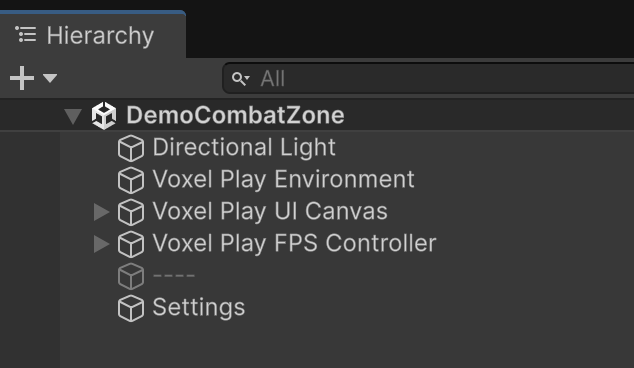
In the demo scene, select the Settings GameObject in the Hierarchy to reach the Combat Zone Generator configuration asset (every knob on the Generator Settings page) and the demo component that shows the current seed and rebinds the R regenerate key.
The inspector shows one district at a time, but it reaches the rest. In a multi-district world a Districts In This World block names every district, marks the one you are editing and any that are disabled, and switches to another with a click. Under it, World Systems opens the City Connector and the Dressing generator, the two assets a world has one of. See Several districts in one world.
Play-mode controls
- 1–0 - select the matching hotbar slot.
- G - throw or fire the selected item (grenade, rocket).
- Tab - open the inventory to reassign hotbar slots.
- R - rebuild the zone with a fresh random seed (via the Combat Zone Demo component).
- F1 - open the Voxel Play console.
- Standard Voxel Play first-person controls for movement, look, jump and mining.
The break-mode key (whole-voxel vs microvoxel breaking) is configurable on the Combat Zone Demo component in the scene.
Example weapons
The demo hands you two ready-to-use throwables so you can test the destruction system right away. They sit in the bottom hotbar; press the number key to select one and G to launch it.
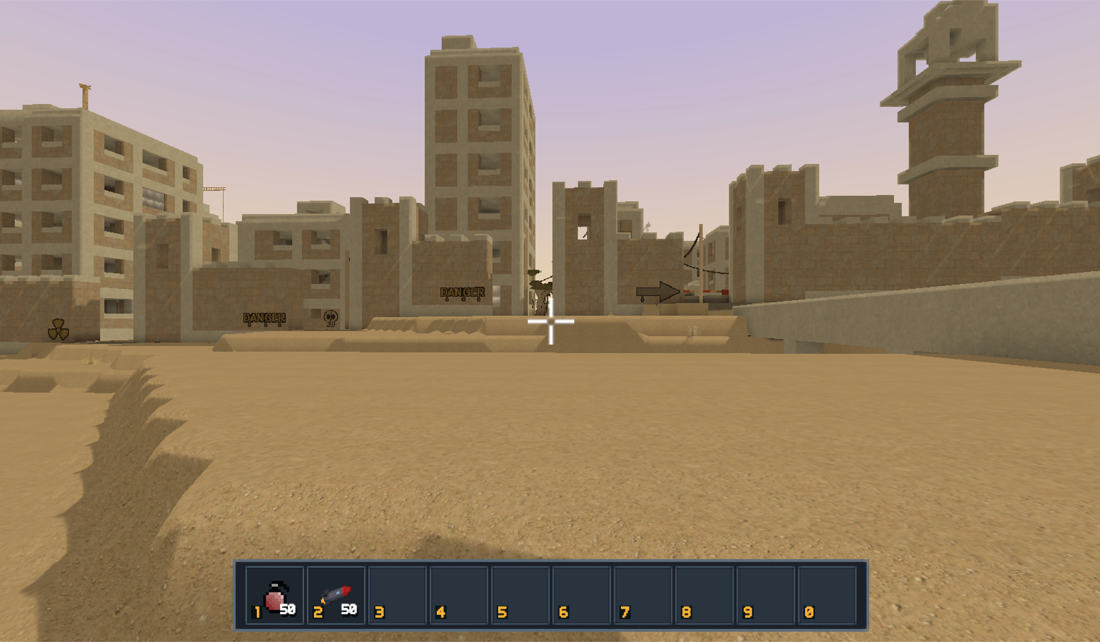
- Grenade (slot 1) - the standard Voxel Play grenade: a physics throwable that explodes on impact, carving a crater and scattering debris.
- Rocket launcher (slot 2) - a Combat Zone weapon that flies straight ahead leaving a smoke trail and detonates with the same blast as the grenade, so you can breach walls and bring down structures from range.
Both are ordinary Voxel Play items granted to the player in the demo scene, so you can add your own, change the starting amounts or remove them from the Player object's item list.
What the demo assembles
The demo builds the whole city from these systems, all deterministic per seed:
- City layout and streets - organic blocks, an old-town quarter, plazas and meandering streets.
- Buildings - RC-frame building grammar with varied facades, storefronts, interiors, switchback stairwells, elevator shafts, rooftop props and a courtyard mosque landmark.
- Battle damage - a frontline seam, per-building wear, breaches, collapses, shell craters, rubble and scorch.
- Fortifications - a perimeter wall with gates, watchtowers, checkpoints and river bridges.
- Props - wrecked cars, sandbags, hedgehogs, barriers, tower cranes, a street market, a stone well.
- Infrastructure - power poles with catenary cables and facade-to-facade alley cables.
- Vegetation, graffiti, fires and smoke reclaiming and burning the ruins.
To make your own world, add a Combat Zone Generator to your Voxel Play world's detail generators list and tune it in the inspector. For several districts in one world, add one Combat Zone Generator per district plus a single City Connector Generator for the highways between them and a single Combat Zone Dressing Generator for the open desert around them. See How Generation Works and Generator Settings.
Suggest an improvement
Help us improve this documentation page.