Scripting
advanced scriptingVoxel Combat Zone · Scripting
Everything the generator plans is available to your own scripts, so you can build gameplay on top of a generated city instead of just walking through it.
Accessing the generator
Get the generator from the Voxel Play world once it exists:
var gen = env.world.GetGenerator<CombatZoneGenerator>();Regenerating
Rebuild the world with a new seed at runtime:
gen.Regenerate(newSeed); // reloads the world with the new layoutKnowing when the plan is ready
CurrentPlan is built lazily as the world starts generating, so read it from a Voxel Play lifecycle event, not in Start. OnWorldLoaded fires once the chunks around the player are in, and again after every Regenerate, so one subscription covers reloads:
void OnEnable()  { VoxelPlayEnvironment.instance.OnWorldLoaded += PlaceGameplay; }
void OnDisable() { VoxelPlayEnvironment.instance.OnWorldLoaded -= PlaceGameplay; }

void PlaceGameplay() {
    var env = VoxelPlayEnvironment.instance;
    var gen = env.world.GetGenerator<CombatZoneGenerator>();
    WorldPlan plan = gen != null ? gen.CurrentPlan : null;
    if (plan == null) return;   // no Combat Zone generator in this world
    // ... place spawns, loot and objectives from plan ...
}
Reading the plan
After the world is generated, gen.CurrentPlan exposes the full WorldPlan as data you can query to place spawns, cover, patrols, objectives or loot:
| Member | What it gives you |
|---|---|
| streets | Street runs with centrelines; main marks the main road. |
| buildings | Footprint, floors, archetype, damage and collapsed flag per building. |
| craters | Position, radius and intensity of each shell crater. |
| wallSegments / towers / gates | The perimeter wall, its watchtowers and its gate openings. |
| poles / cableSpans / buildingCables | Power-line poles and cable runs. |
| props | Planned modules, each tagged (for example checkpoint) with position and rotation. |
| oldTownCenter / oldTownRadius / seam / interior | The old-town disc, the frontline seam and the walkable interior rect. |
Fast lookups are provided as helpers:
plan.IsStreet(x, z);     // is this world column a street?
plan.IsBuilding(x, z);   // is it inside a building footprint?
plan.InInterior(x, z);   // is it inside the perimeter wall?
From plan cells to world positions
The plan works in voxel columns (x, z). To place a GameObject, ask Voxel Play for the ground height at that column and spawn there (one voxel is one world unit by default):
var env = VoxelPlayEnvironment.instance;
foreach (var b in plan.buildings) {
    if (b.collapsed) continue;
    Vector2 c = b.footprint.center;              // building centre, in voxel columns
    float y = env.GetTerrainHeight(c.x, c.y);    // world ground height at that column
    Instantiate(enemyPrefab, new Vector3(c.x, y, c.y), Quaternion.identity);
}
Combine this with plan.IsStreet(x, z) and plan.InInterior(x, z) to filter candidates: patrols along streets, defenders inside the wall, loot in intact footprints. Filter plan.props by tag (such as "checkpoint", "crane", "well", "stall") and read building.archetype (such as "house", "residential", "mosque") to target specific structures.
Combat Zone Demo component shows how to display the seed and rebind the regenerate key.Querying the City Connector
The CityConnectorGenerator holds the layout of the whole world: where every district landed and where the highways run. Reach it from the World Definition's detail generator list and query it instead of guessing coordinates.
CityConnectorGenerator connector = null;foreach (VoxelPlayDetailGenerator g in VoxelPlayEnvironment.instance.world.detailGenerators) { if (g is CityConnectorGenerator c && c.enabled) { connector = c; break; }}| Member | What it does |
|---|---|
void EnsurePlanned() | Plans the layout if it has not been planned yet. Every other query calls it for you; call it directly when you want the cost paid at a moment of your choosing. Planning every district takes a few seconds. |
void EnsureDistrictLayout() | Resolves the district placement only, writing the chosen centre onto each district generator. This is what happens before anything is built when Randomize District Centers is on. |
bool TryGetCityApproach(out Vector3 stand, out Vector3 lookAt) | A point on the slip road outside a city and the gate to face from it. Returns false only if the layout could not be planned at all. |
bool ContainsRoad(int x, int z, int margin = 0) | True if the highway, a bypass or a slip road passes through that world column. Use it with a margin to keep your own props, spawns or vegetation off the carriageway and its shoulders. |
Starting the player at a city
In a multi-district world the City Connector decides where the cities go while the world is being generated, so a spawn position saved in the scene points at open desert as soon as the layout seed or the district count changes. The spawn is therefore asked for, not stored.
Drop the CombatZoneSpawn component on any object in the scene. It finds the environment, the player and the City Connector on its own, asks the Connector for a city approach and moves the player there facing the gate. This is what the multi-district demo scene uses.
| Field | Effect |
|---|---|
| Chunk Wait | Seconds to wait for the destination chunks to mesh before moving the player anyway. Default 8. |
| Look Ahead Chunks | Chunks of road ahead to force-generate, so the player looks down a built street rather than into holes. Default 5. |
| Log Spawn | Logs the chosen spawn. Useful when a layout seed puts a district somewhere unexpected. |
Once it has run, SpawnPosition holds where the player was put and Spawned is true.
To place something of your own, ask the Connector directly:
// A point on the slip road outside a city, and the gate to faceif (connector.TryGetCityApproach(out Vector3 stand, out Vector3 lookAt)) { transform.position = stand; transform.rotation = Quaternion.LookRotation(lookAt - stand);}The point returned sits a little under halfway along the first slip road, so the wall is behind you and the gate fills the view. If no district got a slip road it falls back to the ring road around the first one. The call plans the layout if it has not been planned yet, so it works in the Editor as well as in play mode.
Custom inventory UI
The demo ships a custom HUD, CombatZoneUI, that replaces Voxel Play's default inventory grid with a Minecraft-style bottom hotbar plus a paged inventory. It is a worked example of overriding the Voxel Play UI that you can copy for your own game.
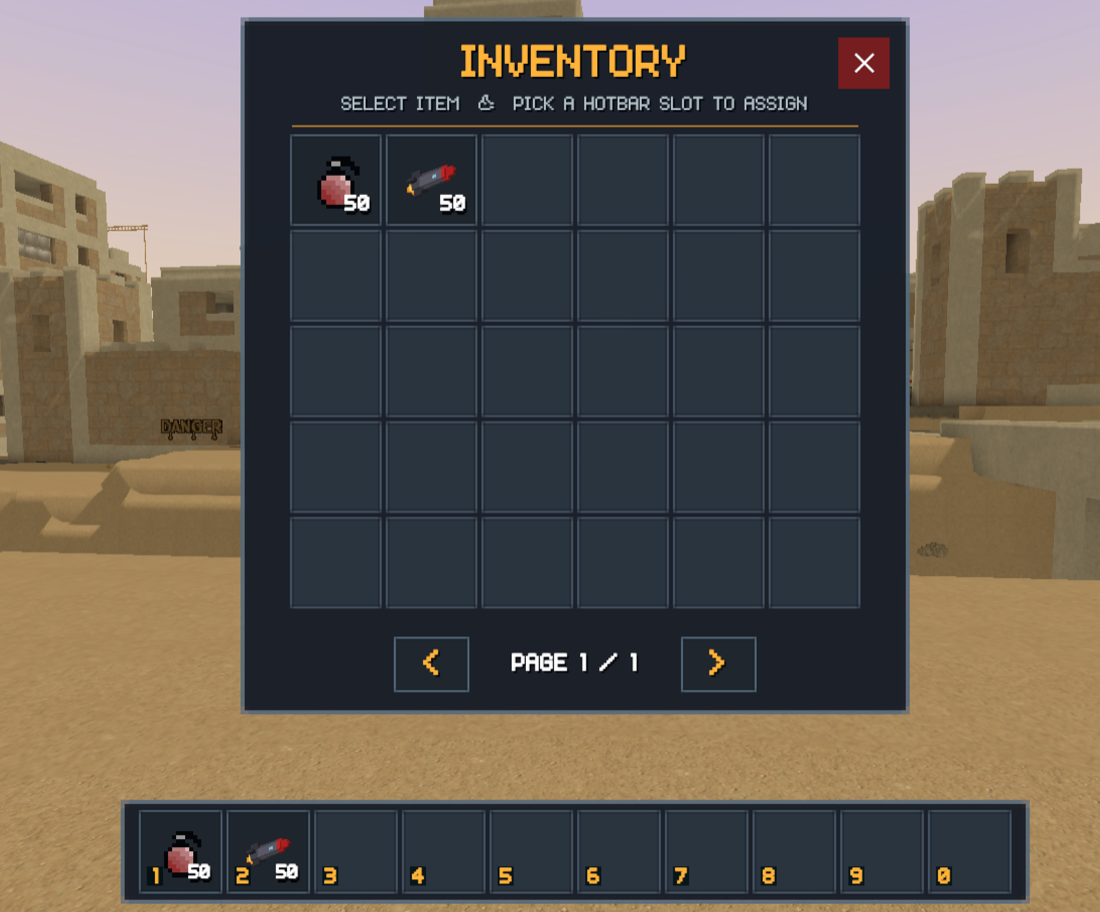
How it works
CombatZoneUIsubclassesVoxelPlayUIDefaultand overridesInitUI,ToggleInventoryVisibility,ToggleInitializationPanel,LateUpdateImplandIsInventoryVisible. It builds the hotbar row at runtime by reusing the base UI's item button template, so icons, counts and the selected-slot highlight match the rest of Voxel Play.- Number keys 1–0 select a hotbar slot; Tab opens a paged grid on top of the hotbar. To assign a weapon to a slot, click the hotbar slot to arm it (it prompts assign item to slot N), then click an inventory item to place it there. Clicking an item without arming a slot simply selects it.
- The loading screen is a separate prefab (
Combat Zone Loading Screen) assigned to the environment's Loading Screen > Prefab slot; it implements Voxel Play 4'sIVoxelPlayLoadingScreeninterface and is driven by the real initialization progress.CombatZoneUI'sToggleInitializationPaneloverride only reveals the hotbar once that screen is dismissed.
Resources and setup
Assets/VoxelCombatZone/Demos/UI/CombatZoneUI.cs- the UI script. It has no assembly definition so it compiles intoAssembly-CSharp; this is required to override the Voxel Play UI.Assets/VoxelCombatZone/Demos/UI/Combat Zone UI Canvas.prefab- a copy of the Voxel Play UI canvas with its root script swapped toCombatZoneUI. The demo scene points the Voxel Play environment's UI Canvas Prefab field at this prefab.- Inspector knobs tune the layout: hotbar slot count, slot size, spacing, bottom margin and slot numbers, plus the paged grid's columns and rows.
CombatZoneUI script and the Combat Zone UI Canvas prefab into your project, keep the script outside any assembly definition, and assign the prefab to the UI Canvas Prefab field of your Voxel Play environment.Suggest an improvement
Help us improve this documentation page.