How Generation Works
beginner conceptsVoxel Combat Zone · Quick Start
Voxel Combat Zone follows a two-stage Plan then Execute model.
1. Plan
From the seed and your settings, a deterministic planner lays out the whole city as pure data (no voxels yet): street centerlines, block and lot subdivision, the old-town disc, the perimeter wall with its gates and towers, building footprints and heights, the frontline seam, craters, power poles, cable spans and prop anchors. This plan is the single source of truth and is identical for every chunk.
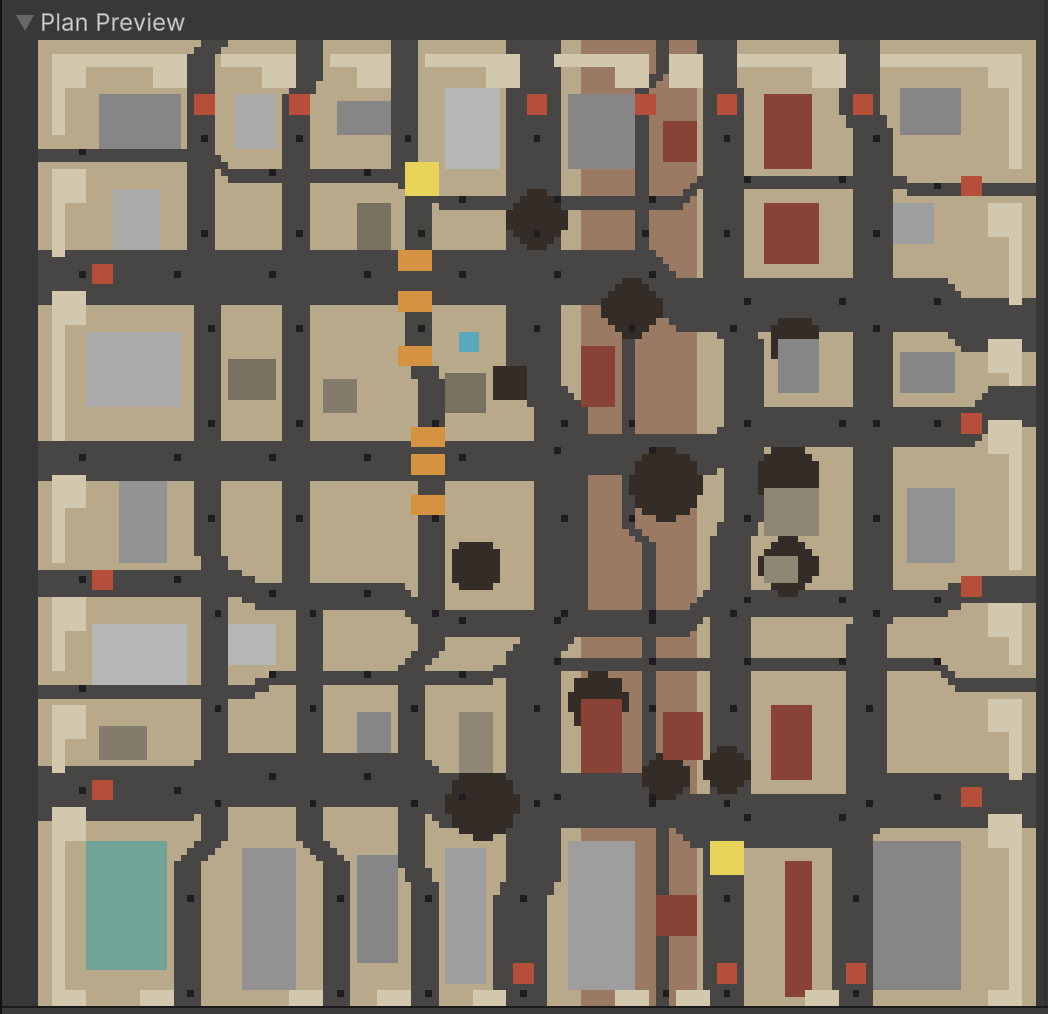
You can see the plan without entering Play mode: the Plan Preview minimap in the generator inspector renders the current seed's layout (streets, lots, buildings, craters, wall gates and the landmark) so you can iterate on the layout before generating a single voxel.
2. Execute
As Voxel Play creates each chunk, the generator sculpts only the part of the plan that intersects that chunk: terrain-fitted foundations, building shells and interiors, damage overlays, props, cables and scatter. This is the only Voxel Play-specific stage; the plan itself is engine-agnostic.
The three generators
The asset ships three detail generators. A world with a single district only needs the first; add the other two when you want several districts joined by roads and a dressed desert between them.
| Generator | Create menu | What it does | How many |
|---|---|---|---|
CombatZoneGenerator | World Play > Combat Zone Generator | One district: terrain fitting, streets and blocks, buildings and interiors, the perimeter wall with its gates and towers, the frontline seam, craters, cables, props and the river bridges where the widest streets leave the wall. | One per district. Each is self-contained and knows nothing about the others. There is no separate district count: the number of districts is the number of these entries. |
CityConnectorGenerator | World Play > City Connector Generator | Where the districts sit and the highways between them. It is the only generator aware that there are several: by default it places every district itself on dry, separated ground a road can reach (writing over each district's World Center), links them with a minimum spanning tree (optionally closing one loop), and lays a graded carriageway with shoulders, dashed centre line, cuttings, embankments and marker posts. Slip roads ramp down from the wall gates onto it, and its viaducts carry the road over rivers. | One for the whole world. |
CombatZoneDressingGenerator | World Play > Combat Zone Dressing Generator | The open desert between the districts: rock outcrops, weeds and trees. It reads each district's centre and zone size to stay out of them, so the cost is paid once however many districts there are and two districts can never scatter on top of each other. | One for the whole world. |
The order in the Detail Generators list matters only for what wins where two generators write the same voxel; the district, the highway and the dressing keep out of each other's way by design.
Roads and water
The highway follows the terrain within its slope budget and never lays tarmac straight across the water line. In a world with a single district the only crossings are the city's own bridges, built by CombatZoneGenerator where the widest streets leave the wall and controlled by the River Bridges setting, which needs a world with water. As soon as a CityConnectorGenerator is present it takes the crossings over: its Disable District Bridges option, on by default, switches the per-district bridges off and the highway spans the river on the Connector's own viaducts.
How it plugs into Voxel Play 4
The Combat Zone Generator is a Voxel Play 4 detail generator (a VoxelPlayDetailGenerator ScriptableObject). You add it to your world's Detail Generators list, and Voxel Play drives it through three lifecycle methods:
| Voxel Play calls | When | What Combat Zone does |
|---|---|---|
Init() | Once at startup, and again on every ReloadWorld. | Registers its voxel types with the environment (env.AddVoxelDefinitions), prepares building models (env.ModelFillInside), sets the shared fire/smoke look, and clears the cached plan. |
ExploreArea() | As the player moves into new chunks. | Builds the city plan once (lazily, the first time it runs) and returns. The plan is engine-agnostic data. |
AddDetail(chunk) | For every chunk Voxel Play creates. | Sculpts only the slice of the plan that intersects that chunk (foundations, shells, interiors, damage, props, cables). These detail voxels are protected: the terrain generator will not overwrite them. |
This is why the city streams in: the plan exists in full from the first chunk, but geometry is written chunk by chunk on the main thread as Voxel Play streams the world around the player. Larger Zone Size means more per-chunk sculpting and longer world-load.
Voxel Play APIs the generator relies on: env.AddVoxelDefinitions (register materials before meshing), env.GetTerrainHeight (fit foundations, craters and props to the ground), voxel writes and half-voxel MicroVoxelTextureStamp detail through the World Play Sculptor, env.ChunkRedraw after edits, and env.ReloadWorld for Regenerate. Fires and smoke reuse Voxel Play 4's own particle system through the environment's fire/smoke settings.
Internal code map
The package keeps planning and sculpting apart, mirroring the two stages above. If you open the source, this is how the pieces fit together:
- CombatZoneDirector.cs (
IWorldDirector) is the planner: from the seed and settings it produces theWorldPlanand nothing else. It has no Voxel Play dependency, so the layout is engine-agnostic and testable on its own. - WorldPlan.cs is the shared data model: streets, building footprints, the wall, craters, poles, cable spans, tagged props and the frontline seam, plus the
IsStreet/IsBuilding/InInteriorlookups. - CombatZoneGenerator.cs and its per-topic files do the sculpting, one concern each:
CombatZoneGenerator.Buildings.cs,CombatZoneGenerator.Cables.cs,CombatZoneGenerator.Fortifications.cs,CombatZoneGenerator.Props.cs,CombatZoneGenerator.Terrain.cs,CombatZoneGenerator.Vegetation.cs, with geometry primitives inCombatZoneGenerator.Shapes.csandCombatZonePalmShapes.cs. - Subsystems are reusable ops the generator calls:
BuildingGrammar.cs(facades, floors, stairwells),DamageOps.cs(pockmarks, breaches, collapses, craters) andGraffitiOps.cs/GraffitiCatalog.cs(texture-stamped decals). - Sculptor.cs (in the shared World Play core) is the only layer that writes to Voxel Play, so every subsystem places voxels and microvoxels through one path.
Because the plan is decoupled from the sculptor, you can read CurrentPlan for gameplay (see Scripting) or swap materials and settings without touching the layout logic.
From plan to chunks: anchoring and sculpting
The plan knows nothing about chunks. Two mechanisms bridge it to the streamed world: an anchor index built once in ExploreArea, and world-space sculpting in AddDetail. Together they explain how one call can build a whole multi-chunk structure.
ExploreArea: mapping the plan to trigger chunks
The plan is a 2D layout in voxel columns. On the first ExploreArea, the generator walks every plan element once and maps it into the world:
- it asks Voxel Play for the ground height under the element,
env.GetTerrainHeight(x, z)(this is exactly why the plan cannot be built inInit: the terrain is not queryable yet); - it finds the chunk that contains the element's ground position,
env.GetChunkPosition(x, Y, z); - it records the element's index under that chunk in an anchor dictionary.
Why here and not in Init? Every anchor calls env.GetTerrainHeight to sit its structure on the ground, and that only returns valid values once Voxel Play has built its heightmap and terrain generator. Init runs earlier, during environment setup, before they exist: at that point GetTerrainHeight returns 0, so the whole city would anchor to Y=0 instead of following the terrain, with no error to warn you. ExploreArea is the first callback that runs after the world is up, so heights are valid there, and its plan != null guard turns the build into a one-shot (it does nothing on every later call). Init is left for the terrain-independent setup that must happen early: registering VoxelDefinitions (required before meshing starts) and the fire/smoke configuration.
The result is a set of anchor dictionaries (Dictionary<chunk, List<int>>), one per category (buildings, wall segments, towers, props, poles, cables, craters). An anchor answers, in O(1): "when Voxel Play creates this chunk, which plan elements must be sculpted here?" Without it, every one of the thousands of AddDetail calls would have to scan the whole plan. Each structure is anchored to exactly one chunk, its ground chunk, because the empty chunks above it only load when the camera is near, while the ground chunk is always created first.
AddDetail: sculpting in world space, across chunks
AddDetail(chunk) looks that chunk up in each anchor dictionary and sculpts the elements it finds. The key point is that the sculptor does not write into the passed chunk's voxel array. It writes at absolute world coordinates through env.VoxelPlace(worldPositions, ...). A single AddDetail on a building's ground chunk therefore sculpts the entire building: upper floors land in the chunks above, foundations in the chunks below. The passed chunk is a trigger, not the write target.
This is the opposite of an idiomatic detail generator (vegetation, ores), which fills only the chunk it is handed. Combat Zone uses the chunk purely as a "which structures belong here" key and places their voxels wherever they fall.
Why allowNestedExecutions stays false
Writing a voxel into a chunk that does not exist yet force-creates it. That is what lets a structure spill into neighbouring chunks, but it raises a re-entrancy risk, and this is why the generator keeps allowNestedExecutions = false:
- With nesting enabled, force-creating a neighbour mid-sculpt would immediately re-enter
AddDetailon that neighbour while the current structure is only half-written, interleaving two sculpts that share the generator's reused scratch buffers and corrupting them. - With nesting disabled (the setting used), Voxel Play instead queues the force-created chunks and drains them after the current
AddDetailreturns, so calls never re-enter. As the source comment puts it: "Force-created chunks are re-dispatched by the engine; AddDetail never re-enters."
Combined with one-anchor-per-structure, this guarantees each structure is sculpted exactly once, atomically and in a deterministic order, no matter how many chunks its voxels touch.
Why it is built this way
A building with interiors, stairwells and several floors, or a crane, is a single coherent structure that crosses chunk boundaries. Sculpting it slice by slice would force every chunk to work out "which part of which structure am I?" and stitch geometry across the seams. Anchoring the whole structure to one reliably-loaded ground chunk and writing it in a single world-space pass is far simpler and keeps it coherent. The cost is that env.VoxelPlace plus force-creation is heavier than the chunk-local fast path, which is why a large Zone Size lengthens world-load and is felt on the main thread.
Deterministic per seed
The same seed and settings always produce the same city, on every machine and every run. Change the seed for a new city; change a setting to reshape this one. Because the plan is data, your own scripts can read it at runtime to place gameplay (see Scripting).
Terrain and water
The city fits your Voxel Play terrain: lots anchor to the ground height per corner with foundation blocks on slopes. When the world has a river, the widest streets that exit the wall get bridges with causeway approaches.
Suggest an improvement
Help us improve this documentation page.