Highlight Plus Manager
Highlight Plus for Unreal · Highlight Plus Manager
A Highlight Plus Manager is an actor that highlights other actors when the player points at them or gets near them. Search for Highlight Plus Manager in the Place Actors panel and drag it into the level. The position of the actor is not important.
Use one manager for each kind of actor, for example one for the items that the player can pick up and one for the enemies.
The settings of the Pointer Profile and of the Nearby Profile appear in the Pointer and Proximity sections, under the options of the manager. A change there also changes every actor that uses the same profile.
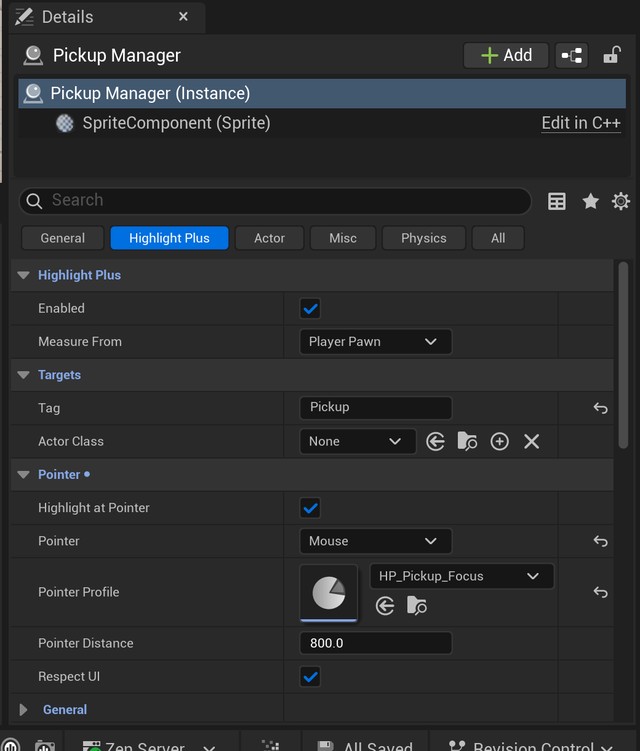
Highlight Plus
| Setting | Description |
|---|---|
| Enabled | Turns this manager on or off. |
| Measure From | The point the distances are measured from: the Player Pawn or the Camera. |
Targets
The actors that the manager can highlight.
| Setting | Description |
|---|---|
| Tag | Actors with this tag are highlighted. None accepts any tag. |
| Actor Class | Actors of this class are highlighted. None accepts any class. |
When a pointer or proximity profile is assigned, set a tag or a class. When no profile is assigned, the manager takes only the actors with a Highlight Plus component and uses the profile of each component.
Pointer
Highlights the actor under the pointer.
| Setting | Description |
|---|---|
| Highlight at Pointer | Enables the highlight of the actor under the pointer. |
| Pointer | Where the pointer is: Camera Center, for a crosshair, or Mouse, for the mouse cursor. |
| Pointer Profile | The look of the actor under the pointer. None takes only the actors with a Highlight Plus component. |
| Pointer Distance | The longest distance to the actor under the pointer, in cm. |
| Respect UI | Highlights nothing while an interface widget is under the pointer. |
Proximity
Highlights the actors near the player.
| Setting | Description |
|---|---|
| Highlight Nearby | Enables the highlight of the actors near the player. |
| Nearby Profile | The look of the actors near the player. None takes only the actors with a Highlight Plus component. |
| Nearby Distance | Actors closer than this distance are highlighted, in cm. |
| Nearby Fade Range | The last part of the distance where the effects fade out, in cm. With 0 the effects appear at once. |
| Only Nearest | Highlights only the nearest actor. |
| View Angle | Only the actors inside this angle in front of the player are highlighted, in degrees. 360 accepts every direction. |
An actor can be near the player and under the pointer at the same time. In that case it shows the pointer profile.
Functions and events
| Name | Description |
|---|---|
| Set Enabled | Turns the manager on or off. |
| Get Highlighted Actor | The actor highlighted by this manager: the one under the pointer, or else the nearest of the ones near the player. |
| Get Highlighted Actors | Every actor highlighted by this manager. |
| Refresh | Applies the settings again after you change them in the game. |
| On Highlight Start | Event called when a manager or a rule starts to highlight an actor. |
| On Highlight End | Event called when a manager or a rule stops highlighting an actor. |
Use Get Highlighted Actor to know which actor the player is pointing at, for example to pick it up when a key is pressed.
Suggest an improvement
Help us improve this documentation page.