Introduction
Highlight Plus for Unreal · Introduction
Highlight Plus for Unreal adds outline, glow, overlay, see-through and other highlight effects to any actor of a level. The effects are drawn in screen space, so you do not need to change your materials or your meshes.
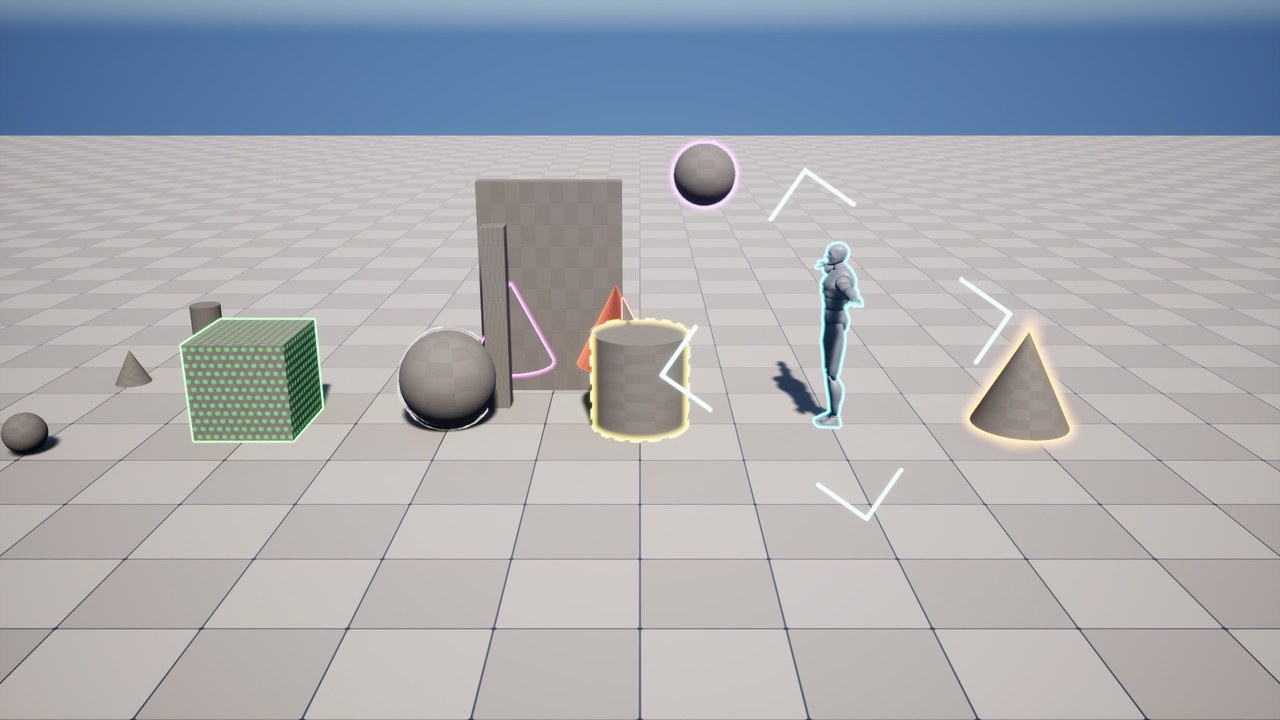
Key Features
- Outline: a line around the actor. It can be solid, dashed or stylized like a hand drawn line, with one color or a gradient.
- Outer Glow and Inner Glow: a soft light around the actor that can pulse or rise like an aura, and a color that covers the actor from its edge.
- Overlay: a color over the whole actor, with optional patterns of dots, lines or a grid.
- See-Through: shows the part of the actor that is hidden behind other objects.
- Focus: dims, desaturates and blurs the rest of the screen.
- Target FX: a mark that closes on the actor, with an arrow at the edge of the screen when the actor is out of the view.
- Hit FX: a flash on the actor when it is hit.
- Profiles: the look of the effects is an asset that many actors can share.
- Highlight Plus Manager: highlights the actors that the player points at or gets near, without any Blueprint.
- Blueprint nodes: every function is available in Blueprints and in C++.
What Is Included
| Highlight Plus Profile | A data asset that holds the look of the effects. |
| Highlight Plus | A component that highlights its actor with a profile. |
| Highlight Plus Blocker | A component that keeps the effects of other actors off the meshes of its actor. |
| Highlight Plus Manager | An actor that highlights other actors by pointer or by proximity. |
| Blueprint nodes | Nodes to highlight any actor, to flash it and to start its target mark. |
| Demo level | A level that shows every effect, with its profiles. It is in the content of the plugin. |
Requirements
| Engine version | Unreal Engine 5.6, 5.7 and 5.8. |
| Development platforms | Windows and macOS. |
| Custom Depth-Stencil Pass | The effects need the Enabled with Stencil mode. The plugin enables this mode by itself when an actor is highlighted. |
Next Steps
- Installation: add the plugin to your project.
- Quick Start: highlight your first actor.
- Profile Settings: the description of every setting of a profile.
- Components: the Highlight Plus and Highlight Plus Blocker components.
- Highlight Plus Manager: highlight by pointer or by proximity.
- Blueprint Nodes: control the effects from your game logic.
- Demo: the demo level and how to use it.
Was this page helpful?
Suggest an improvement
Help us improve this documentation page.