Blueprint Nodes
Highlight Plus for Unreal · Blueprint Nodes
The nodes are in the Highlight Plus category. They work on any actor, with or without a Highlight Plus component.
Highlight
| Node | Description |
|---|---|
| Highlight Actor | Shows the effects of a profile on an actor. Include sets if the attached actors are covered too. |
| Stop Highlight | Removes the effects from an actor. |
| Stop All Highlights | Removes the effects from every actor of the world. |
| Is Highlighted | True when the actor is highlighted. |
| Get Highlight Profile | The profile the actor is highlighted with, or none when it is not highlighted. |
Hit FX
A flash on the actor, for example when it receives damage. The actor does not need to be highlighted.
| Node | Description |
|---|---|
| Hit FX | Flashes the actor with the Hit FX settings of a profile. Without a profile it uses the profile the actor is highlighted with, or the default settings. Location is used by the Local mode. |
| Hit FX Custom | Flashes the actor with the color, fade out time, intensity and mode that you pass to the node. |
| Hit FX At Location | Flashes the part of the actor around a location. The flash grows from the location up to the radius. The location is in world space and the radius is in cm. |
Other nodes
| Node | Description |
|---|---|
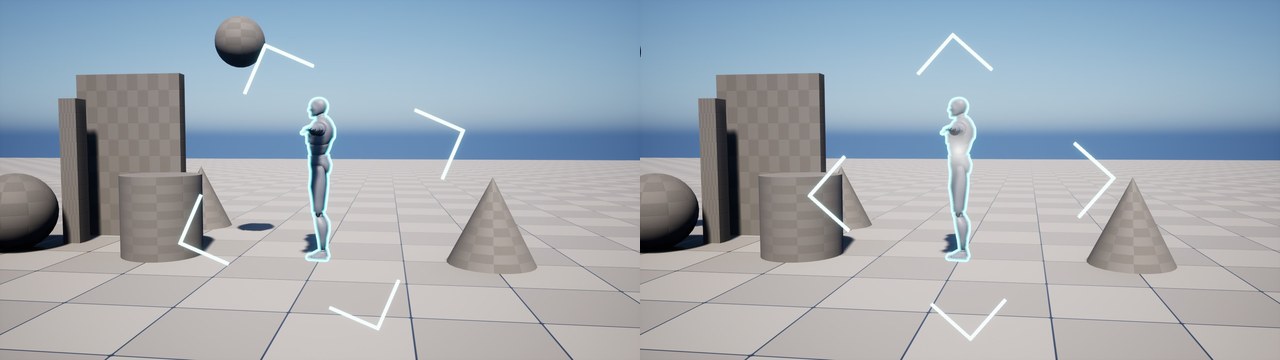
| Target FX | Starts again the target mark of a highlighted actor whose profile has Target FX enabled. |
| Set Blocker | Makes the meshes of an actor keep the effects of other actors off them, or stops it. It does the same as the Highlight Plus Blocker component. |
Rules
These nodes control the rules while the game runs. The rules are explained in Project Settings. The nodes are in the Highlight Plus > Rules category.
| Node | Description |
|---|---|
| Add Rule | Adds a rule while the game runs, for example to highlight the items of a mission while the mission lasts. It returns a number, the rule id, that the other nodes use. A rule with a profile needs a tag or a class. |
| Remove Rule | Removes a rule added with Add Rule. Pass the id that Add Rule returned. |
| Get Rule Actors | Gives the actors that a rule highlights now. Pass the id that Add Rule returned. |
| Set Rules Enabled | Turns all the rules off or on, for example while a menu or a cinematic is shown. |
| Set Focused Actor | Use it when your game already knows which actor the player is looking at. Pass that actor and the crosshair rules use it. The plugin then stops its own trace. |
| Reset Focused Actor | The crosshair rules use the trace of the plugin again. |
C++
The same functions are in the class UHighlightPlusLibrary, in the header HighlightPlusLibrary.h. The rule functions are in the class UHighlightPlusSubsystem, in the header HighlightPlusSubsystem.h. Add the module HighlightPlus to the dependencies of your module to use them.
Was this page helpful?
Suggest an improvement
Help us improve this documentation page.