Parameters
intermediate conceptsVolumetric Lights 2 (URP) · Core Concepts
Volumetric Light Parameters
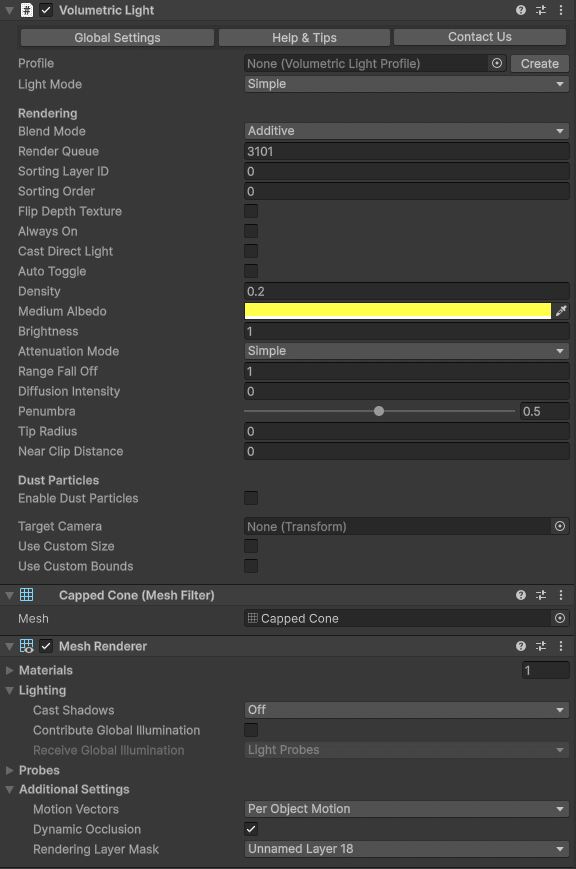
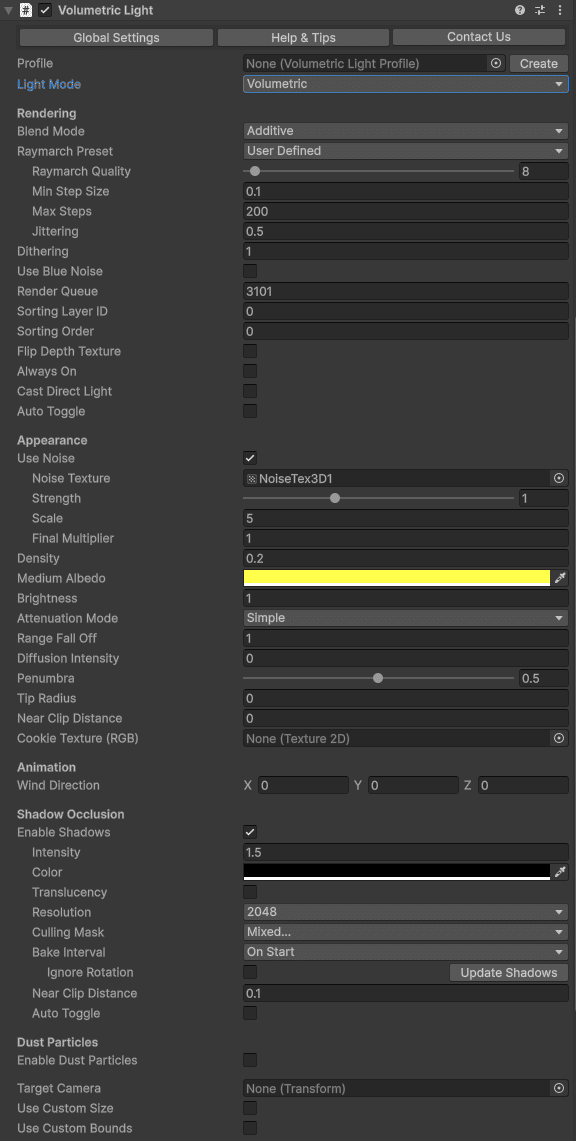
The VolumetricLight component exposes all settings in the Inspector, organized into collapsible sections. There are two light modes:
- Simple - optimized, fewer options, best for mobile or background lights.
- Volumetric - full ray-marching with all features enabled.
Rendering
| Parameter | Description | Default |
|---|---|---|
| Blend Mode | Blend (alpha blending) or Additive (adds light intensity to existing pixels). | Blend |
| Raymarch Quality | Number of ray-marching iterations. Lower values improve performance. | Default preset |
| Min Step Size | Minimum step size along the ray. Increase for better performance at the cost of accuracy. | 0.1 |
| Max Steps | Maximum number of samples per ray. Caps performance cost for long rays. | 200 |
| Dithering | Reduces color banding in the volumetric effect. | 1 |
| Jittering | Randomizes ray start position to reduce banding. Especially useful when shadows are enabled. | 0.5 |
| Use Blue Noise | Uses blue noise instead of white noise for jittering. Slightly more expensive but reduces moire patterns. | Off |
| Render Queue | Controls rendering order in the transparent queue. | 3100 |
| Sorting Layer / Order | Additional render order control. | Default / 0 |
| Flip Depth Texture | Enable if the effect clips incorrectly due to an inverted depth buffer (can happen when MSAA and HDR are both off). | Off |
| Always On | Forces the volumetric effect to render even if the Unity light is disabled. Useful for fake volumetric lights with zero lighting overhead. | Off |
Appearance
| Parameter | Description | Default |
|---|---|---|
| Use Noise | Enables 3D noise texture for a heterogeneous medium (clouds, dust). | Off |
| Noise Texture | 3D noise texture. A default is provided in Resources/Textures. Additional options in Demo/NoiseTextures. | Built-in |
| Density | Medium density inside the volume. Higher values produce a more opaque effect. Very low density over a large range increases ray-march cost. | 0.3 |
| Brightness | Overall intensity multiplier for the volumetric effect. | 1 |
| Brightness Mode | Whether the volumetric brightness depends on the Unity light intensity. Relative multiplies Brightness by the light intensity, so changing the light intensity also changes the volumetric effect. Absolute ignores the light intensity, so a profile produces the same volumetric appearance on lights with different intensities. | Relative |
| Diffusion Intensity | Controls the intensity of forward scattering when looking toward the light source. | 0 |
| Distance Falloff | Controls how the effect fades toward the edges of the volume. | 1 |
| Border | Additional edge falloff (no effect on point lights). | 0.1 |
Dust Particles
| Parameter | Description | Default |
|---|---|---|
| Enable Dust Particles | Adds floating dust motes inside the light volume using a particle system with a volume-aware shader. | Off |
| Dust Brightness | Brightness multiplier for dust particles. | 0.5 |
| Dust Min/Max Size | Size range of individual dust particles. | 0.01 / 0.03 |
| Dust Wind Speed | Wind speed affecting particle drift. | 0 |
Shadow Occlusion
| Parameter | Description | Default |
|---|---|---|
| Enable Shadows | Enables volumetric shadow occlusion inside the light volume. | Off |
| Shadow Intensity | Amount of light cancelled by shadows (0 = no shadow, 1 = full). | 0.7 |
| Shadow Resolution | Shadow map resolution. Lower values are faster; usually 256–512 is sufficient. | 256 |
| Shadow Culling Mask | Which layers cast shadows. By default excludes TransparentFX (where volumetric lights live), unless Include Transparent is enabled. | Everything |
| Include Transparent | When enabled, transparent objects and 2D sprites also occlude the volumetric light. The shadow-occlusion depth capture then spans the transparent render queue and the built-in TransparentFX layer is no longer auto-excluded from the Culling Mask. The occluder material must write depth (have a DepthOnly pass). | Off |
| Shadow Bake Interval | OnStart: bakes once. EveryFrame: updates each frame. Moving/rotating the light auto-rebakes regardless. | EveryFrame |
| Shadow Bake Mode (Point) | Half-sphere (faster, oriented to camera) or Cubemap (full 360°, option to spread across frames). | Half-sphere |
| Shadow Orientation (Point) | Fixed direction or auto-orient to player camera. | Camera |
| Shadow Near Distance | Near clip plane for the shadow camera. Skips objects too close to the light. | 0.01 |
| Translucency | Captures colors of transparent objects (requires VolumetricLightsTranslucency script on those objects). See Translucency & Shadow Maps. | Off |
When Shadow Bake Interval is set to OnStart, call
ScheduleShadowCapture() on the VolumetricLight component to force a refresh at any time.
Enabling Shadow Occlusion automatically adds a
VolumetricLightsDepthRenderer to your URP Asset’s Renderer List. It is used only by a hidden shadow camera and does not affect your main camera. See Setup - Behind the scenes for details.
Other Settings
| Parameter | Description | Default |
|---|---|---|
| Use Custom Size | Overrides the Unity light’s range or size for the volumetric effect only. | Off |
| Use Custom Bounds | Clips the volumetric effect to a custom box. Handles appear in the Scene view for adjustment. | Off |
| Auto Toggle | Distance-based LOD: dims and deactivates the effect beyond configurable distances. | Off |
| Distance Start Dimming | Distance at which the effect begins fading out. | 70 |
| Distance Deactivation | Distance at which the effect is fully disabled. | 100 |
Was this page helpful?
Suggest an improvement
Help us improve this documentation page.