Parameters
intermediate conceptsAll parameters live in the Kronnect / Global Dirt volume override, grouped in the same sections you see in the inspector. Every value is a standard volume parameter, so it blends between volumes and can be animated or scripted. The same override is what a Zone or a Global Dirt Object carries when you give one its own profile.
Header
| Clear Effects | Turns off every effect override in this volume, keeping Intensity, Quality, Show In Scene View, Limit To Zones and the four layer masks. Compare is cleared with the rest. It asks for confirmation. |
| Quick Settings | Applies the Grimy example setup: dirt led, some dust, a little moss. |
| Online Resources & Support | Links to the support portal, the website and the support email. |
| Dry / Grimy / Abandoned | Three complete starting looks, from light settled dust to heavy dirt with moss taking over. Metal Aging and Rust join in on the deferred paths only. Each one sets Intensity to 1 and fills dirt, dust, moss and the bottom gradient. Every slider stays editable afterwards. |
A section header shows a small dot when something inside it is enabled, so you can tell at a glance what a collapsed section is contributing.
General Settings
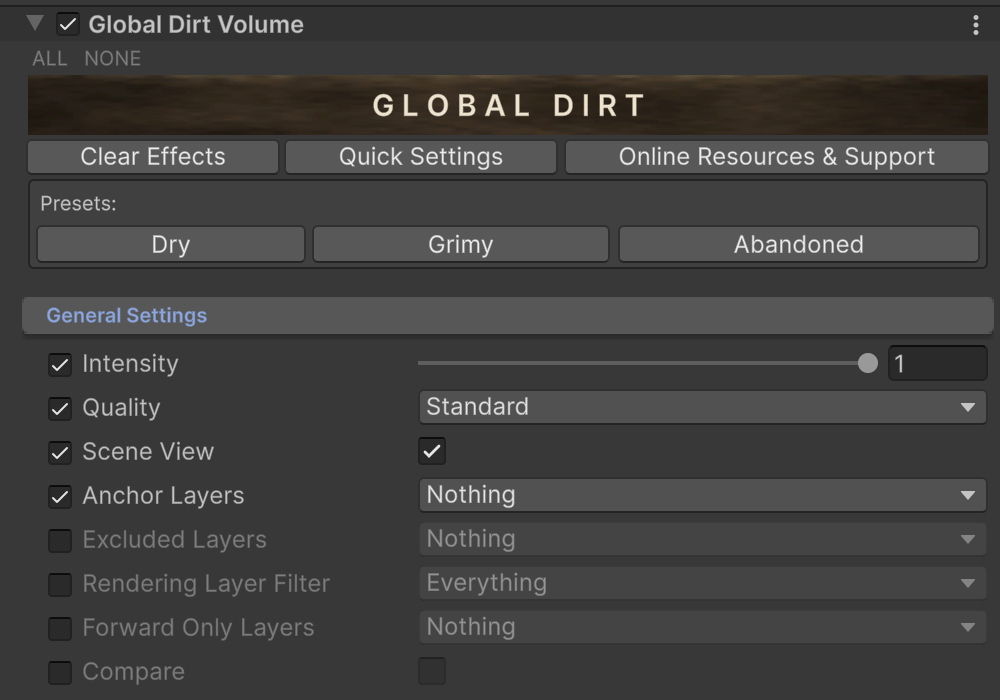
| Intensity | The master slider, a plain multiplier over the whole effect. Zero turns it off at no cost: nothing renders at all. |
| Quality | Fast, Standard or High. It sets how much detail the procedural patterns carry (one, two or three octaves). Fast also drops the moss parallax, and the rust run-off is capped at 3, 6 or 12 steps by the level. High adds a stochastic breakup to the moss and rust surfaces so their texture never reads as a repeated tile, shapes the moss into cushions (a ragged front, sparse patches where the carpet thins to its crowns, and shaded gaps between the clumps). Micro Shadows apply on Standard and High. |
| Show In Scene View | Apply the effect in the Scene view too, so you can work with it on. |
| Limit To Zones | Apply the effect only inside Global Dirt Zones. Outside every zone the scene stays clean, and with no zone in view nothing is rendered. A renderer with its own Global Dirt Object profile keeps it anywhere. |
| Anchor Layers | Objects on these layers keep their dirt attached when they move. See Moving Objects & Exclusions. |
| Excluded Layers | Objects on these layers stay clean. |
| Rendering Layer Filter | Extra filter for Excluded Layers, based on each renderer's Rendering Layer. An object must match both masks to be excluded. |
| Forward Only Layers | Layers with materials that skip the GBuffer, like unlit shaders, receive the effect in an extra pass. Leave empty for no extra cost. The inspector only shows this field when it detects a Deferred renderer, because that is the only path where it does anything. |
| Compare | Split view with and without the effect. |
| Same Side | Show both views next to each other instead of splitting the image in place. On Deferred it works in the Game view only, with a hidden camera that renders the scene a second time. |
| Angle (°) | Angle of the split line. Scripting uses radians. |
| Panning | Slides the two side by side views. |
| Line Width | Width of the split line, when Same Side is off. |
Color Variation
Meter-scale patches that shift hue, saturation or brightness, so two objects with the same material stop looking identical. It adds no deposit and works on the surface as it is: the kind of unevenness that comes from age, batches of paint or weathering.
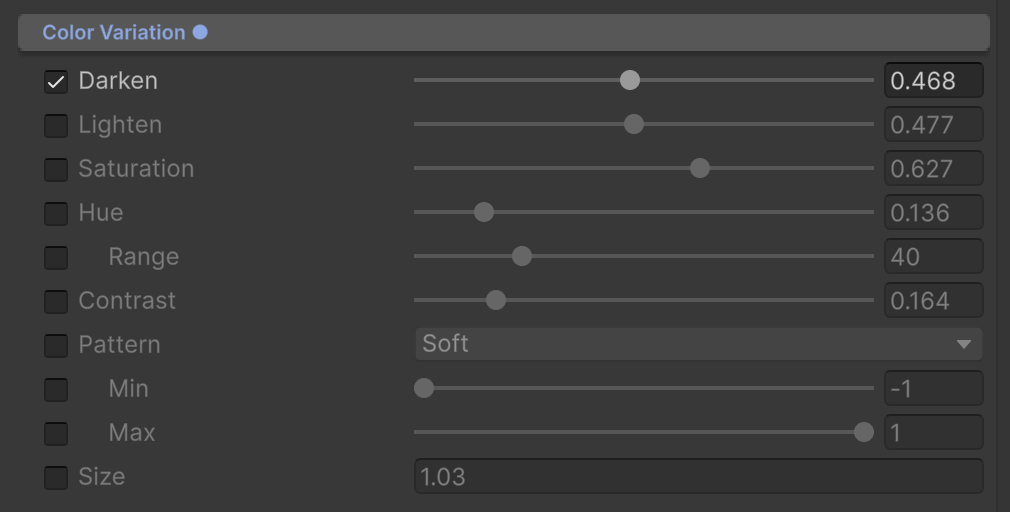
| Darken / Lighten | Varies brightness down or up from area to area. |
| Saturation | Varies color richness from area to area. |
| Hue | Shifts the color slightly from area to area. |
| Range | Largest hue shift, in degrees. Only shown when Hue is enabled. |
| Contrast | Sharpens the variation. |
| Pattern | Shape of the variation: Soft, Cellular, Speckled or Directional. Directional makes bands, Cellular costs the most. |
| Min / Max | Range the pattern spans, from -1 to 1. -1 applies the full Darken and the full Hue and Saturation shift to one side, 1 the full Lighten and the full shift to the other. The default, -1 to 1, darkens some areas and lightens others. 0 to 1 only lightens, and -1 to -0.4 always darkens with variation on top. With Min equal to Max the look is uniform: Contrast and Size have no effect and the pattern is skipped, which is cheaper. Version 1.4 or later. |
| Size | Size of the variation areas, in meters. |
Surface Deposits
Three materials that sit on top of your surfaces: dirt, dust and moss. They share the same grammar. Strength is how visible the deposit is and it gates the work: at zero the deposit is skipped entirely. Coverage is how much surface it reaches, and it is independent, so you can have strong dirt in a few spots or faint dirt everywhere. Size is the size of the patches in meters. Seed picks another deterministic arrangement and Offset slides that deposit through the scene in meters, until the patches land where you want them. None of them comes from a tile: they are placed procedurally in world space, so there is no visible grid to break.
Every Size field, here and in Metal Surfaces and Color Variation, is a plain numeric field with a minimum and no ceiling, so a large outdoor scene can use patches as big as it needs.
The details that cost the most per pixel carry their own Max Distance, in meters from the camera plane: dirt Thickness, dust settling, moss Relief and Micro Shadows, and rust Relief. Past that distance the detail is not computed and the pixel keeps the rest of the effect. Dust fades over the last 30% of its range, the others switch off. See Performance Tips.
Dirt
Stuck material. At full Strength it builds into a crust: chunks with torn edges and gaps that show the stained surface underneath.
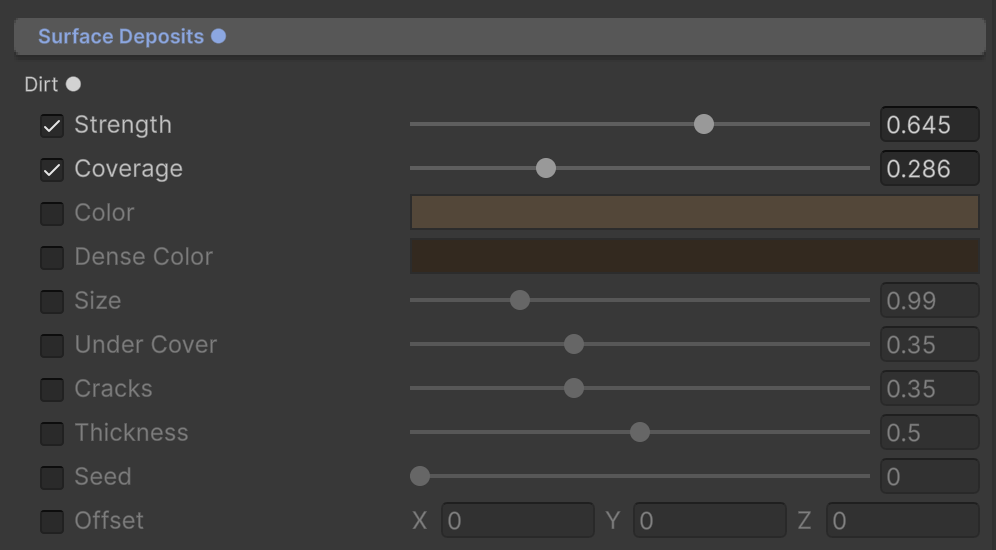
| Strength / Coverage / Size | The shared controls above. |
| Color / Dense Color | Two tints, mixed by how much dirt there is: Color where it is thin, Dense Color where it piles up. |
| Under Cover | Goes from -1 to 1. Positive values put more dirt on surfaces that do not face the sky, out of the rain, and at 1 nothing survives on surfaces that face up. Negative values do the opposite and favor the surfaces that face the sky, where dirt settles; at -1 walls stay clean, the smear that runs down from them included. |
| Cracks | Dirt prefers cracks. At 1 it only stays in them. |
| Thickness | Thickness of the built up grime. The crust gets rims and gaps that catch the light. Deferred only. |
| Thickness Max Distance | Thickness is computed only closer than this, in meters from the camera plane. Default 15. Editable when Thickness is above zero. |
| Seed / Offset | Arrangement and world position of the dirt pattern. |
Dust
Loose material that falls and settles, so it collects on whatever faces up.
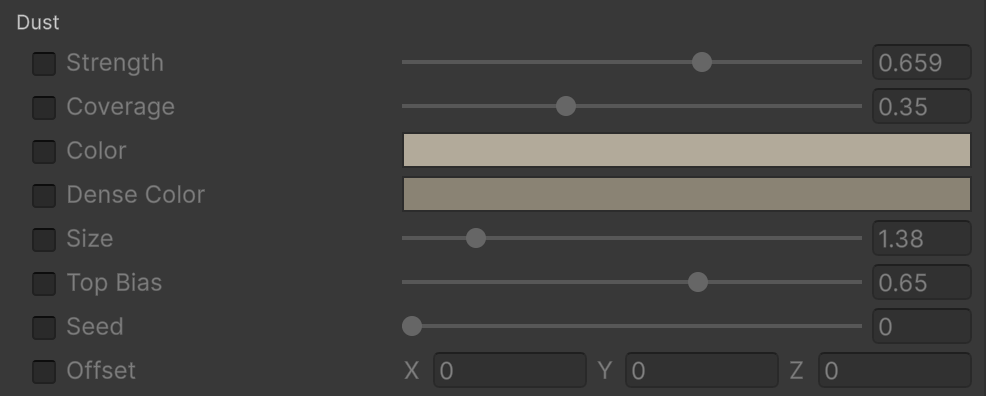
| Strength / Coverage / Size | The shared controls above. |
| Color / Dense Color | Color where the dust is thin, Dense Color where it settles thick. |
| Top Bias | Dust prefers surfaces that face up. At 1 nothing settles on walls. |
| Settle Max Distance | Dust softens the edges it settles on only closer than this, in meters from the camera plane, fading out over the last 30% of the range. Default 15. |
| Cracks | Dust prefers cracks. At 1 it only settles in them. Cracks come from the material occlusion map (Deferred) or the side away from the sun. |
| Seed / Offset | Arrangement and world position of the dust pattern. |
Moss
Organic growth. Moss is a real deposit: it uses a bundled, world anchored PBR surface set for its color, roughness and relief, so it reads as a material and not as a tint.
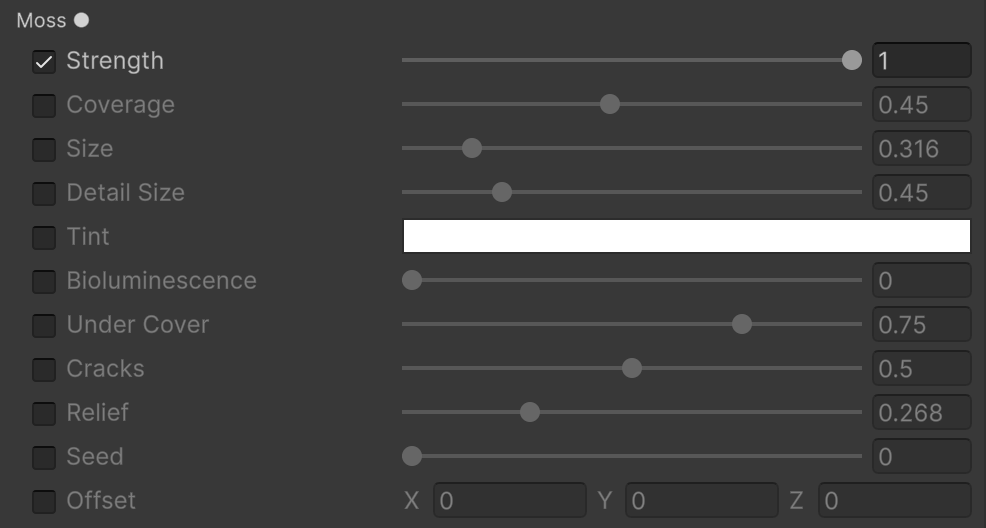
| Strength / Coverage | The shared controls above. |
| Size | Size of the moss patches in the scene, in meters. This is distribution. |
| Detail Size | World size of one tile of the bundled moss surface, in meters. This changes the texture sampling only, not where the moss grows. |
| Tint | Plain multiplier over the sampled moss color. White leaves the texture unchanged. |
| Bioluminescence | Light emitted by the moss itself, up to 8. Zero keeps the moss unlit. Above zero a Glow Color field appears: it is HDR, so it can drive Bloom without lighting the surfaces around it. |
| Under Cover | Moss prefers surfaces that do not face the sky. At 1 nothing grows on surfaces that face up. |
| Cracks | Moss prefers cracks. At 1 it only grows in them. |
| Relief | Height relief and fine normal strength, taken from the packed height channel of the surface set. The parallax that shifts the surface works on Standard and High quality; the bent normal that lights the moss as a raised material needs Deferred. |
| Relief Max Distance | Relief is computed only closer than this, in meters from the camera plane. Default 12. Editable when Relief is above zero. |
| Micro Shadows | Height of the clumps for the short shadows they cast on the gaps behind them, under the main light. Standard and High quality only, and at zero the moss lights as it did before. |
| Shadow Max Distance | Micro shadows are computed only closer than this, in meters from the camera plane. Default 5. Editable when Micro Shadows is above zero. |
| Seed / Offset | Arrangement and world position of the moss pattern. |
Metal Surfaces
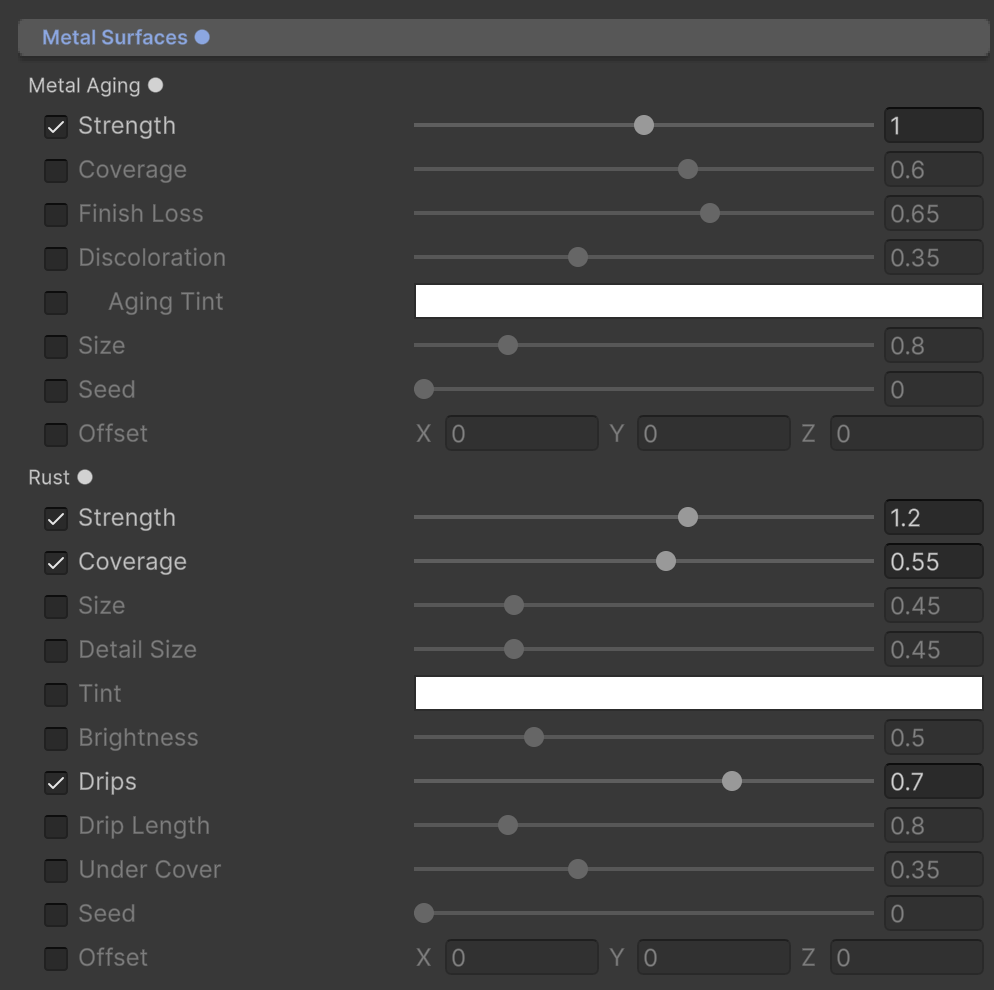
Two effects meant for metal, and the only ones that look at what a surface is made of. On Deferred they read the metalness from the GBuffer, so they only form on metal, and Deferred+ also rebuilds the reflections of the aged metal. On Forward and Forward+ there is no metalness to read, so they reach every surface as an approximation. Both take Strength up to 2: metalness multiplies the value before the mask saturates, so Strength 2 lets a metallic 0.5 surface reach the full effect. They are independent and compose: aging dulls the metal, rust corrodes it, and rust is drawn over the aged substrate.
Metal Aging
Metal that has simply gotten old: it loses its polish and shifts color, without any deposit or relief on top. The original metal response and the surface normal are kept, so it still reads as metal, just tired.
| Strength | How strongly the aging shows, from 0 to 2, multiplied by metalness. Non metallic surfaces never age. |
| Coverage | How far the aged areas spread across eligible metallic surfaces. |
| Finish Loss | How much polish and smoothness the aged areas lose. |
| Discoloration | Amount of darkening, desaturation and tint, all relative to the original material. At zero only the finish changes. |
| Aging Tint | Color multiplier for aged metal. White gives a neutral darkened, desaturated age; tinting is optional. Only shown when Discoloration is enabled. |
| Size | Size of the broad aged patches in the scene, in meters. |
| Seed / Offset | Arrangement and world position of the aging pattern. |
Rust
Pitted corrosion with its own bundled PBR surface set, and optional run-off below the patches. Full rust replaces the metal response with opaque corrosion color, dielectric specular and low smoothness.
| Strength | Rust strength on metallic surfaces, from 0 to 2, multiplied by metalness. Non metallic surfaces never rust. |
| Coverage | How far rust spreads across eligible surfaces. |
| Size | Size of the rust patches in the scene, in meters. |
| Detail Size | World size of one tile of the bundled rust surface, in meters. Sampling only, not distribution. |
| Relief | Strength of the rust surface relief, taken from the normal map of the bundled set. At zero the map is not sampled at all. |
| Relief Max Distance | Relief is computed only closer than this, in meters from the camera plane. Default 5. Editable when Relief is above zero. |
| Tint | Plain multiplier over the sampled rust color. White leaves the texture unchanged. |
| Brightness | Brightness of the rust color only. The bundled set reads as heavy corrosion near 0.5; lower values read darker still. |
| Drips | Amount of narrow, gravity aligned run-off hanging from the rust above it. Every streak starts where the stain is actually visible, and the slider decides how many columns stay wet as the run gets away from its source, so zero is nothing and it grows from there. Walls only: surfaces that face up or down get no run-off. |
| Drip Length | How far the run-off reaches below its source, in meters. It also sets how many steps the shader walks up the surface to find that source, capped by Quality at 3, 6 or 12. |
| Under Cover | Rust favors the sheltered side where water sits. At 1 nothing forms on surfaces that face up. |
| Seed / Offset | Arrangement and world position of the rust pattern. The run-off follows the offset. |
Artistic Choices
Two broad strokes that age a scene without adding any material on top.
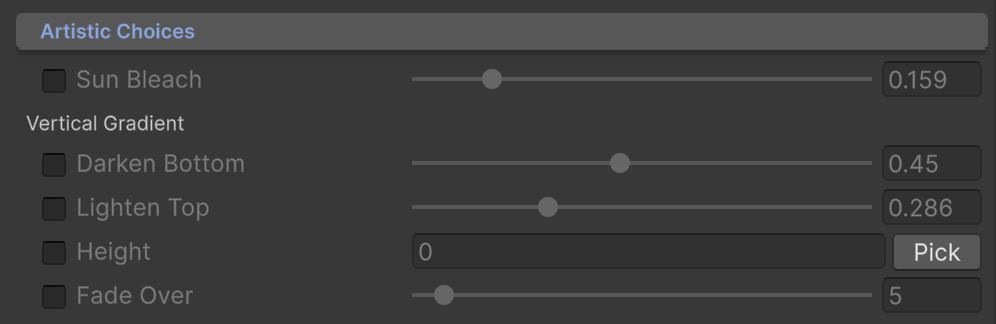
| Sun Bleach | Lightens and washes out surfaces that face the sun, like paint aged by daylight. |
| Darken Bottom | Darkens walls near the ground. |
| Lighten Top | Lightens walls toward the top. |
| Height | World height where the gradient starts. The Pick button grabs the height of the selected object or the Scene view pivot. |
| Fade Over | Meters over which the gradient fades. |
Placing an effect where you want it
The deposits are procedural on purpose, so there is no mask to paint and no tile to hide. You steer them with four things instead, and between them you can put the aging exactly where a shot needs it:
| Seed | Picks another deterministic arrangement of that effect. Same seed, same result, every run and on every machine. |
| Offset | Slides that effect through the scene, in meters, on the three axes. Use it to move a patch off a doorway or onto the base of a wall. Rust run-off follows its offset. |
| Under Cover / Cracks / Top Bias | Decide where an effect is allowed to be at all, from the shape of the surface rather than from a position. |
| Zones and object profiles | Customize the effect inside an area or on one object: exclude it, or give it its own profile. See Zones and Object Settings. |
Seeds and offsets are per effect, so you can slide the dirt without moving the moss.
Suggest an improvement
Help us improve this documentation page.