This page documents every parameter available in the Edge Fusion Custom Pass Inspector for HDRP. Parameters are organized into the same groups shown in the component.
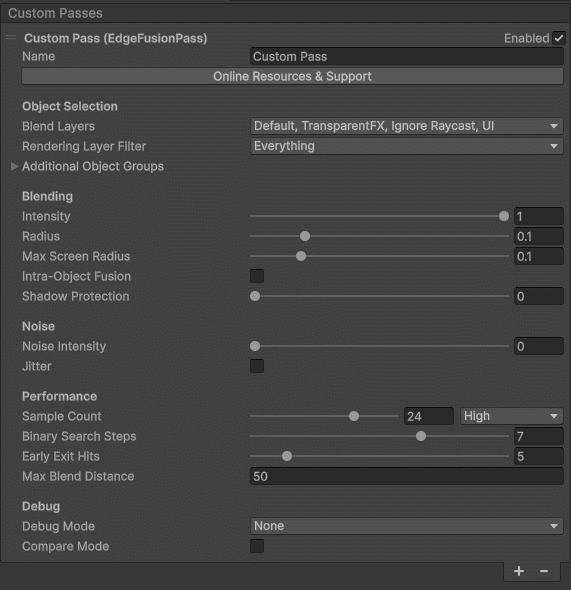
Object Selection
| Parameter | Description |
|---|
| Blend Layers | Layer mask that defines which objects participate in edge fusion blending. |
| Rendering Layer Filter | Optional HDRP Rendering Layer Filter to further refine single-sided object selection within the Blend Layers. |
| Blend With Others | When some layers are excluded, Edge Fusion fills the empty pixels of the Object ID texture using the camera depth, so selected objects can also blend with the excluded geometry (for example a terrain excluded from Blend Layers). Enabled by default. |
Additional Object Groups
Double-Sided Objects
For meshes that render both front and back faces (walls, panels, etc.).
| Parameter | Description |
|---|
| Double-Sided Layers | Include objects with visible front and back faces in the object-ID texture. The main Blend Layers renders only front faces (cull back); this option captures both sides. |
| Rendering Layer Filter | Rendering Layer Filter exclusive to double-sided objects for finer selection control. |
Special Shader Objects
For objects using custom vertex shaders (displacement, animated vegetation, etc.).
| Parameter | Description |
|---|
| Special Group Layers | Select objects with custom vertex shaders (deformation, displacement, animated vertices) to include them in edge blending. |
| Rendering Layer Filter | Rendering Layer Filter for the special shader group. |
Blending Settings
| Parameter | Description |
|---|
| Intensity | Overall intensity of the edge fusion effect (0–1). |
| Radius | Default blur radius in world units (meters). |
| Max Screen Radius | Upper boundary for the on-screen radius to prevent excessive blur at close range. |
| Intra-Object Fusion | Enable fusion of edges within a single object based on normal discontinuities. |
| Normal Threshold | Angle threshold for detecting intra-object edges. |
| Concavity Test | When enabled, only concave edges are fused. |
| Per-Object | When enabled, only GameObjects with the EdgeFusionObject script receive intra-fusion. |
| Shadow Protection | Threshold for shadow detection. Prevents the blending from adding lighting over shadowed areas. |
Noise
| Parameter | Description |
|---|
| Noise Intensity | Strength of the 3D noise texture applied to blending (0–1). Adds organic variation to the blend boundary. |
| Jitter | Randomizes sampling to improve edge coverage and reduce banding patterns. TAA-friendly - enable Temporal Anti-Aliasing on the camera for smooth results. |
Performance
| Parameter | Description |
|---|
| Sample Count | Number of samples for edge detection (higher = better quality, more GPU cost). |
| Binary Search Steps | Refinement steps when locating the nearest edge boundary. |
| Early Exit Hits | Stop searching after N nearest-edge hits. Lower values improve performance. |
| Max Blend Distance | Maximum camera distance at which the effect is applied. Saves GPU on distant objects. |
Debug
| Parameter | Description |
|---|
| Debug Mode | Visualize intermediate buffers (object IDs, edge detection, blend mask) for troubleshooting. |
| Compare Mode | Split-screen comparison showing the scene with and without edge fusion. |
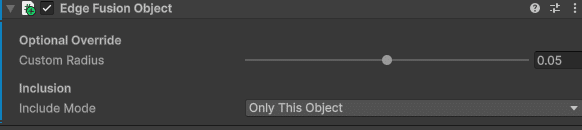
Edge Fusion Object (Per-Object Component)
Attach the EdgeFusionObject script to any GameObject to override global settings for that object.
| Parameter | Description |
|---|
| Override Radius | Enable a custom blend radius for this object. |
| Custom Radius | Per-object blend radius in meters. Set to 0 to disable blending entirely on this object. |
| Override Object ID | Assign a custom Object ID. Objects sharing the same ID are treated as one for inter-object detection. |
| Disallow Intra-Object Fusion | Disable intra-object fusion for this object while keeping inter-object fusion active. |