Safe Delete
beginner conceptsEditor Doctor Pro · Core Concepts
Safe Delete
Safe Delete lists assets that nothing in your project references — and lets you remove them safely. The window contract is simple: anything you see in the list deletes safely. EDP only surfaces assets it can prove are unreachable from every build root, every prefab, every scene and every addressable group. Reachable, referenced or protected assets never make it to the public surface.
Open it from Window > Kronnect > Editor Doctor Pro > Safe Delete.
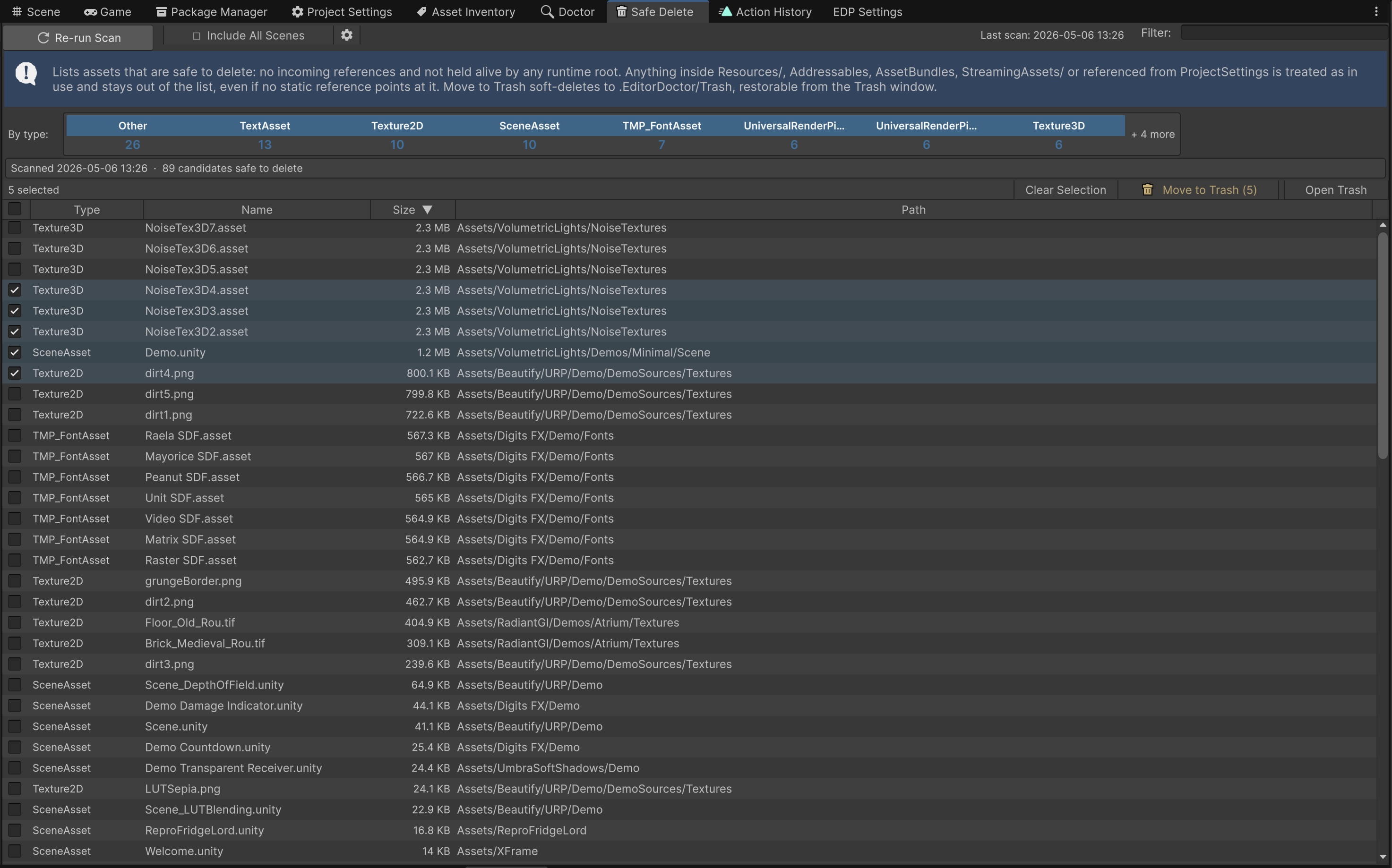
.EditorDoctor/Trash/ with full restore. Every move is journaled in Action History so you can revert the whole batch in one click. The Trash is gitignored and lives outside your project's Assets tree.
How the list is built
The scanner builds an index of every asset under Assets/ and walks dependencies in three layers:
- Build roots. Every reachable entry point gets walked:
- Scenes in Build Settings and in any active Build Profile.
- Every asset under any
Resources/folder. - Every Addressables group entry.
- Every asset bundle assignment.
- Every reference from
ProjectSettings/(default skybox, lightmap settings, render pipeline asset, graphics settings, etc.). - Everything under
Assets/StreamingAssets/. - Currently open scenes in the editor (so unsaved work is never proposed for deletion).
- Optional conservative pass: every
.unityfile in the project, even scenes not in Build Settings - controlled by the Include All Scenes header toggle.
- Reachability. Starting from build roots, the scanner walks the AssetDatabase dependency graph. Anything reachable from any root is excluded from the candidate list.
- Protection rules. Path-based and pattern-based protections that override reachability. Defaults include
Editor/,Editor Default Resources/,Packages/, every.cs/.asmdef/.asmref/.dll/.unitypackage, and common code-generation suffixes (.g.asset,.gen.asset). User-configurable protection patterns are reserved for a future Settings UI; v1.0 ships the hardcoded defaults above.
The remaining set - assets that are not reachable, not referenced and not protected - is the candidate list. Every other asset shows up under one of three internal categories that you can surface from the filter bar for review: Shipped (reachable from a build root), Referenced (in the graph but not from a build root) and Protected (matches a protection rule).
Render pipeline coverage
The build-root walker handles the full set of URP and HDRP entry points: UniversalRenderPipelineAsset, ScriptableRendererData, Renderer Features, Volume Profiles, Volume Components, custom render passes. Built-in render pipeline scenes are walked through the standard Lighting Settings and graphics settings paths. In practice this means no false positives: if an asset shows up here, it really is safe to remove.
Window layout
- Header - Re-run Scan primary button, Include All Scenes toggle (folds in scenes not in Build Settings; conservative scope), candidate count, total reclaimable disk size.
- Filter bar - text search, type chip (Material / Shader / Prefab / Texture / Audio / Mesh / Scene / Other), category toggle (Candidates / Shipped / Referenced / Protected).
- Candidates table - one row per asset with Type, Name, Size, Path. Click to ping the asset, double-click to open it. Protected rows show a tooltip explaining why they are protected.
- Action toolbar - Move to Trash for the current selection, Open Trash to view / restore previously deleted entries, Open Action History, Export CSV for review.
Moving to Trash
Select one or more rows and click Move to Trash. A confirmation dialog lists every asset that will be moved, grouped by type, with the total disk reclaimed. On accept, EDP:
- Moves each asset and its
.metasidecar into.EditorDoctor/Trash/entries/<entryId>/(manifest at.EditorDoctor/Trash/manifest.json). - If the meta-move fails for any reason, EDP rolls the asset move back so you never end up with a half-moved asset.
- Records the whole batch as a single Action History entry, with a per-item list of original paths.
- Refreshes the AssetDatabase.
Restoring
There are two equivalent ways to undo a Safe Delete:
- From Action History - open the entry and click Undo. EDP restores every item in the batch atomically. Partial restore is supported: if you restore a single item from the Trash window, the Action History entry stays open and the remaining items can still be undone later.
- From the Trash window - browse every soft-deleted entry by date and restore items individually. Conflicts (something else now occupies the original path) are surfaced row-by-row so you can decide.
Either way, the asset and its meta sidecar go back to their original path with the original GUID intact - every scene, prefab and serialized reference that used to point at them keeps working.
Suggest an improvement
Help us improve this documentation page.