Liquid Material
Chemistry Flasks for Unreal · Liquid Material
The liquid of each flask uses a material instance of one of the two master materials in ChemistryFlasks/Materials. M_LiquidVolume provides all the options, and M_LiquidVolumeSimple is a simplified version of the effect. The shader uses raymarching to simulate the light as it crosses the foam layer and the liquid.
The Materials Folder
| M_LiquidVolume | The master liquid material with all the options. |
| M_LiquidVolumeSimple | The simplified master liquid material. |
| MI_LiquidVolume / MI_LiquidVolumeSImple | Material instances of the two master materials. Duplicate them, or create new instances from the master materials, and assign them to the liquid of your flasks. |
| M_Glass_Generic | The glass material used by the flasks of the blueprints. |
| M_LiquidMask | An unlit material used by the mask of the blueprints. It generates the custom depth that the liquid raymarcher uses to compute the distance to the back of the flask. |
| T_Noise2D3D / T_NoiseTex256 | Noise textures used by the liquid raymarcher. Do not modify or replace T_Noise2D3D, because it contains specific values that some functions of the raymarcher need. |
In a material instance of M_LiquidVolume, the parameters appear in three groups.
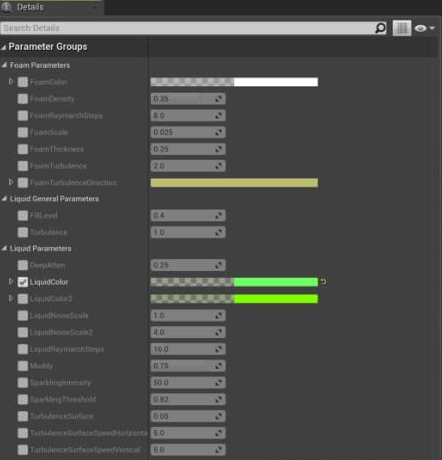
Foam Parameters
| FoamColor | The overall color and transparency of the foam. |
| FoamDensity | The density of the value sampled from the foam noise texture. |
| FoamRaymarchSteps | The number of samples used by the raymarcher for the foam. Keep a low value when possible, because the foam usually does not need many steps. |
| FoamScale | The scale of the foam noise texture. |
| FoamThickness | The height of the foam layer. |
| FoamTurbulence | The speed of the foam animation. |
| FoamTurbulenceDirection | The direction of the foam animation. Only the X and Y values are used, because the foam only moves horizontally. |
Liquid General Parameters
| FillLevel | From 0 (empty) to 1 (full). |
| Turbulence | A global multiplier of all the turbulence options. Use it to animate the whole liquid with a single value. A value of 0 stops the animation of the liquid and the foam. |
Liquid Parameters
| DeepAtten | Makes the liquid darker at the bottom of the flask. |
| LiquidColor / LiquidColor2 | The two liquid colors that are blended. Try different transparency (alpha) values for different results. |
| Muddy | The murkiness of the liquid, that is, the amount of coarse noise visible in it. A low value makes the liquid more uniform. |
| LiquidNoiseScale / LiquidNoiseScale2 | The scales used to sample the noise textures. |
| LiquidRaymarchSteps | The number of samples used by the raymarcher for the liquid. A low number of steps runs faster but is less accurate. |
| SparklingIntensity | The brightness of the sparkles or bubbles inside the liquid. |
| SparklingThreshold | How many sparkles or bubbles are visible. Higher values show fewer. |
| TurbulenceSurface | The intensity of the turbulence on the surface of the liquid. |
| TurbulenceSurfaceSpeedHorizontal / TurbulenceSurfaceSpeedVertical | Additional settings for the displacement caused by the turbulence animation of the liquid. |
M_LiquidVolumeSimple
The simplified material has four parameters, without groups: FillLevel, FoamColor, LiquidColor and LiquidColor2. They work as described above.
Was this page helpful?
Suggest an improvement
Help us improve this documentation page.