Parameters
Beautify for Unreal · Parameters
All the settings are parameters of the M_Beautify material. You change them in a material instance, where they appear in the groups shown below. The parameters marked as a switch turn a feature on or off.
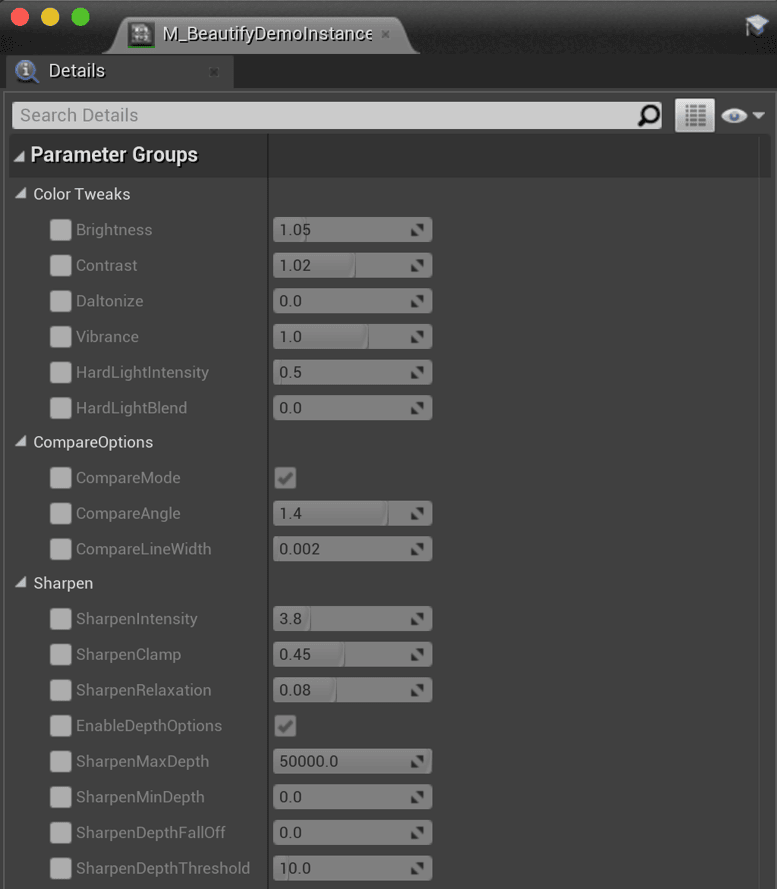
Sharpen
| SharpenIntensity | General multiplier of the sharpen effect. |
| SharpenClamp | The maximum sharpen amount applied to a single pixel, whatever the intensity or the other settings. |
| SharpenRelaxation | Makes the sharpen effect subtler around pixels with high contrast. Reduce this value to remove ghosting and to protect thin edges, bright areas, and fine drawings or wires over a flat surface. |
| EnableDepthOptions | Switch. Enables the depth options below. |
| SharpenMinDepth / SharpenMaxDepth | The sharpen effect is applied only within this range of distances to the camera. Pixels outside the range are not affected. |
| SharpenDepthFallOff | Makes the transition softer at the minimum and maximum limits. |
| SharpenDepthThreshold | Reduces the sharpen effect where the depth difference around a pixel exceeds this value. Use it to prevent artifacts around geometry edges, wires and thin objects. |
Color Tweaks
| Vibrance | Improves pixel color depending on its saturation. Pixels with low saturation receive more color than pixels with high saturation. |
| Daltonize | Accentuates the primary red, green and blue colors to compensate protanomaly (red deficiency), deuteranomaly (green deficiency) and tritanomaly (blue deficiency). It does not shift the hue, so it does not help with complete red, green or blue color blindness. The result varies from person to person, so enable it on user demand, for example with a separate material instance. |
| Brightness / Contrast | A brightness and contrast operator integrated in Beautify, so no additional post-processing material is needed for them. |
| HardLightIntensity | Multiplies the color before the hard light operator is applied. |
| HardLightBlend | Blends the result of the hard light operator with the original image. The hard light operator combines a multiply and a screen blend, depending on the brightness of the pixel. |
Vignette
| EnableVignetting | Switch. Darkens the borders of the image like a photographic vignette. |
| VignetteOuterRing / VignetteInnerRing | The start and end radius of the vignette gradient. |
| VignetteAspectRatio | A value of 1 gives a perfect circle. Other values stretch the vignette. |
| VignetteTintColor | The tint color of the vignette. |
| VignetteBlink | Increasing this value closes the vignette, in the same way as eyelids. |
| VignetteFadeOut | Fades the image out to the vignette tint color. |
Dithering
| DitherStrength | Intensity of the dithering applied to the image. Dithering reduces banding, especially in dark areas and in the sky. |
CompareOptions
| CompareMode | Switch. Shows a side by side view of the scene with and without the effect. |
| CompareAngle | Angle of the separator line. |
| CompareLineWidth | Width of the separator line. |
Was this page helpful?
Suggest an improvement
Help us improve this documentation page.