Volumetric Light Parameters
This page documents every parameter available on the Volumetric Light component. The component supports two light modes - Simple (fast, simplified) and Volumetric (full ray-marched). Some parameters are only available in Volumetric mode.
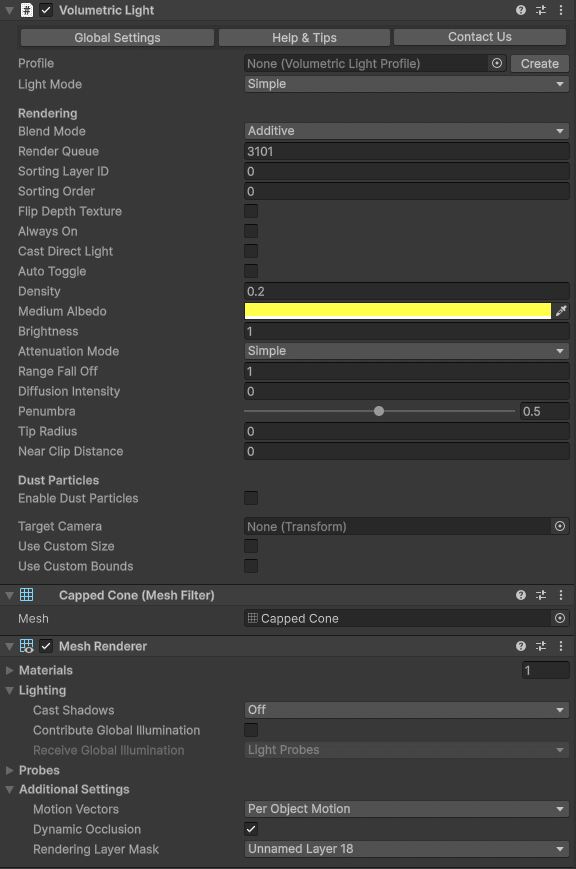
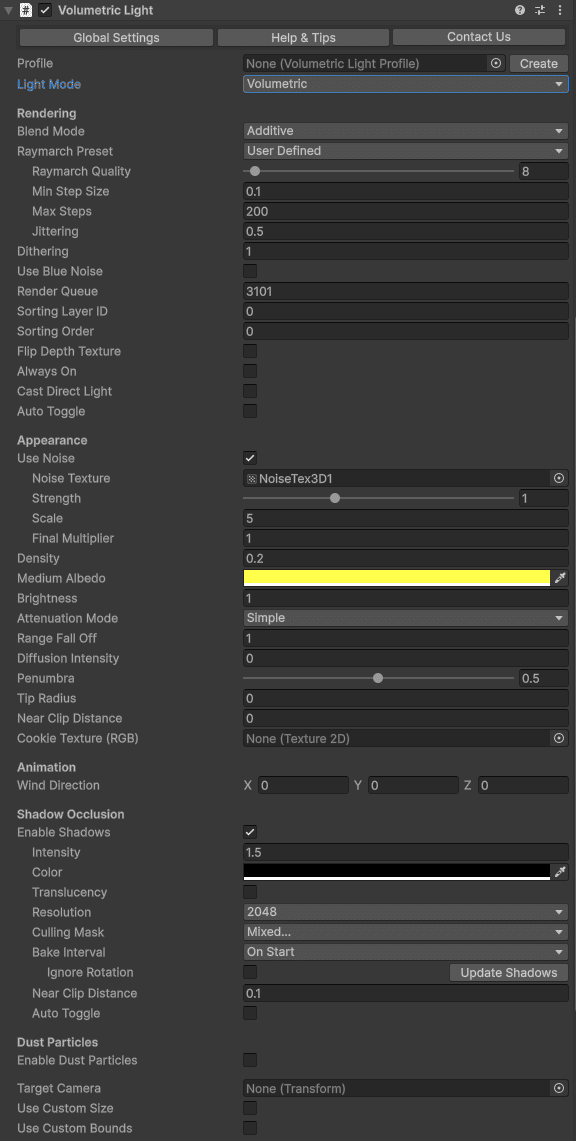
General
| Parameter | Description | Default |
|---|
| Light Mode | Choose between Simple (lightweight) or Volumetric (full featured). | Volumetric |
| Show Global Settings | Opens the Volumetric Lights Post Process component on the camera for global downscaling and blur settings. | - |
| Profile | Optional ScriptableObject profile for saving/loading settings. Create via Create > Volumetric Light Profile. | None |
| Always On | Forces the volumetric effect to remain visible even when the Unity Light component is disabled. Useful for "fake" volumetric lights with zero lighting cost. | Off |
Rendering
| Parameter | Description | Default |
|---|
| Blend Mode | How the effect composites with the scene. Additive adds light intensity; Blend uses traditional alpha blending. | Additive |
| Raymarch Preset | Quality preset: Default, Faster, EvenFaster, LightSpeed, or UserDefined for manual control. | Default |
| Raymarch Quality | Number of samples along each ray (1–256). Only used when preset is UserDefined. Lower values improve performance. | - |
| Min Step Size | Minimum distance between ray samples. Increase to improve performance at the cost of accuracy. | - |
| Max Steps | Maximum number of samples per ray. Caps the work done by rays that traverse large volumes. | - |
| Dithering | Reduces color banding in smooth gradients. | 0 |
| Jittering | Adds randomness to ray start positions to reduce banding artifacts. Especially useful when shadows are enabled. | 0 |
| Use Blue Noise | Replaces white noise jittering with blue noise for a more uniform distribution. Adds one extra texture fetch. | Off |
| Render Queue | Controls rendering order within the transparent queue. | 3000 |
| Sorting Layer / Order | Additional sorting controls for the transparent-queue volumetric mesh. | Default / 0 |
Appearance
| Parameter | Description | Default |
|---|
| Density | Fog thickness inside the light volume. Higher values produce opaquer fog. Very low density in a large volume can increase ray-march iterations. | 0.2 |
| Medium Albedo | Color of the scattering medium. | White |
| Brightness | Overall intensity multiplier for the volumetric effect. | 1.0 |
| Brightness Mode | Whether the volumetric brightness depends on the Unity light intensity. Relative multiplies Brightness by the light intensity, so changing the light intensity also changes the volumetric effect. Absolute ignores the light intensity, so a profile produces the same volumetric appearance on lights with different intensities. | Relative |
| Penumbra | Soft edge amount (0–1). Controls how gradually the light fades at cone edges. | - |
| Distance Falloff | Controls how quickly the effect fades at the light range boundary. | - |
| Border | Controls edge softness of the volume boundary. Has no effect on point lights. | - |
| Diffusion Intensity | Controls the intensity of light scattering when looking directly toward the light source through the medium. | 0 |
Noise
| Parameter | Description | Default |
|---|
| Use Noise | Enables 3D noise for organic, non-uniform fog instead of a homogeneous medium. | Off |
| Noise Texture | 3D noise texture used for variation. Default provided in Resources/Textures. Additional textures available in Demo/NoiseTextures. | Built-in |
| Noise Strength | Intensity of the noise effect (0–3). | 1.0 |
| Noise Scale | Scale of the 3D noise texture. Larger values produce finer detail. | 1.0 |
| Noise Final Multiplier | Final multiplier applied to the noise output. | 1.0 |
| Wind Direction | Direction and speed of noise animation, simulating wind movement through the volume. | (0, 0, 0) |
Dust Particles
| Parameter | Description | Default |
|---|
| Enable Dust Particles | Activates floating dust particles inside the light volume using a custom particle shader that respects volume geometry. | Off |
| Dust Brightness | Brightness multiplier for the dust particles. | 0.5 |
| Dust Min Size | Minimum particle size. | - |
| Dust Max Size | Maximum particle size. | - |
| Dust Wind Speed | Wind speed that affects dust particle movement. | 0 |
Shadow Occlusion
| Parameter | Description | Default |
|---|
| Enable Shadows | Activates shadow mapping for the volumetric light. | Off |
| Shadow Intensity | Amount of light cancelled by shadows (0–1). | 0.7 |
| Shadow Resolution | Shadow map texture resolution (32–4096). Use the smallest size that gives acceptable results. | 256 |
| Shadow Culling Mask | Layer mask that determines which objects cast shadows. Exclude unnecessary layers for better performance. | Everything |
| Shadow Bake Interval | OnStart - captures once at startup (fastest). EveryFrame - captures each frame (required for moving occluders). Shadow maps auto-refresh when the light moves or rotates. | EveryFrame |
| Shadow Bake Mode | Point lights only. Choose between half-sphere (faster) or cubemap (360° coverage). Cubemap can spread rendering across multiple frames. | Half-sphere |
| Shadow Orientation | Point lights only. Orientation for the half-sphere capture: fixed direction or auto-orient toward the player camera. | Auto |
| Shadow Near Distance | Near clip plane of the shadow capture camera. Use to skip objects too close to the light source. | 0.1 |
| Use Default RT Format | When enabled, uses a default render texture format for shadows. Disable to use a single depth buffer (slightly faster but can conflict with shaders using Grab Pass). | On |
| Translucency | Captures colors of transparent objects that have the Volumetric Lights Translucency script. See Shadows & Translucency. | Off |
When Shadow Bake Interval is set to OnStart, you can force a shadow update at any time by calling ScheduleShadowCapture() on the VolumetricLight component.
Attenuation
| Parameter | Description | Default |
|---|
| Attenuation Mode | Simple - linear falloff. Quadratic - physically-based inverse-square law falloff with configurable coefficients. | Simple |
| Constant Coefficient | Constant term in the quadratic attenuation formula. | 1.0 |
| Linear Coefficient | Linear term in the quadratic attenuation formula. | 0 |
| Quadratic Coefficient | Quadratic term in the quadratic attenuation formula. | 1.0 |
Spot Light Options
| Parameter | Description | Default |
|---|
| Tip Radius | Radius of the spotlight tip. 0 creates a point; values > 0 create a truncated cone. | 0 |
| Near Clip Distance | Near clip distance to prevent artifacts close to the light source. | 0.01 |
| Cookie Texture | Optional 2D texture projected through the light volume for patterned light effects. | None |
Auto-Toggle (LOD)
| Parameter | Description | Default |
|---|
| Auto Toggle | Enables distance-based automatic fading and deactivation for performance. | Off |
| Distance Start Dimming | Distance from the camera at which the light begins fading out. | - |
| Distance Deactivation | Distance from the camera at which the volumetric effect is fully disabled. | - |
Other Settings
| Parameter | Description | Default |
|---|
| Use Custom Size | Overrides the Unity Light's range or size values with custom ones. | Off |
| Use Custom Bounds | Enables custom bounding box to clip the volumetric effect. Adjust the box handles in the Scene View to confine the effect to specific areas. | Off |