Introduction
Sun Flares for Unreal · Introduction
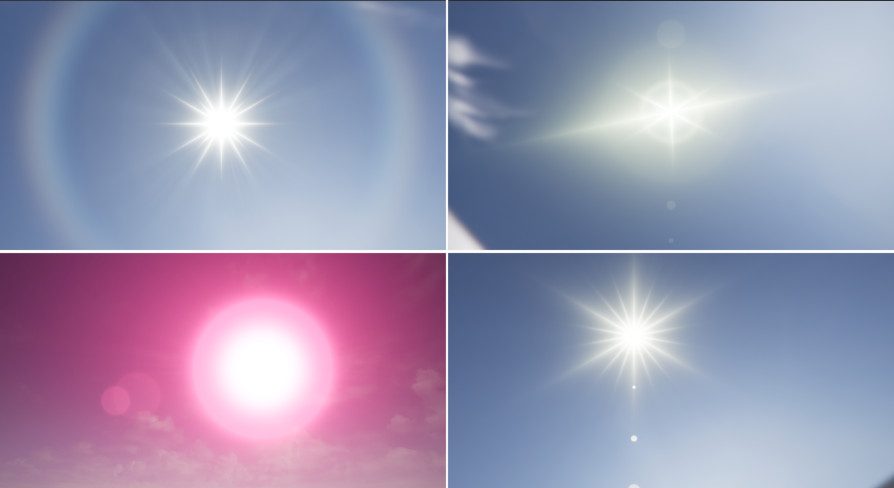
Sun Flares for Unreal is a procedural post-processing material for Unreal Engine that renders realistic lens flares for the sun. It runs entirely on the GPU, renders all its features in a single pass, and does not use C++ code or blueprints.
Key Features
- Sun disk with adjustable size and intensity.
- Two sets of corona rays, each with its own number of rays, length, spread, angle and intensity.
- Light diffraction rays with animation.
- Four ghosts with configurable size, brightness and offset, in four shapes: circular, pentagon, hexagon and octagon.
- Halo with chromatic aberration.
- Depth occlusion: the flare fades when scene geometry covers the sun.
- View direction attenuation: the flare fades as the camera turns away from the sun.
- Cloud occlusion: an option to dim the flare when a cloud covers the sun.
What Is Included
The package adds a SunFlares folder to the Content folder of your project.
| Resources/PostProcessingMaterial | Four master post-processing materials, one for each ghost shape: SunFlares (circular ghosts), SunFlaresPentagon, SunFlaresHexagon and SunFlaresOctogon. They share the same parameters. The folder also contains the flareNoise texture and the SampleSceneDepthUV material function used by the materials. |
| Resources/FlaresExamples | Eight preconfigured flares, ready to use: Artistic1, Natural1, Natural2, RedGiant, SciFi1, SciFi2, SciFi3 and SciFi4. All of them are material instances of the SunFlares material. |
| Demo | The Demo map, with the material instance SunFlaresDemo applied to the sun. |
Requirements
| Engine versions | Unreal Engine 4.25 to 5.7, as listed on Fab for version 2.1.1 |
| Target platforms | Windows, Mac and Linux, as listed on Fab |
| Code | None. The package contains only content: materials, a texture and a demo map. |
The Fab listing always shows the engine versions supported by the current version of the package.
Next Steps
- Installation: add the pack to your project from Fab.
- Quick Start: add a flare to your level.
- Parameters: the description of every setting.
- FAQ: answers to common questions.
Was this page helpful?
Suggest an improvement
Help us improve this documentation page.