Transparency Support
intermediate tasksVolumetric Lights 2 (URP) · Common Tasks
Transparency Support
Volumetric Lights relies on the depth buffer to determine object positions. Since transparent objects do not write to the depth buffer, they can be overdrawn by the volumetric effect. There are two solutions.
Option A — Adjust Render Queues
Set the volumetric light’s Render Queue to a value lower than your transparent objects (transparent queue starts at 3000). This ensures the volumetric effect renders before transparent objects regardless of scene position.
Note: If you are using the Volumetric Lights Render Feature (composition blur), changing the render queue in the volumetric light inspector has no effect. Instead, change the Render Event in the Render Feature inspector.
Option B — Depth Pre-Pass Render Feature
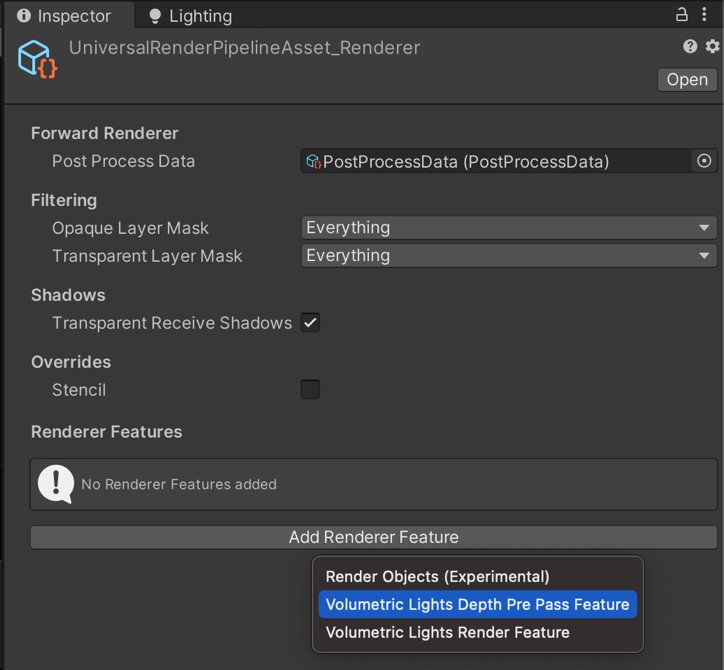
Add the Volumetric Light Depth Pre-Pass Render Feature to your URP Renderer for more precise control.
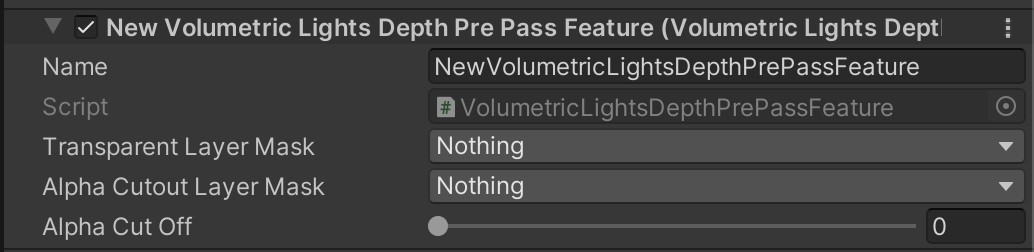
Depth Pre-Pass Settings
| Parameter | Description | Default |
|---|---|---|
| Transparent Layer Mask | Which layers contain transparent objects to include in the depth pre-pass. | Nothing |
| Alpha Cutout Layer Mask | Layers with semi-transparent objects. Only solid parts are included. This option can be expensive. | Nothing |
Was this page helpful?
Suggest an improvement
Help us improve this documentation page.