Parameters
intermediate conceptsVolumetric Lights 2 (URP) · Core Concepts
Volumetric Light Parameters
The VolumetricLight component exposes all settings in the Inspector, organized into collapsible sections. There are two light modes:
- Simple — optimized, fewer options, best for mobile or background lights.
- Volumetric — full ray-marching with all features enabled.
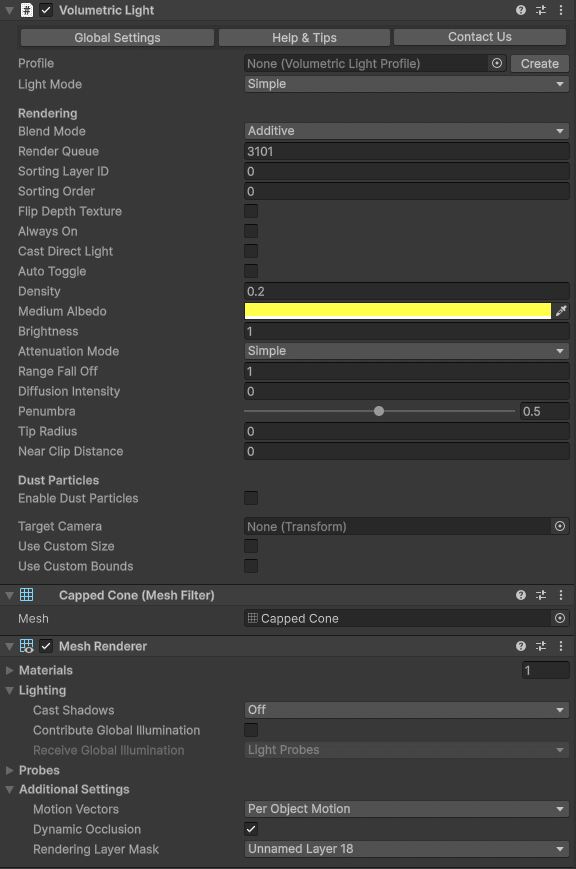
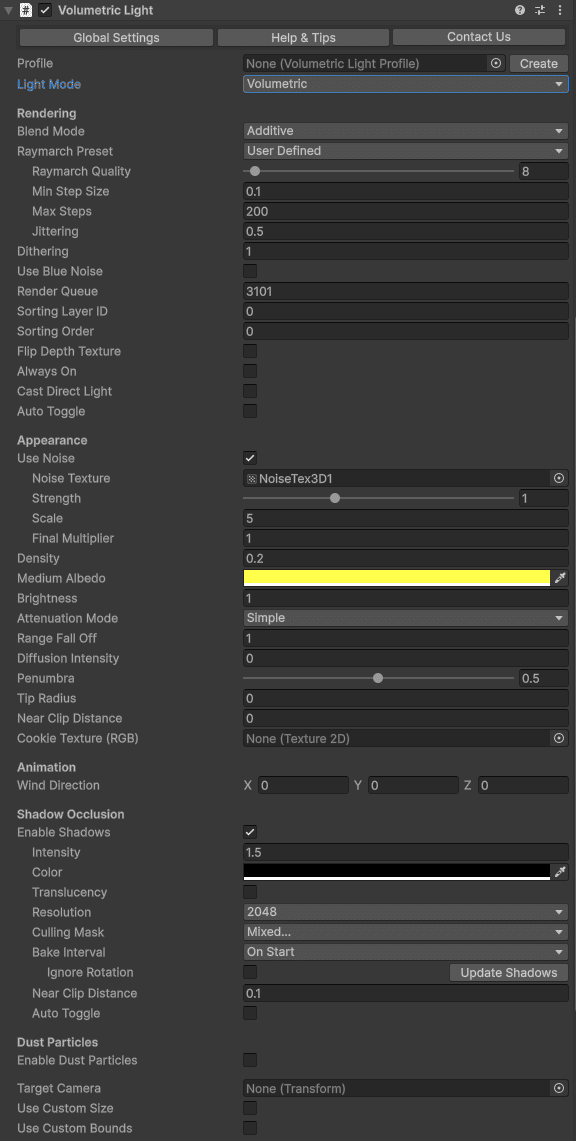
Rendering
| Parameter | Description | Default |
|---|---|---|
| Blend Mode | Blend (alpha blending) or Additive (adds light intensity to existing pixels). | Blend |
| Raymarch Quality | Number of ray-marching iterations. Lower values improve performance. | Default preset |
| Min Step Size | Minimum step size along the ray. Increase for better performance at the cost of accuracy. | 0.1 |
| Max Steps | Maximum number of samples per ray. Caps performance cost for long rays. | 200 |
| Dithering | Reduces color banding in the volumetric effect. | 1 |
| Jittering | Randomizes ray start position to reduce banding. Especially useful when shadows are enabled. | 0.5 |
| Use Blue Noise | Uses blue noise instead of white noise for jittering. Slightly more expensive but reduces moire patterns. | Off |
| Render Queue | Controls rendering order in the transparent queue. | 3100 |
| Sorting Layer / Order | Additional render order control. | Default / 0 |
| Flip Depth Texture | Enable if the effect clips incorrectly due to an inverted depth buffer (can happen when MSAA and HDR are both off). | Off |
| Always On | Forces the volumetric effect to render even if the Unity light is disabled. Useful for fake volumetric lights with zero lighting overhead. | Off |
Appearance
| Parameter | Description | Default |
|---|---|---|
| Use Noise | Enables 3D noise texture for a heterogeneous medium (clouds, dust). | Off |
| Noise Texture | 3D noise texture. A default is provided in Resources/Textures. Additional options in Demo/NoiseTextures. | Built-in |
| Density | Medium density inside the volume. Higher values produce a more opaque effect. Very low density over a large range increases ray-march cost. | 0.3 |
| Diffusion Intensity | Controls the intensity of forward scattering when looking toward the light source. | 0 |
| Distance Falloff | Controls how the effect fades toward the edges of the volume. | 1 |
| Border | Additional edge falloff (no effect on point lights). | 0.1 |
Dust Particles
| Parameter | Description | Default |
|---|---|---|
| Enable Dust Particles | Adds floating dust motes inside the light volume using a particle system with a volume-aware shader. | Off |
| Dust Brightness | Brightness multiplier for dust particles. | 0.5 |
| Dust Min/Max Size | Size range of individual dust particles. | 0.01 / 0.03 |
| Dust Wind Speed | Wind speed affecting particle drift. | 0 |
Shadow Occlusion
| Parameter | Description | Default |
|---|---|---|
| Enable Shadows | Enables volumetric shadow occlusion inside the light volume. | Off |
| Shadow Intensity | Amount of light cancelled by shadows (0 = no shadow, 1 = full). | 0.7 |
| Shadow Resolution | Shadow map resolution. Lower values are faster; usually 256–512 is sufficient. | 256 |
| Shadow Culling Mask | Which layers cast shadows. By default excludes TransparentFX (where volumetric lights live). | Everything |
| Shadow Bake Interval | OnStart: bakes once. EveryFrame: updates each frame. Moving/rotating the light auto-rebakes regardless. | EveryFrame |
| Shadow Bake Mode (Point) | Half-sphere (faster, oriented to camera) or Cubemap (full 360°, option to spread across frames). | Half-sphere |
| Shadow Orientation (Point) | Fixed direction or auto-orient to player camera. | Camera |
| Shadow Near Distance | Near clip plane for the shadow camera. Skips objects too close to the light. | 0.01 |
| Translucency | Captures colors of transparent objects (requires VolumetricLightsTranslucency script on those objects). See Translucency & Shadow Maps. | Off |
Tip: When Shadow Bake Interval is set to OnStart, call
ScheduleShadowCapture() on the VolumetricLight component to force a refresh at any time.
Other Settings
| Parameter | Description | Default |
|---|---|---|
| Use Custom Size | Overrides the Unity light’s range or size for the volumetric effect only. | Off |
| Use Custom Bounds | Clips the volumetric effect to a custom box. Handles appear in the Scene view for adjustment. | Off |
| Auto Toggle | Distance-based LOD: dims and deactivates the effect beyond configurable distances. | Off |
| Distance Start Dimming | Distance at which the effect begins fading out. | 70 |
| Distance Deactivation | Distance at which the effect is fully disabled. | 100 |
Was this page helpful?
Suggest an improvement
Help us improve this documentation page.