Global Composition Blur
intermediate conceptsVolumetric Lights 2 (URP) · Core Concepts
Global Composition Blur
The Volumetric Lights Render Feature renders all volumetric lights to an off-screen buffer and applies screen-space blur before compositing the result onto the camera image. This produces smoother, higher-quality results on desktop.
Note: This render feature is not necessary on mobile devices with high-density screens, where per-pixel banding is less noticeable.
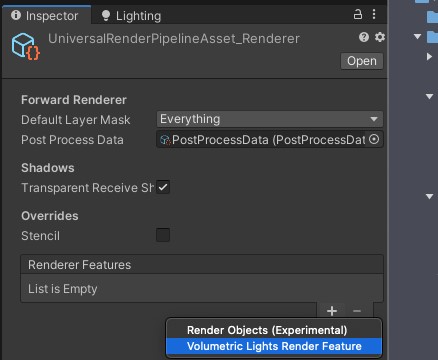
Adding the Render Feature
- Select your URP Renderer asset (e.g.,
ForwardRenderer). - Click Add Renderer Feature > Volumetric Lights Render Feature.
Settings
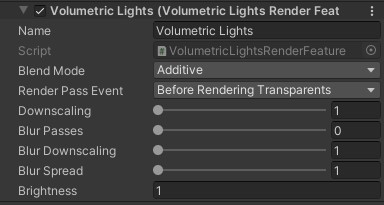
| Parameter | Description | Default |
|---|---|---|
| Blend Mode | Blending mode for the final composition pass. | Additive |
| Brightness | Global brightness multiplier applied on top of individual light brightness values. | 1 |
| Downscaling | Reduces the resolution of the intermediate light buffer. Improves performance. | 1 (off) |
| Blur Passes | Number of blur iterations. Higher values produce a softer result. | 2 |
| Blur Downscaling | Reduces blur buffer resolution. Improves performance at quality cost. | 1 |
| Blur Spread | Increases the blur kernel radius for broader softening. | 1 |
| HDR | Uses HDR format for blur buffers to preserve bright colors. | On |
| Preserve Edges | Enables a bilateral filter to preserve geometry edges during the blur pass. | Off |
Was this page helpful?
Suggest an improvement
Help us improve this documentation page.