Fog Volume Settings
intermediate conceptsVolumetric Fog & Mist 2 (URP) · Core Concepts
Volumetric Fog Volume Settings
Each Volumetric Fog volume is configured through a Fog Profile. Below is a complete reference of all profile parameters.
Creating a Fog Volume
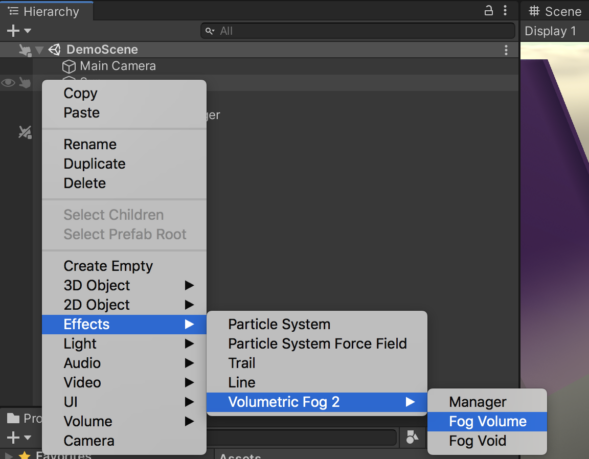
- Right-click in the Hierarchy and select Effects > Volumetric Fog & Mist 2 > Fog Volume.
- Click New Fog Profile or assign an existing profile.
- Position and scale the volume using the Transform component.
Ray Marching
| Parameter | Description | Default |
|---|---|---|
| Raymarch Quality | Number of samples used by the shader. Lower values improve performance. | Medium |
| Raymarch Near Distance Quality | Extra samples near the camera. A value of 8 covers ~9 m with boosted density that fades to normal. Higher values push this zone farther. | 8 |
| Raymarch Min Step | Minimum step size between samples. Increasing improves performance but reduces accuracy. | 0.1 |
| Dithering | Reduces banding artifacts when fog renders in front of solid surfaces. | 1 |
| Jittering | Reduces banding artifacts on fog edges. | 0.5 |
Noise
| Parameter | Description | Default |
|---|---|---|
| Noise Texture | 3D noise texture for fog shape. Custom textures can be found in demo folders or generated via the Noise Generator tool. | Built-in |
| Noise Strength | How strongly noise affects fog shape. | 1 |
| Noise Scale / Final Multiplier | Size and final amplitude of the noise pattern. | 1 / 1 |
| Use Detail Noise | Combines primary noise with additional 3D detail noise for more compelling fog. | Off |
| Detail Noise Texture | Custom 3D detail texture (red channel only). Additional textures in the demo folder. | Built-in |
| Scale Noise With Height | Automatically adapts the noise frequency to the fog volume's height. At 0, noise scale is fixed regardless of volume size. At 1, noise fully scales with the volume's Y dimension - useful for maintaining consistent cloud appearance across different world scales. | 0 |
| Constant Density | When enabled, disables noise entirely for a smooth, uniform fog. Saves performance. | Off |
Density & Shape
| Parameter | Description | Default |
|---|---|---|
| Density | Overall fog density. Low values produce subtle mist; high values produce thick fog. | 1 |
| Shape | Box or Sphere shape for the fog volume. | Box |
| Border | Smooth fog volume edges to avoid hard cutoffs. | 0.1 |
| Distance | Distance from camera at which fog starts rendering. | 0 |
| Distance Fall Off | Gradient length for the distance start/end transition. | 0 |
| Max Distance | Maximum distance for fog rendering. Reduce for better performance. | — |
| Max Distance FallOff | Smooth fade at the maximum distance boundary. | 0 |
Color & Appearance
| Parameter | Description | Default |
|---|---|---|
| Albedo | Base color and transparency of the fog. | White (semi-transparent) |
| Brightness | Overall brightness multiplier. | 1 |
| Deep Obscurance | Darkens fog at the center of the volume for added depth perception. | 0 |
| Distance Near Color / Far Color | Tints fog based on distance to camera. Active only when Distance > 0. | White / White |
| Depth Gradient | Color gradient based on distance to camera (requires a gradient texture). | Off |
| Height Gradient | Color gradient based on vertical position. Symmetrical above and below volume center. | Off |
Lighting
| Parameter | Description | Default |
|---|---|---|
| Light Diffusion Power / Intensity | Controls directional light scattering through the fog (god rays). | — |
| Specular Color / Threshold / Intensity | Simulated light reflections on the fog surface. | — |
| Receive Shadows | Enables shadow reception from the directional light. | Off |
| Shadow Intensity | Controls the darkness of received shadows. | 0.5 |
| Shadow Max Distance | Maximum distance for shadow computation. Reduce for performance. | — |
| Use Day Night Cycle | Syncs fog intensity/color with Sun and Moon (assigned in Volumetric Fog Manager). | Off |
Animation
| Parameter | Description | Default |
|---|---|---|
| Turbulence | Animation speed of the fog noise over time. | 0 |
| Wind Direction | Direction vector for fog movement. | (1, 0, 0) |
The Volumetric Fog Manager
Created automatically when you add the first fog volume. The manager exposes global settings:
| Parameter | Description |
|---|---|
| Main Camera | Camera used for fog rendering. Auto-detected if not set. |
| Sun | Directional light used as the primary light source. |
| Moon | Optional secondary directional light for day/night cycle. |
| Downscaling | Reduces fog rendering resolution. Values of 1.25–2.0 improve performance. |
| Blur | Post-process blur to smooth noise artifacts. |
| Flip Depth Texture | Workaround for inverted depth bugs in certain URP versions. |
| Shader Options | Advanced shader settings (blue noise, orthographic camera, max iterations, etc.). |
Rendering
| Parameter | Description |
|---|---|
| Render Queue | Controls rendering order relative to other transparent objects. |
| Rendering Layer Mask | Controls which lights affect this fog volume (requires Rendering Layers in URP). |
| Update Mode | When Visible — updates only when the camera can see the volume. When Camera Inside Area — updates while camera is within a boundary. |
Was this page helpful?
Suggest an improvement
Help us improve this documentation page.