Dynamic Fog Settings
intermediate conceptsVolumetric Fog & Mist 2 (URP) · Core Concepts
Dynamic Fog & Mist Settings
Dynamic Fog & Mist is a lightweight, distance-based fog effect included alongside the main volumetric fog. It is ideal for quick atmospheric haze without the overhead of full ray-marching.
Creating a Dynamic Fog Volume
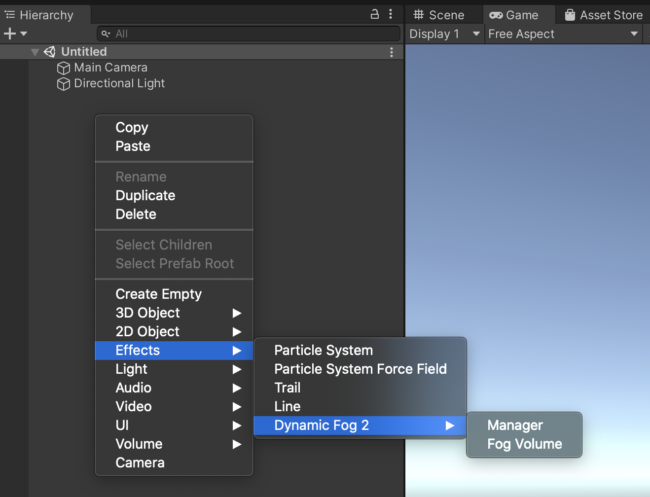
- Right-click in the Hierarchy and select Effects > Dynamic Fog & Mist > Fog Volume.
- A Dynamic Fog Manager is created automatically on the first volume.
- Click New Fog Profile or assign an existing profile.
- Position and scale the volume to cover the desired area.
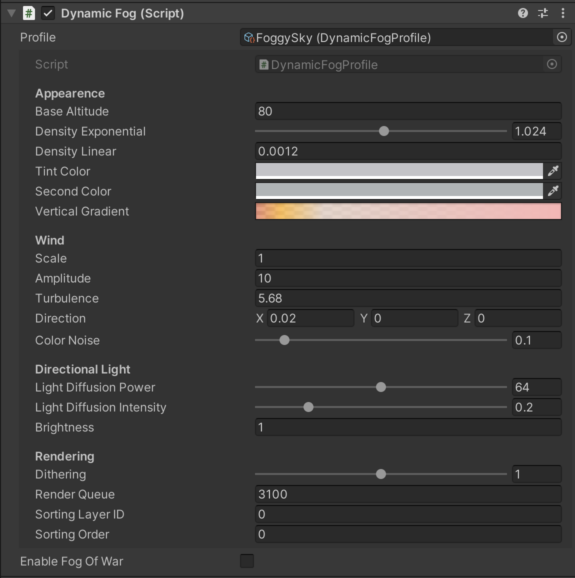
Dynamic Fog Profile Parameters
| Parameter | Description | Default |
|---|---|---|
| Base Altitude | Base height for the fog effect. | 0 |
| Density Exponential | Fog density using exponential falloff over distance. Combined with volume size for the final result. | — |
| Density Linear | Fog density using linear falloff over distance. | — |
| Tint Color | Base color of the fog. | White |
| Second Color | Secondary color blended via color noise amount. | White |
| Vertical Gradient | Color and alpha gradient from horizon (left) to zenith (right). Useful for reddish horizons at sunset. | — |
| Wind Intensity / Scale / Amplitude | Wind animation effect. Scale controls horizontal noise size; Amplitude controls vertical displacement. | 0 / 1 / 1 |
| Wind Turbulence / Direction | Turbulence strength and direction vector for wind movement. | 0 / (1,0,0) |
| Directional Light | Sun light diffusion intensity and color spread across the fog. | — |
| Dithering | Reduces banding artifacts. | — |
| Rendering Order | Controls render queue relative to other objects. | — |
Tip: Dynamic Fog is excellent for simple distance fog or skyline haze. For full 3D volumetric effects with lighting and shadows, use the main Volumetric Fog volumes instead.
Was this page helpful?
Suggest an improvement
Help us improve this documentation page.