Quick Start
beginner quick startEdge Fusion (HDRP) · Quick Start
Get Edge Fusion running in your HDRP scene in four steps.
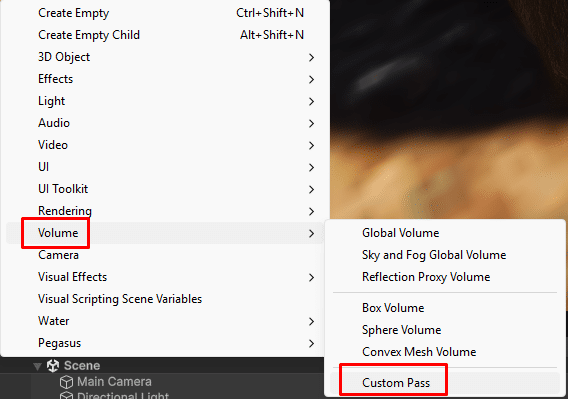
Step 1 — Create a Custom Pass Volume
- In the Hierarchy, go to GameObject > Volume > Custom Pass.
- This creates a new GameObject with a Custom Pass Volume component.
Step 2 — Add the Edge Fusion Pass
- Select the Custom Pass Volume object.
- In the Inspector, click the + button on the Custom Passes list.
- Select Edge Fusion from the dropdown.
Step 3 — Configure the Volume
| Setting | Value |
|---|---|
| Mode | Set to Global (affects the entire scene) or Local with a collider trigger. |
| Injection Point | Select After Opaque And Sky or Before Transparent for best results. |
Step 4 — Enable the Effect
- Set Intensity to
1. - Enter Play mode — edges between objects are now blended.
- Adjust Radius and Sample Count to taste.
Tip: Open the included demo scene (Assets > EdgeFusionHDRP > Demo) to see a fully configured example.
Was this page helpful?
Suggest an improvement
Help us improve this documentation page.