Volumetric Light Parameters
This page documents every parameter available on the Volumetric Light component. The component supports two light modes — Simple (fast, simplified) and Volumetric (full ray-marched). Some parameters are only available in Volumetric mode.
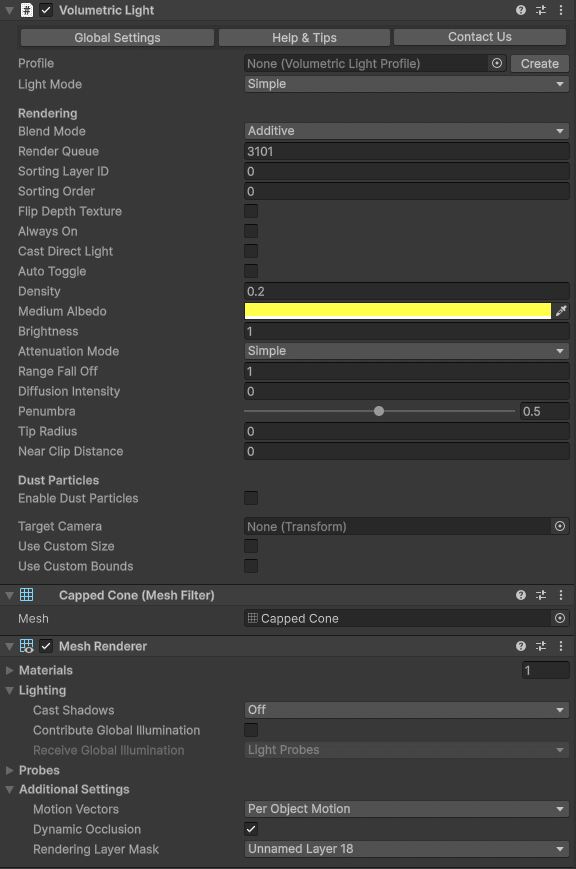
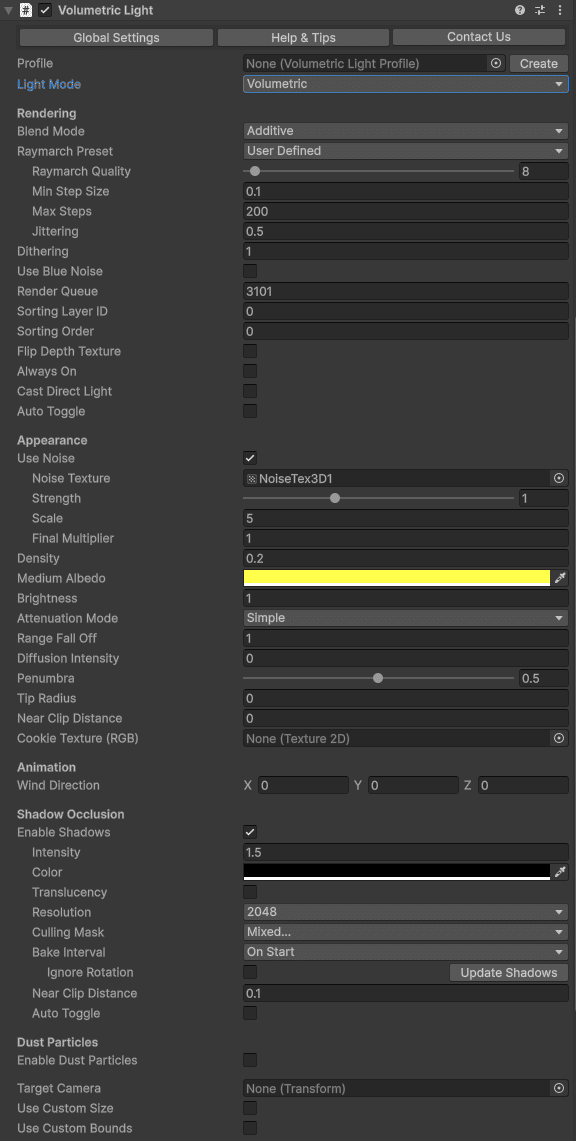
General
| Parameter | Description | Default |
|---|
| Light Mode | Choose between Simple (lightweight) or Volumetric (full featured). | Volumetric |
| Show Global Settings | Opens the Volumetric Lights Post Process component on the camera for global downscaling and blur settings. | — |
| Profile | Optional ScriptableObject profile for saving/loading settings. Create via Create > Volumetric Light Profile. | None |
| Always On | Forces the volumetric effect to remain visible even when the Unity Light component is disabled. Useful for "fake" volumetric lights with zero lighting cost. | Off |
Rendering
| Parameter | Description | Default |
|---|
| Blend Mode | How the effect composites with the scene. Additive adds light intensity; Blend uses traditional alpha blending. | Additive |
| Raymarch Preset | Quality preset: Default, Faster, EvenFaster, LightSpeed, or UserDefined for manual control. | Default |
| Raymarch Quality | Number of samples along each ray (1–256). Only used when preset is UserDefined. Lower values improve performance. | — |
| Min Step Size | Minimum distance between ray samples. Increase to improve performance at the cost of accuracy. | — |
| Max Steps | Maximum number of samples per ray. Caps the work done by rays that traverse large volumes. | — |
| Dithering | Reduces color banding in smooth gradients. | 0 |
| Jittering | Adds randomness to ray start positions to reduce banding artifacts. Especially useful when shadows are enabled. | 0 |
| Use Blue Noise | Replaces white noise jittering with blue noise for a more uniform distribution. Adds one extra texture fetch. | Off |
| Render Queue | Controls rendering order within the transparent queue. | 3000 |
| Sorting Layer / Order | Additional sorting controls for the transparent-queue volumetric mesh. | Default / 0 |
Appearance
| Parameter | Description | Default |
|---|
| Density | Fog thickness inside the light volume. Higher values produce opaquer fog. Very low density in a large volume can increase ray-march iterations. | 0.2 |
| Medium Albedo | Color of the scattering medium. | White |
| Brightness | Overall intensity multiplier for the volumetric effect. | 1.0 |
| Penumbra | Soft edge amount (0–1). Controls how gradually the light fades at cone edges. | — |
| Distance Falloff | Controls how quickly the effect fades at the light range boundary. | — |
| Border | Controls edge softness of the volume boundary. Has no effect on point lights. | — |
| Diffusion Intensity | Controls the intensity of light scattering when looking directly toward the light source through the medium. | 0 |
Noise
| Parameter | Description | Default |
|---|
| Use Noise | Enables 3D noise for organic, non-uniform fog instead of a homogeneous medium. | Off |
| Noise Texture | 3D noise texture used for variation. Default provided in Resources/Textures. Additional textures available in Demo/NoiseTextures. | Built-in |
| Noise Strength | Intensity of the noise effect (0–3). | 1.0 |
| Noise Scale | Scale of the 3D noise texture. Larger values produce finer detail. | 1.0 |
| Noise Final Multiplier | Final multiplier applied to the noise output. | 1.0 |
| Wind Direction | Direction and speed of noise animation, simulating wind movement through the volume. | (0, 0, 0) |
Dust Particles
| Parameter | Description | Default |
|---|
| Enable Dust Particles | Activates floating dust particles inside the light volume using a custom particle shader that respects volume geometry. | Off |
| Dust Brightness | Brightness multiplier for the dust particles. | 0.5 |
| Dust Min Size | Minimum particle size. | — |
| Dust Max Size | Maximum particle size. | — |
| Dust Wind Speed | Wind speed that affects dust particle movement. | 0 |
Shadow Occlusion
| Parameter | Description | Default |
|---|
| Enable Shadows | Activates shadow mapping for the volumetric light. | Off |
| Shadow Intensity | Amount of light cancelled by shadows (0–1). | 0.7 |
| Shadow Resolution | Shadow map texture resolution (32–4096). Use the smallest size that gives acceptable results. | 256 |
| Shadow Culling Mask | Layer mask that determines which objects cast shadows. Exclude unnecessary layers for better performance. | Everything |
| Shadow Bake Interval | OnStart — captures once at startup (fastest). EveryFrame — captures each frame (required for moving occluders). Shadow maps auto-refresh when the light moves or rotates. | EveryFrame |
| Shadow Bake Mode | Point lights only. Choose between half-sphere (faster) or cubemap (360° coverage). Cubemap can spread rendering across multiple frames. | Half-sphere |
| Shadow Orientation | Point lights only. Orientation for the half-sphere capture: fixed direction or auto-orient toward the player camera. | Auto |
| Shadow Near Distance | Near clip plane of the shadow capture camera. Use to skip objects too close to the light source. | 0.1 |
| Use Default RT Format | When enabled, uses a default render texture format for shadows. Disable to use a single depth buffer (slightly faster but can conflict with shaders using Grab Pass). | On |
| Translucency | Captures colors of transparent objects that have the Volumetric Lights Translucency script. See Shadows & Translucency. | Off |
Pro tip: When Shadow Bake Interval is set to OnStart, you can force a shadow update at any time by calling ScheduleShadowCapture() on the VolumetricLight component.
Attenuation
| Parameter | Description | Default |
|---|
| Attenuation Mode | Simple — linear falloff. Quadratic — physically-based inverse-square law falloff with configurable coefficients. | Simple |
| Constant Coefficient | Constant term in the quadratic attenuation formula. | 1.0 |
| Linear Coefficient | Linear term in the quadratic attenuation formula. | 0 |
| Quadratic Coefficient | Quadratic term in the quadratic attenuation formula. | 1.0 |
Spot Light Options
| Parameter | Description | Default |
|---|
| Tip Radius | Radius of the spotlight tip. 0 creates a point; values > 0 create a truncated cone. | 0 |
| Near Clip Distance | Near clip distance to prevent artifacts close to the light source. | 0.01 |
| Cookie Texture | Optional 2D texture projected through the light volume for patterned light effects. | None |
Auto-Toggle (LOD)
| Parameter | Description | Default |
|---|
| Auto Toggle | Enables distance-based automatic fading and deactivation for performance. | Off |
| Distance Start Dimming | Distance from the camera at which the light begins fading out. | — |
| Distance Deactivation | Distance from the camera at which the volumetric effect is fully disabled. | — |
Other Settings
| Parameter | Description | Default |
|---|
| Use Custom Size | Overrides the Unity Light's range or size values with custom ones. | Off |
| Use Custom Bounds | Enables custom bounding box to clip the volumetric effect. Adjust the box handles in the Scene View to confine the effect to specific areas. | Off |