Inspector Reference
intermediate conceptsTerrain Grid System 2 · Core Concepts
Inspector Reference
Complete reference for all properties in the TerrainGridSystem inspector. Properties are organized by section as they appear in the Unity Inspector.
Grid Configuration
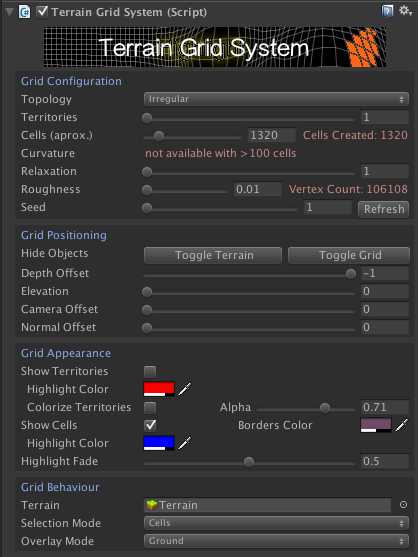
| Property | Description |
|---|---|
| Camera | The camera used for calculations such as highlighting and fade. Main camera is used by default. |
| Terrain | The terrain or root GameObject for the grid. Works with Unity Terrain or any mesh. |
| Multiple Objects | Spans the grid across multiple terrain tiles or mesh objects. TGS automatically locates all neighbours and adjusts the grid size. |
| Objects Name Prefix | Only include terrain game objects whose name starts with this prefix (case insensitive). Visible when Multiple Objects is enabled. |
| Objects Layer Mask | Only include terrain game objects that match this layer mask. Visible when Multiple Objects is enabled. |
| Search Global | Search for potential terrain objects in the entire scene hierarchy. Visible when Multiple Objects is enabled. |
| Heightmap Width / Height | Dimensions for custom heightmap when using mesh-based terrain that supports it. |
| Topology | Grid shape: Irregular (Voronoi), Box, or Hexagonal. |
| Bake Voronoi / Clear Baked Data | Serializes or clears the Voronoi cell layout so it persists without regeneration (irregular topology only). |
| Columns / Rows | Grid dimensions (box and hexagonal topologies). |
| Cells (aprox.) | Approximate number of cells (irregular topology only). |
| Territories | Number of territories. Each territory contains one or more cells. |
| Territories Texture | Color texture defining territory shapes. Each unique color creates a territory. Use solid colors only. |
| Neutral Color | Color to be ignored when using a territories texture. |
| Hide Neutral Cells | Cells belonging to neutral (ignored) territories will be invisible. |
| Initial Cell Method | How the initial cell for each territory is selected: Random or UserDefined. |
| Asymmetry | Controls the distribution of cells among territories. Higher values produce territories with different sizes. |
| Organic | Produces irregular, organic-looking territory borders. |
| Max Iterations | Maximum number of iterations for territory generation. 0 = no limit. |
| Max Range | Maximum distance in cell units from the origin cell when growing a territory. |
| Regular Hexes | Preserves correct hexagon aspect ratio regardless of grid scaling (hexagonal topology). |
| Hex Width | Width of each hexagon when Regular Hexes is enabled. |
| Adjust Canvas Size | Automatically adjusts the canvas to fit the regular hexagons. |
| Pointy Top | Switches hexagon orientation between flat-top and pointy-top (hexagonal topology). |
| Even Layout | Toggles the up/down shift of the first hexagon row. |
| Curvature | Applies curvature to grids with 100 or fewer cells. Triples segment count. |
| Corner Jitter | Adds random displacement to cell corners for a more organic look (box and hexagonal topologies). |
| Relaxation | Makes Voronoi cells more uniform. Higher values = more iterations (irregular topology only). |
| Seed | Randomization seed for reproducible cell layouts. |
| Roughness | Controls how closely the grid follows the terrain surface. |
| Flat Cells | When enabled, cells ignore terrain slope and remain horizontal. |
| Mask | Texture controlling flat cell rendering via alpha channel (0 = cell adapts to terrain as usual). Only available when Flat Cells is enabled. |
| Max Slope | Maximum terrain slope for cell visibility (0-1). Cells on steeper surfaces are hidden. |
| Max Height Difference | Maximum vertex height difference within a cell. Cells exceeding this value are hidden. 0 = not used. |
| Minimum Altitude | Cells below this altitude are hidden. Useful for hiding cells under water. 0 = not used. |
| Maximum Altitude | Cells above this altitude are hidden. 0 = not used. |
| Clamp Vertices | When using min/max altitude, clamp cell vertices to the altitude limit instead of hiding the entire cell. |
| Hide Isolated Cells | Cells with no visible neighbours will be hidden automatically. |
Rendering Options
Controls how the grid mesh is generated and rendered.
| Property | Description |
|---|---|
| Disable Mesh Generation | The grid system can be used through API but won't render any visual grid. Useful for logic-only grids. |
| Mask | Texture controlling cell visibility via alpha channel (alpha = 0 hides the cell). Hidden cells are excluded from highlighting and pathfinding. |
| Use Scale | Respects grid offset and scale parameters when applying the mask texture. |
| Inside Count | Minimum number of vertices that must fall inside the mask to consider the entire cell visible. |
| Use Geometry Shaders | Use geometry shaders if the platform supports them. Not supported on VR or Metal. |
| Transparent Background | Renders the grid without an opaque background, suitable for 2D or overlay use cases. |
| Sorting Order | Renderer sorting order when Transparent Background is enabled. |
| Use Stencil Buffer | Uses the stencil buffer to avoid overdraw and ensure correct rendering order. Disable if it conflicts with other stencil-based renderers. |
| Lines Ignore Depth | Draws cell borders and territory frontiers through scene geometry by ignoring the depth buffer. Objects drawn after the grid, such as transparent objects, can still cover the lines. |
| Canvas Texture | Optional background texture revealed when using the texture methods of cells or territories. |
| Animation Sorting Order | Sorting order for animation effects such as fade-out grid elements. |
| Animation Sorting Layer | Sorting layer for animation effects. |
Grid Positioning
| Property | Description |
|---|---|
| Toggle Terrain / Toggle Grid | Buttons to quickly show/hide the terrain or the grid in the editor for easier visualization. |
| Mesh Pivot | Local center offset for custom meshes (not Unity Terrain). Adjust if the grid appears off-center. |
| Grid Center | Position of the grid center in local space. Use to show a partial grid around a specific area. |
| Grid Scale | Size of the grid on the terrain surface in local space. |
| Match Cell Size | Specify a desired cell size and click Update Cell Size to automatically adjust the grid scale. |
| Bottom Left Corner / Size | Shows the current world-space position and size of the grid. You can set new values and click Set Position & Size. |
| Mesh Depth Offset | Z-buffer offset for the grid mesh lines. |
| Cells Depth Offset | Z-buffer offset for cell highlight surfaces. |
| Territories Depth Offset | Z-buffer offset for territory surfaces. |
| Elevation | Y-axis displacement above the terrain surface. |
| Elevation Base | Base elevation added to the Elevation value. |
| Min Elevation Multiplier | Multiplier for the small Y-offset between grid layers. Reduce for very large terrain scales. |
| Camera Offset | Dynamic displacement toward the camera position. |
| Normal Offset | Per-vertex displacement along terrain normals. Expensive - use only when needed. |
Territories Appearance
Controls the visual appearance of territory borders and fills.
Performance: If you do not use territories, ensure all territory-related options (Show Frontiers, Colorize Territories, highlight mode = Territory) are disabled to avoid unnecessary mesh generation.
| Property | Description |
|---|---|
| Show Frontiers | Toggle territory border visibility. Enables territory mesh generation. |
| Frontier Color | Color of the territory borders. |
| Disputed Frontier | Color for shared borders between two territories. |
| Custom Thickness | Enable to draw territory borders with a configurable thick line. |
| Thickness | Border line thickness when Custom Thickness is enabled. |
| Miter Joins | Reuses vertices at joints to produce continuous borders without gaps or overlaps. |
| Outer Borders | Show territory borders on the outer edges of the grid. |
| Show Interior Borders | Draw an additional inner border line inside each territory. |
| Interior Border Thickness | Thickness of the interior border. |
| Interior Border Padding | Distance between the interior border and the territory edge. |
| Show On Top | Render interior borders on top of regular territory borders. |
| Include Enclaves | Adds additional interior borders around regions belonging to other territories (enclaves). |
| Colorize Territories | Fill territories with colors. Also triggers territory mesh generation. |
| Alpha | Opacity of the territory fill color. |
| Color Scheme | Automatic color assignment: Gradient, Cool, Warm, or UserDefined. |
| Color Seed | Random seed for territory color assignment. |
| Fill Colors | Array of custom colors when Color Scheme is set to UserDefined. |
| Internal Territories | Allows territories to be fully contained inside other territories. |
| Highlight Color | Color used when the pointer hovers over a territory. |
Cells Appearance
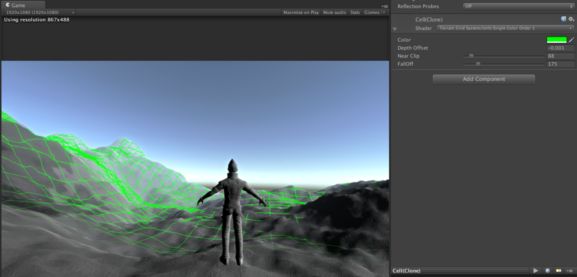
Controls the visual appearance of cells, highlights, and fade effects.
| Property | Description |
|---|---|
| Show Cells | Toggle cell border visibility. |
| Border Color | Color of cell borders. |
| Custom Thickness | Enable to draw cell borders with a configurable thick line. |
| Thickness | Cell border line thickness when Custom Thickness is enabled. |
| Texture Mode | Choose how textures are rendered inside cells: Cell (inside the cell shape) or Floating (a quad over the cell area). Only available without terrain, for box/hexagonal topology. |
| Background Mode | How the floating texture background is rendered (Floating mode only). |
| Scale / Offset | Scale and offset for floating textures (Floating mode only). |
| Fill Padding | Enlarge or shrink the colored/textured surface area of cells. |
| Alpha Clipping | Enables alpha clipping so transparent pixels are discarded instead of blended. |
| Threshold | Alpha test threshold value when Alpha Clipping is enabled. |
| Highlight Color | Color used when the pointer hovers over a cell. |
| Use Cell Color | Use the cell's current fill color as the highlight color instead. |
| Border Size / Border Color | Add a highlight border effect to the highlighted cell (box topology only). |
| Highlight Fade | Min/max range for the highlight fade animation. |
| Highlight Speed | Speed of the highlight fade animation. |
| Highlight Effect | Visual effect for highlighting: Default, DualColors, TextureAdditive, TextureMultiply, TextureColor, TextureScale, or None. |
| Scale Range | Min/max scale for the TextureScale highlight effect. |
| Alternate Colors | Secondary highlight colors for cells and territories when using DualColors effect. |
| Highlight Mask | Optional mask texture for the highlight effect. |
| Near Clip Fade | Fades out grid lines when the camera is very close (useful for FPS cameras). |
| Far Distance Fade | Fades out grid lines when the camera is far away. |
| Circular Fade | Fades out grid lines based on distance from a target Transform. Useful for showing the grid only around the player. |
| Distance / FallOff | Distance threshold and transition smoothness for all fade modes. |
Grid Interaction
| Property | Description |
|---|---|
| Selection Mode | Interactive selection: None, Cells, or Territories. |
| Include Invisible Cells | Allow invisible cells to be highlighted and selected. |
| Minimum Distance | Minimum distance from the camera for a cell or territory to be selectable. Useful in first-person view to prevent selecting cells under the character. |
| Highlight While Drag | Allows highlighting while dragging the mouse over the grid during a drag operation not started on the grid. |
| Overlay Mode | Ground (surfaces appear below scene content) or Overlay (surfaces render on top; faster but less realistic). |
| Respect Other UI | When enabled, grid interaction is suppressed while the pointer is over a uGUI Canvas element. |
| Blocking Mask | Layer mask used to block grid interaction when other objects block the raycast. |
Path Finding
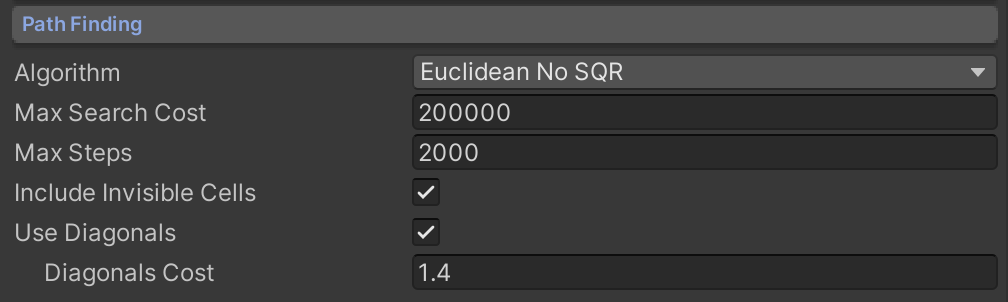
| Property | Description |
|---|---|
| Algorithm | Heuristic for A* pathfinding:
|
| Max Search Cost | Maximum total path cost. 0 = unlimited. |
| Max Steps | Maximum number of cells to evaluate during pathfinding. Limits computation for large grids. |
| Include Invisible Cells | Allow pathfinding to traverse invisible cells. |
| Use Diagonals | Allow diagonal movement between cells (box topology only). |
| Diagonals Cost | Cost multiplier for diagonal steps. |
| Turn Cost | Extra cost added on each direction change (box topology only). 0 = off (default); small values prefer straighter, fewer-turn paths. |
Optimization: The pathfinding algorithm uses a faster variant when the column count is a power of 2 (4, 8, 16, 32, 64, 128, 256...).
Four methods to control path traversal:
| Method | Purpose |
|---|---|
CellSetCanCross | Block or unblock a cell for pathfinding. |
CellSetGroup | Assign a cell to a group. Filter allowed groups in FindPath. |
CellSetCrossCost | Set a custom cost for entering a cell. |
CellSetSideCrossCost | Set a custom cost for a specific cell edge, with optional direction awareness. |
See demo scene 12 for a pathfinding example. See Scripting Support for the full API.
Grid Editor
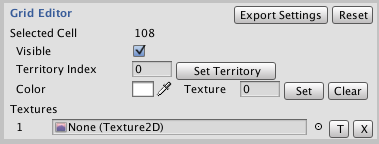
The Grid Editor section lets you customize individual cells in the Unity Editor.
| Feature | Description |
|---|---|
| Export Grid Config | Creates a TGS Config component that stores all cell settings for later loading. |
| Export Grid Mesh | Creates a copy of each territory grid mesh as a new game object. Does not modify the current grid. |
| Reset | Clears all per-cell customizations and restores defaults. |
| Display Cell Info | Shows cell information in Scene View: Nothing, Cell Index, Cell Coordinates, or Path Finding Cross Cost. |
| Display Territory Info | Shows territory information in Scene View: Nothing or Territory Index. |
| Enable Editor | Enables cell editing in the Scene View. Click a cell to select it (hold Control or Shift for multi-select). |
| Visible | Toggle visibility of the selected cell. |
| Visible Always | This cell will ignore visibility rules and remain visible regardless of other settings. |
| Can Cross | Whether this cell can be traversed by pathfinding. |
| Cross Cost | Cost to cross this cell or individual sides. You can set per-side costs for fine-grained control. |
| Territory Index | Assign the selected cell to a specific territory. |
| Tag | An integer tag for custom cell identification. |
| Custom Cell Data | Key-value attribute pairs that can be attached to individual cells for game-specific data. |
| Color / Texture | Assign a fill color and texture to the selected cell. Textures support scale and offset. |
| Texture Painting | Load textures into the array, click the T button to enter paint mode, then click cells to apply textures. |
| Multiple Configurations | Add multiple TGS Config components. Enable one or call LoadConfiguration() to switch. |
Ensure Gizmos are enabled in the Scene View toolbar for cell selection to work.
Was this page helpful?
Suggest an improvement
Help us improve this documentation page.