Introduction
beginner start hereBeautify 3 (URP) · Start Here
What is Beautify?
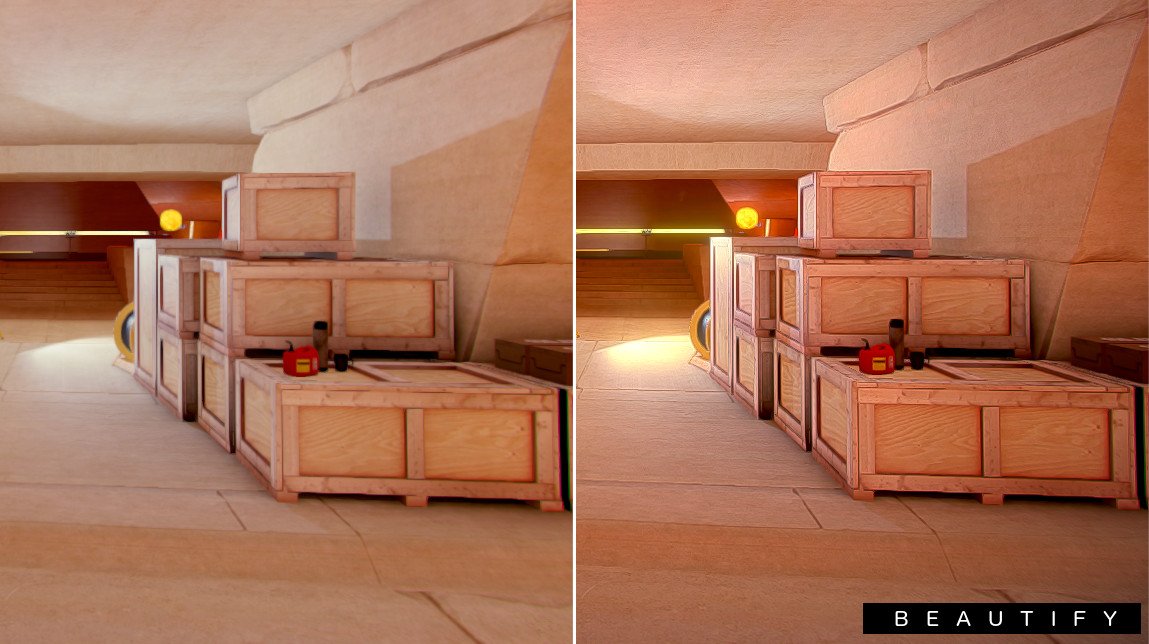
Beautify 3 is a high-performance post-processing image enhancement asset for Unity's Universal Render Pipeline (URP). It combines multiple visual effects into optimized render passes, delivering professional-quality results with minimal GPU overhead.
Unlike Unity's built-in post-processing stack, Beautify merges several operations into single passes — meaning you can stack sharpen, bloom, depth of field, color grading and more without the performance cost of running them separately.
Award-winning quality — Kronnect was nominated for Publisher of the Year at the Unity Awards 2023, with Beautify being one of its flagship products.
Key Features
Image Enhancement
- Sharpen — intelligent local-contrast sharpening that enhances detail without haloing artifacts.
- Dithering — removes color banding in gradients (skyboxes, fog, smooth surfaces).
- Color Tweaks — saturation, brightness, contrast, daltonize, tint, and white balance controls.
- Edge Anti-aliasing — per-pixel edge smoothing that works on top of MSAA or FXAA.
Tonemapping & Color Grading
- ACES & AGX Tonemapping — filmic tone-mapping operators used in AAA productions.
- LUT Support — use standard .CUBE or texture-based LUTs. Includes an in-editor LUT Browser.
- Sepia, B&W & Daltonize — creative and accessibility color transforms.
Lens & Lighting Effects
- Bloom — high-quality multi-pass bloom with customizable thresholds, tint, and layer exclusion.
- Anamorphic Flares — horizontal/vertical lens flares with spread and intensity controls.
- Sun Flares — procedural or directional light flares with ghosts and chromatic aberration.
- Lens Dirt — screen-space dirt/dust overlay that reacts to bloom intensity.
- Chromatic Aberration — lens fringe effect with configurable intensity.
- Depth of Field — bokeh-quality DoF with transparency support and focus tracking.
- Eye Adaptation — automatic exposure adjustment based on scene luminance.
Artistic Effects
- Vignetting — customizable screen-edge darkening with inner ring control.
- Outline — edge detection (Sobel method) for stylized or toon rendering.
- Night & Thermal Vision — preset vision modes for gameplay effects.
- Film Grain, Pixelate, Blur — additional creative post-effects.
See It in Action
Requirements
| Requirement | Minimum |
|---|---|
| Unity version | 2022.3 LTS or newer |
| Render pipeline | Universal Render Pipeline (URP) 12+ |
| Platforms | PC, Mac, Linux, iOS, Android, WebGL, consoles |
| Graphics APIs | Direct3D 11/12, Vulkan, Metal, OpenGL ES 3.0+ |
HDRP or Built-in? — This documentation covers the URP version. Separate packages exist for HDRP and Built-in RP.
Next Steps
Ready to get started? Follow the recommended path:
- Quick Start — see your first result in 5 minutes.
- Setup Guide — learn about renderer features, volumes, and configuration options.
- Parameters Reference — full list of every setting and what it does.
- FAQ — common questions answered.
Was this page helpful?
Suggest an improvement
Help us improve this documentation page.