Inspector Reference
beginner conceptsWorld Map 2D Edition · Core Concepts
Inspector Reference
When you select the WorldMap2D GameObject, the Inspector shows the following properties. Use the Reset option from the gear icon to revert all values to factory defaults.
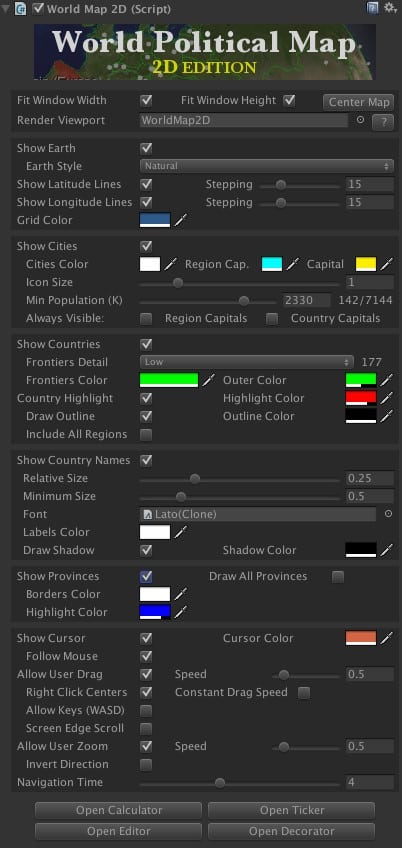
Map Layout
| Property | Description |
|---|---|
| Fit Width / Height / Center Map | Controls how the map can be moved and centered on screen. |
| Render Viewport | When assigned a Viewport GameObject, the map renders inside that viewport instead of its normal transform. See Viewport Feature. |
Earth
| Property | Description |
|---|---|
| Show Earth | Shows or hides the Earth texture. Hiding it shows only frontiers for a futuristic UI look. |
| Earth Style | Changes the texture applied to the map (Natural, Alternate 1–3, Solid Color, Natural High-Res, Scenic, 16K variants). |
Grid Lines
| Property | Description |
|---|---|
| Show Latitude / Longitude Lines | Activates or deactivates the grid overlay. Stepping options control the separation in degrees between lines. |
| Grid Color | Color of the latitude/longitude lines. |
Cities
| Property | Description |
|---|---|
| Show Cities | Show or hide city markers on the map. |
| Min Population (K) | Filters cities by population (in thousands). Set to 0 to show all cities in the catalog. |
Frontiers
| Property | Description |
|---|---|
| Show Frontiers | Show or hide all country borders. Individual countries can be styled via the API. |
| Frontiers Detail | Low (110M:1 scale, default) or High (50M:1 scale). High detail recommended only when zooming into small regions; may impact performance on low-end devices. |
| Frontiers Color | Color used for all frontier lines. |
| Thin Lines | When enabled, frontier lines do not get thicker when zooming in. Useful for VR and mobile. |
Country Highlight
| Property | Description |
|---|---|
| Country Highlight Enabled | Enables highlighting countries on mouse hover. The current country is available via countryHighlighted. |
| Country Highlight Color | Fill color for the highlighted country. |
| Draw Outline / Outline Color | Draws a colored border around the highlighted or colorized country. |
| Include All Regions | When enabled, all regions of the highlighted country light up (e.g., Alaska highlights when hovering USA). |
Country Labels
| Property | Description |
|---|---|
| Show Country Names | Draws country labels blended with the Earth map using a RenderTexture. |
| Relative Size | Controls how much labels fill the country area. Higher values make labels larger. |
| Minimum Size | Minimum label size. Keep low to prevent overlap in dense areas. |
| Font | Default label font (factory default: Lato). Use the Decorator component to assign per-country fonts. |
| Labels / Shadow Color | Color and alpha for labels and their shadows. Per-label customization is available via Country.labelGameObject. |
Provinces
| Property | Description |
|---|---|
| Show Provinces | When enabled, individual provinces/states highlight on hover. Access via provinceHighlighted. |
Cursor & Navigation
| Property | Description |
|---|---|
| Show Cursor | Displays a crosshair at the mouse position. Read the position with cursorLocation when mouseIsOver is true. |
| Navigation Time | Duration (seconds) for fly-to animations. Set to 0 for instant movement. |
| Autorotation Speed | Continuous rotation speed. Set to 0 to disable. |
User Interaction
| Property | Description |
|---|---|
| Allow User Rotation | Whether the user can drag to pan the map. Set to false to implement custom interactions. |
| Allow User Zoom | Whether the user can zoom with the mouse wheel. |
| Zoom Speed | Multiplier for mouse wheel zoom speed. |
| Screen Edge Scroll | Auto-pans the map when the mouse reaches the screen edges. |
| Static Camera | When enabled, the map moves instead of the camera during drag and zoom. |
Was this page helpful?
Suggest an improvement
Help us improve this documentation page.