POI Settings
beginner conceptsCompass Navigator Pro 3 · Core Concepts
A Point of Interest (POI) is a CompassProPOI MonoBehavior attached to any GameObject. POIs self-register with the compass system on Start().
Creating POIs
In the Editor
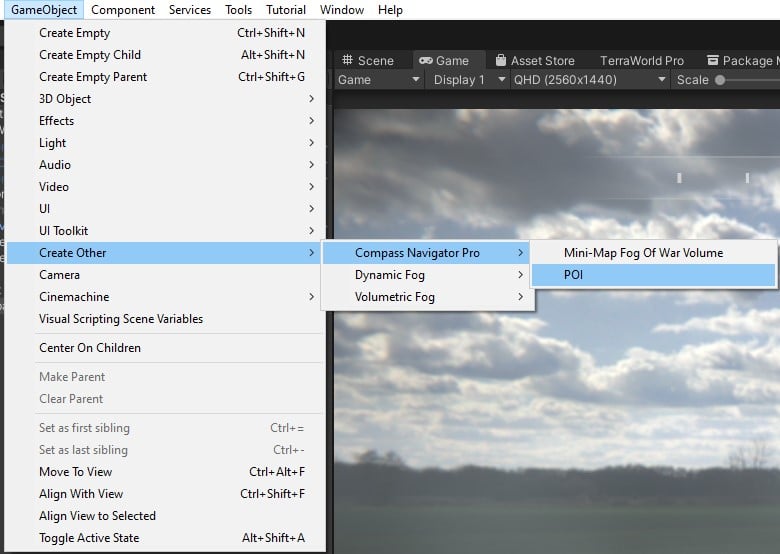
Use GameObject > Create Other > Compass POI to create a new POI GameObject, or add the CompassProPOI component to any existing GameObject.
Via Script
using CompassNavigatorPro;

GameObject obj = new GameObject("My POI");
obj.transform.position = targetPosition;

CompassProPOI poi = obj.AddComponent<CompassProPOI>();
poi.title = "Quest Marker";
poi.iconNonVisited = mySprite;
POI Inspector Settings
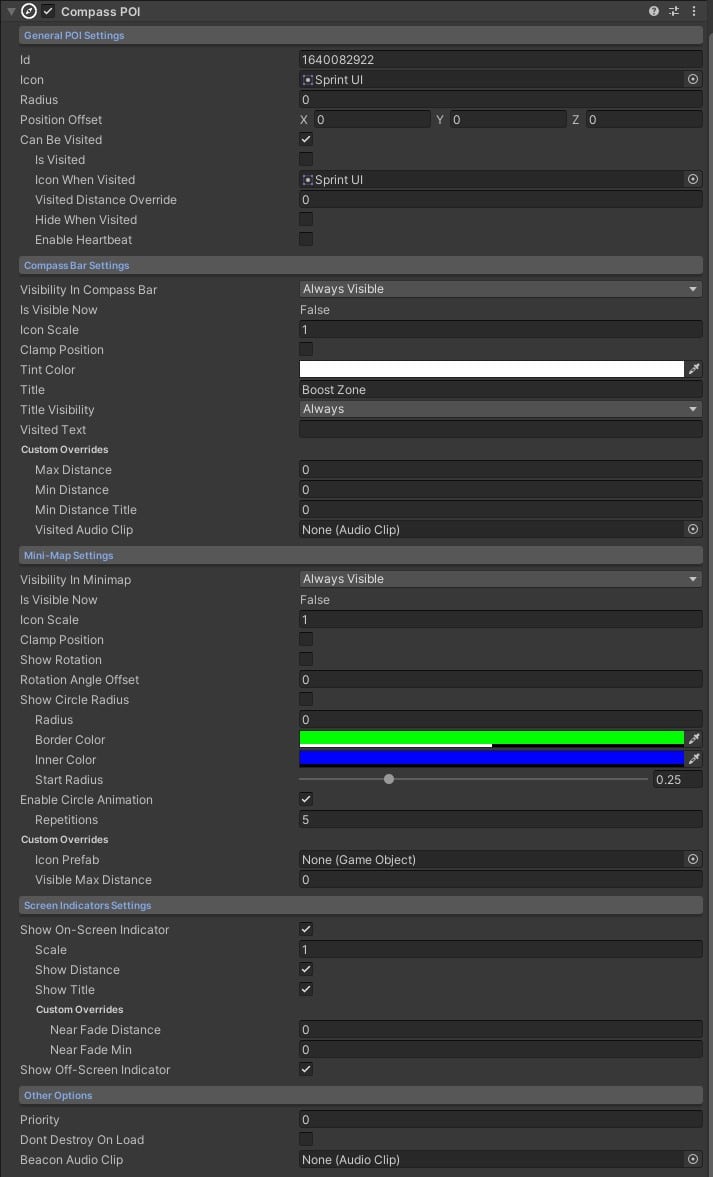
General
| Parameter | Description |
|---|---|
| ID | Unique identifier, required when Don't Destroy On Load is enabled. |
| Icon | Default icon sprite for this POI (used if no visited/discovered icons are set). |
| Radius | Area-of-interest radius around the POI. |
| Position Offset | Optional offset added to the POI world position. |
| Can Be Visited | Allow the POI to be marked as visited when the player reaches it. |
Compass Bar
| Parameter | Description |
|---|---|
| Visibility on Compass Bar | When the icon appears: always, when in range, or hidden. |
| Icon Scale | Icon size on the compass bar. |
| Clamp Position | Pin the icon to the bar edge when the POI is behind the player. |
| Tint Color | Color tint applied to the icon. |
| Title | Text shown on the compass bar when the icon is visible. |
| Title Visibility | When the title appears. |
| Visited Text | Discovery text shown when the POI is visited. |
Mini-Map
| Parameter | Description |
|---|---|
| Visibility in Mini-Map | When the icon appears on the mini-map. |
| Icon Scale | Icon size on the mini-map. |
| Clamp Position | Keep the icon visible even when the POI is far away. |
| Show Rotation | Rotate the icon based on the POI orientation. |
| Rotation Angle Offset | Custom rotation offset for the icon. |
| Show Circle Radius | Display a circular area with custom color around the POI. |
| Enable Circle Animation | Pulse animation for the circle. |
Screen Indicators
| Parameter | Description |
|---|---|
| Show On-Screen Indicator | Enable the in-world indicator for this POI (with distance and title options). |
| Show Off-Screen Indicator | Enable edge-of-screen arrows for this POI. |
Other
| Parameter | Description |
|---|---|
| Priority | Higher-priority POIs render above others. |
| Don't Destroy On Load | Preserve POI state across scene changes. |
| Beacon Audio Clip | Sound played when the beacon effect is triggered for this POI. |
See also: Custom Art, Scripting Support (C#).
Was this page helpful?
Suggest an improvement
Help us improve this documentation page.