Mini-Map Settings
intermediate conceptsCompass Navigator Pro 3 · Core Concepts
The Mini-Map section in the CompassNavigatorPro inspector controls the look and behavior of the mini-map. The mini-map is synchronized with the compass bar — any POI added to the compass is automatically visible on the mini-map.
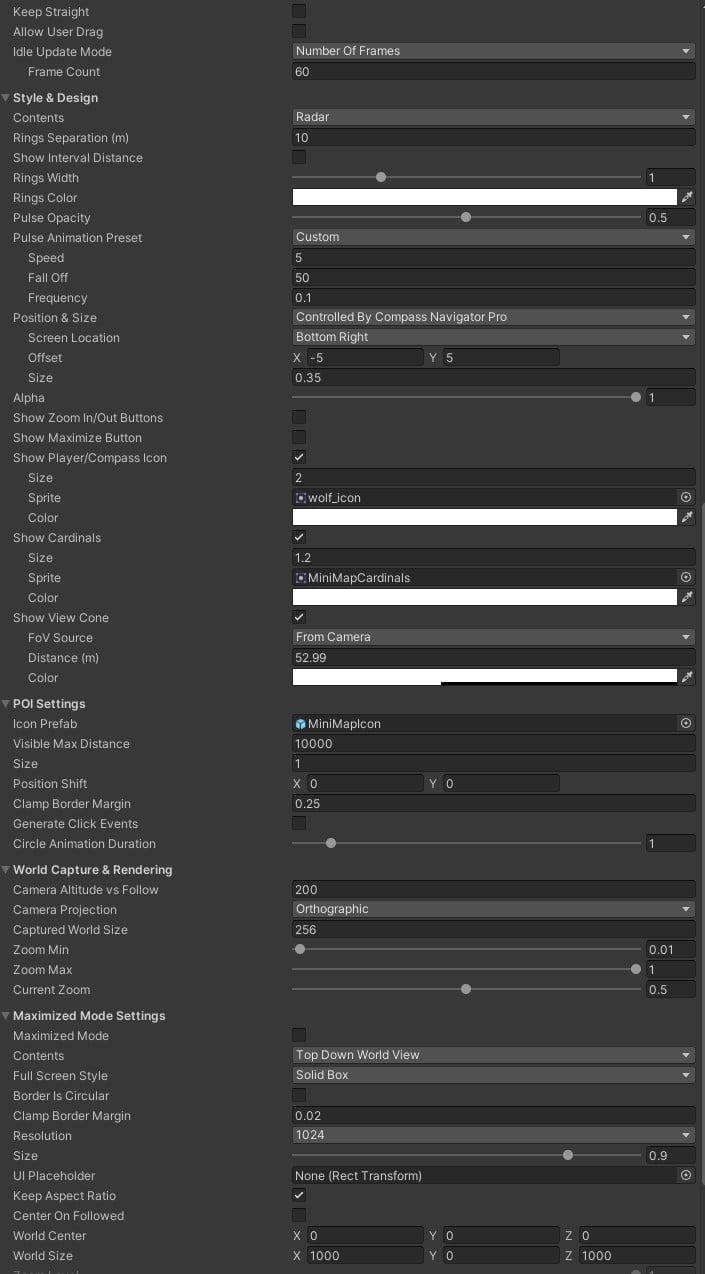
Style & Design
| Parameter | Description |
|---|---|
| Keep Straight | Lock the mini-map orientation to North. |
| Allow User Drag | Let the player pan the mini-map with left-click. |
| Idle Update Mode | Interval for checking POI changes on the mini-map. |
| Contents | View mode: Top Down World View, World Map Texture, UI Texture, or Radar. |
| Style | Border preset (12+ styles) or Custom. Available in Top Down World View mode. |
| Border is circular | Enable for circular map textures. |
| Vignette | Edge darkening effect with custom color. |
| Background Color | Color shown beyond map boundaries. |
| Position & Size | Screen corner preset or manual coordinates. |
| Alpha / Contrast / Brightness | Visual adjustments for the mini-map view. |
| LUT Texture | Color correction lookup texture. |
| Tint Color | Color overlay for the mini-map view. |
| Zoom In/Out Buttons | Show interactive zoom controls. |
| Maximize Button | Show a button to expand the mini-map to full screen. |
| Player Icon | Enable and select the player position marker. |
| Show Cardinals | Display cardinal labels on the mini-map. |
| Show View Cone | Display the camera field-of-view cone on the mini-map. |
POI Settings (Mini-Map)
| Parameter | Description |
|---|---|
| Icon Prefab | Default icon prefab for POIs on the mini-map. |
| Visible Max Distance | POIs beyond this distance are hidden on the mini-map. |
| Size | Icon size on the mini-map. |
| Position Shift | Custom displacement for POI icons. |
| Clamp Border Margin | Inset distance for clamped icons at the mini-map edge. |
| Generate Click Events | Enable pointer click events on mini-map POIs. |
| Circle Animation Duration | Pulse animation interval for POI circles. |
World Capture Rendering
| Parameter | Description |
|---|---|
| Resolution | Render texture resolution for the mini-map. |
| Layer | Layer mask for objects visible on the mini-map. |
| Render Shadows | Include shadows in the mini-map capture. |
| Camera Altitude vs Follow | Height of the capture camera relative to the followed object. |
| Camera Projection | Orthographic or Perspective for the mini-map camera. |
| Captured World Size | Orthographic size of the capture camera. |
| Snapshot Frequency | How often the mini-map refreshes. |
| Zoom Min / Max | Allowed zoom range. |
| Current Zoom | Current zoom level. |
Maximized Mode
| Parameter | Description |
|---|---|
| Maximized Mode | Preview full-screen mode in the editor. |
| Contents / Border / Clamp Border | Override settings for full-screen mode. |
| Resolution / Size | Render texture resolution and screen size for full-screen mode. |
| UI Placeholder | Optional UI element for exact positioning. |
| Keep Aspect Ratio | Maintain aspect ratio in full-screen. |
| Center on Followed / World Center / World Size | Control the world mapping in full-screen mode. |
Fog of War
Enable Fog of War to hide unexplored mini-map areas. See the dedicated Fog of War page for details.
All mini-map parameters are available via C#. See Scripting Support (C#).
Was this page helpful?
Suggest an improvement
Help us improve this documentation page.