Indicator Settings
intermediate conceptsCompass Navigator Pro 3 · Core Concepts
Compass Navigator Pro provides two types of screen indicators that help the player locate POIs outside the compass bar.
On-Screen Indicators
In-world markers that float above or near visible POIs.
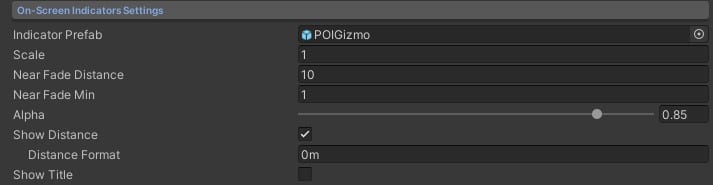
| Parameter | Description |
|---|---|
| Indicator Prefab | Base prefab used for on-screen indicators. |
| Scale | Scale multiplier for the indicator. |
| Near Fade Distance | Distance at which the indicator starts fading near the camera. |
| Near Fade Min | Minimum distance where the indicator fully disappears. |
| Alpha | Default transparency (0–1). |
| Show Distance | Display the distance to the POI. |
| Show Title | Display the POI title on the indicator. |
Important: These are global toggles. Each POI also has its own Show On-Screen Indicator, Show Distance, and Show Title checkboxes in the POI Settings. Both the global setting here and the per-POI setting must be enabled for the feature to appear.
Off-Screen Indicators
Edge-of-screen arrows pointing toward POIs that are outside the camera view.

| Parameter | Description |
|---|---|
| Base Prefab | Base prefab for off-screen indicators. |
| Scale | Scale multiplier. |
| Margins | Separation from screen edges. |
| Alpha | Default transparency (0–1). |
| Show Distance | Display the distance to the POI on the off-screen arrow. Titles are not supported on off-screen indicators. |
| Avoid Icon Overlapping | Prevent off-screen indicators from overlapping when they converge. |
Important: As with on-screen indicators, both the global Show Distance toggle here and the per-POI toggle must be enabled for the distance to appear.
Both indicator types can be enabled per-POI via the CompassProPOI component. See POI Settings for per-POI options and Scripting Support (C#) for the API.
Suggest an improvement
Help us improve this documentation page.